Alteryx Server Ideas
Share your Server product ideas - we're listening!Submitting an Idea?
Be sure to review our Idea Submission Guidelines for more information!
Submission Guidelines- Community
- :
- Community
- :
- Participate
- :
- Ideas
- :
- Server
Featured Ideas
Hello all,
This may be a little controversial. As of today, when you buy an Alteryx Server, the basic package covers up to 4 cores :
https://community.alteryx.com/t5/Alteryx-Server-Knowledge-Base/How-Alteryx-defines-cores-for-licensing-our-products/ta-p/158030
I have always known that. But these last years, the technology, the world has evolved. Especially the number of cores in a server. As an example, AMD Epyc CPU for server begin at 8 cores :
https://www.amd.com/en/processors/epyc-7002-series

So the idea is to update the number of cores in initial package for 8 or even 16 cores. It would :
-make Alteryx more competitive
-cost only very few money
-end some user frustration
Moreover, Alteryx Server Additional Capacity license should be 4 cores.
Best regards,
Simon
It's been mentioned previously but I haven't seen an official idea posted. The width of the "Name" column on the Collections page needs to be adjustable to allow users to see the full name. Since we have many distinct areas, we use naming conventions to help organize different groups' Collections. But, even as short as we try to keep it the full names don't appear most of the time. At the very least, increase the default width because cutting the names off after 24 characters is simply too short.
I have a lot of workflows that depend on each other. Currently there's LOTS of hassle to effectively schedule a set of workflows to run subsequent.
Typically we run workflows (eg. product hierarchies) that would need to be completed before the next workflow should start (eg. sales data). We currently have some wonky workarounds that are high maintenance, but I would love to see this as a feature in the Gallery.
A better process Needed for Alteryx Backup and restore.
- Why do we have to stop the service to do a backup,? We cannot stop a service in Enterprise platform just to do a backup. we are not able to take backups because our jobs will be running 24X7 We Run jobs on Alteryx Server,
- All of a Sudden our Windows server crashed and we lost all the data, The backup we have of Mongo DB was not perfectly restored on the new server which breaks the workflow, connections etc due to encryption....
- what is the purpose of backup if we cannot restore on a new server in case of DR
Please fix it ASAP,
We have groups asking within our organization for ways to check the status of a running workflow in Gallery. They are wanting to understand which step in the process the workflow has completed for longer-running workflows.
They are looking for an experience similar to when running in Designer where they can see which tools have been completed. At the very least, they would like the log to be reported live and not shown at the end of the run.
Currently, the run feels like a black box where they do not know how close it is to completion or which steps it has made it through.
We have tried to build workarounds like the Email tool, but have been unsuccessful. For example, the Email tool does not send an Email until the workflow completes which defeats the purpose. The closest workaround is writing our own log along the way that can be reported on which is not a clean solution.
In Gallery, I'd like to see the execution log in the workflow results, i.e. what you get if you run the workflow from Designer. I'd like to see this whatever the status of the workflow completion. Would be useful to assess warnings and the performance of components within the workflow. Also would give me useful stats about records loaded etc.
Hello, Alteryx users,
My idea is simple but would make things way easier for the analytical app users on the Gallery.
Currently, the order is ascending and we can see all the files from all the applications we have run before.
It would help a million to see the most recent files first and only see the files related to this workflow.

Thank you,
Fernando Vizcaino
For large implementations of Alteryx - you'd want to have a live control-center view that allows you to see:
- The state of health of all the server components
- the depth of the queue in the controller
- Jobs failing vs. succeeding.
While this can be done by running alteryx jobs, and by going and looking for problems - what we'd want is to have a heads-up control center view which is self-refreshing all the time so that administrators can be notified when there are issues. And this should not be e-mail notification (it's too easy to miss an e-mail or an SNMP alert)
Think about a 40 inch monitor on a wall (like in a traffic control center) that allows the server management team to see the state of health of the plant at a glance, and dive into issues without having to constantly be looking for them. this is a critical capability for enterprise install-base and would be a very useful capability to add to the platform.
I would like the ability to add a workflow description on Alteryx server. This step would be done after the workflow is published, this way future edits can be made without having to republish the workflow. A checkbox to allow HTML content would also be appreciated.
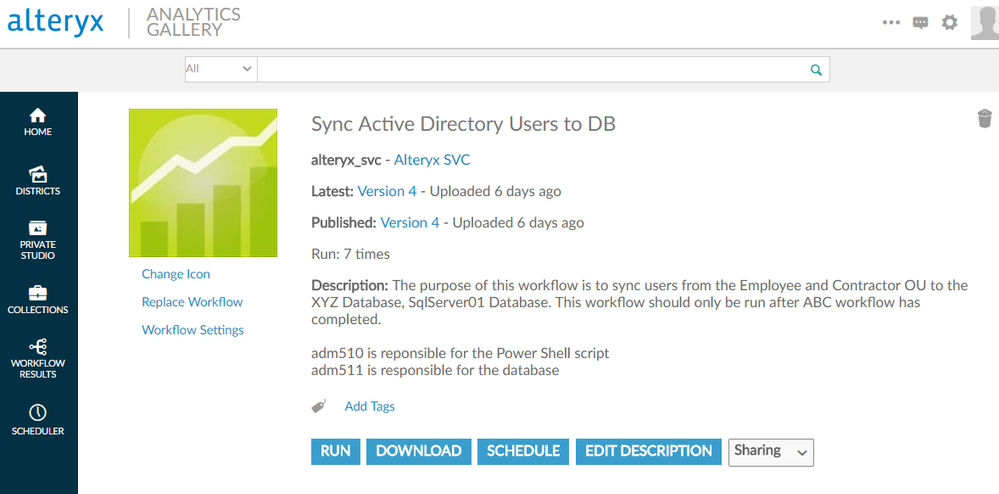
Can we have search option enabled in Gallery Admin > Jobs to filter on running jobs to specific ones or to check specific job schedules.
It would be helpful if there was a way to setup notifications so that it would email Admin whenever a workflow runs longer than a preset amount of time.
Admin would set time threshold for triggering notification i.e. > 15min and Alteryx Server would email Admin whenever a workflow runs longer than that so that they could monitor this specific workflow and take corrective action,
At the moment when you give the "assign job" permission the user can choose any worker, it would be great if there was a way to assign workers to users or groups.
Example 1 (worker 3 is assigned to one group):
Worker1 - Assigned to ALL
Worker2 - Assigned to ALL
Worker3 - Assigned to ArtisansGroup1
In this scenario, all Gallery users have access to Worker 1 and Worker 2 and the ArtisansGroup1 has access to Worker1, Worker2 and Worker3.
Alteryx has its own version control built in - however in large Enterprise environments there is a requirement to be able to use the version control platform that already exists.
In other words - when you install the server - you are asked:
Do you want to use Alteryx for version control, or your own SVN; GIT or a 4th custom option based on API integration (i.e. build this yourself based on a defined API).
This is very important to ensure that enterprise assets are maintained under the regimen of control that our Infosec & Auditors need, and the investment in making sure that Version Control contains all the right discipline; governance; etc - is all done in the enterprise Version Control platform.
Can we please extend Alteryx to have this flexibility so that we can cater to large Enterprise customers, and also anyone else who has a strict governance & change control requirement with existing infrastructure already in place?
If this is built as an independant layer and separated out from the core server slightly - it will be possibly to flexibly add other VC systems later (or provide companies with the ability to build their own).
Thank you
Sean
Currently when we need to disable/enable schedule on API,we need to update all the schedule info,could you provide only one attribute to disable.
Can we just update on parameter
"enabled": true, --> "enabled": false
current update example,we need update all
{
"workflowId": "string",
"ownerId": "string",
"iteration": {
"iterationType": "Once",
"startTime": "2022-09-06T08:01:52.717Z",
"endTime": "2022-09-06T08:01:52.717Z",
"hourlyContract": {
"hours": 0,
"minutes": 0
},
"dailyContract": {
"runOnlyWorkWeek": true
},
"weeklyContract": {
"daysOfWeek": [
"Sunday"
]
},
"monthlyContract": {
"simpleDayOfMonth": true,
"dayOfMonth": 0,
"occurrence": 0,
"dayOfWeek": "Sunday"
},
"customContract": {
"daysOfMonth": [
0
],
"months": [
0
]
}
},
"name": "string",
"comment": "string",
"priority": "Default",
"workerTag": "string",
"enabled": true,
"credentialId": "string"
}
When saving a workflow to the gallery, none of the options I could choose from Set workflow credentials validates a workflow successfully when using database connections due to missing permission on the server (No specific Run As is configured on the Server). Apparently the server validates the workflow as following:
User is not required to specify credentials:No possibility to add credentials when running the workflow on the server. In that case, the workflow validates database connections with errors due to missing permission on the server. This error was expected.
User must specify their own credentials: This option is the most appropriate in case of working with database connections with regard to our use cases and security policies. Unfortunately this option is only enabled when the workflow is saved on the server already and run from the gallery. In case of the validation step when saving the workflow to the gallery, the server evaluates with the system user of the server. As a result, the validation fails. In that case, I expected the server to run the validation with the user from the Alteryx Designer.
Always run this workflow with these credentials: This option is not appropriate in terms of our security policy, since the workflow is permanently set with the users credentials.
So my suggestion would be to:
- Prompt dialog to enter my credentials for validation once or
- The server runs the validation with the User from Designer, where the workflow is going to be saved from.
Otherwise is see no benefit of the validation feature (with respect to our use cases and security policies)
Hello all,
As of today, if you want to give the Alteryx Gallery user an Excel with your data out of your worfklow, you MUST design an Excel Report with Report tools.
However :
1/ It's highly time consuming to design the report
2/ It leads to many errors, especially on column size : a quick research on Alteryx community gives you several hundred topics
3/ the excel output works really fine
This is frustrating as hell for users !

Best regards,
Simon
In stead of having to create an event to notify me when workflows are failing, I would like to easily enable that option from gallery after scheduling a workflow.
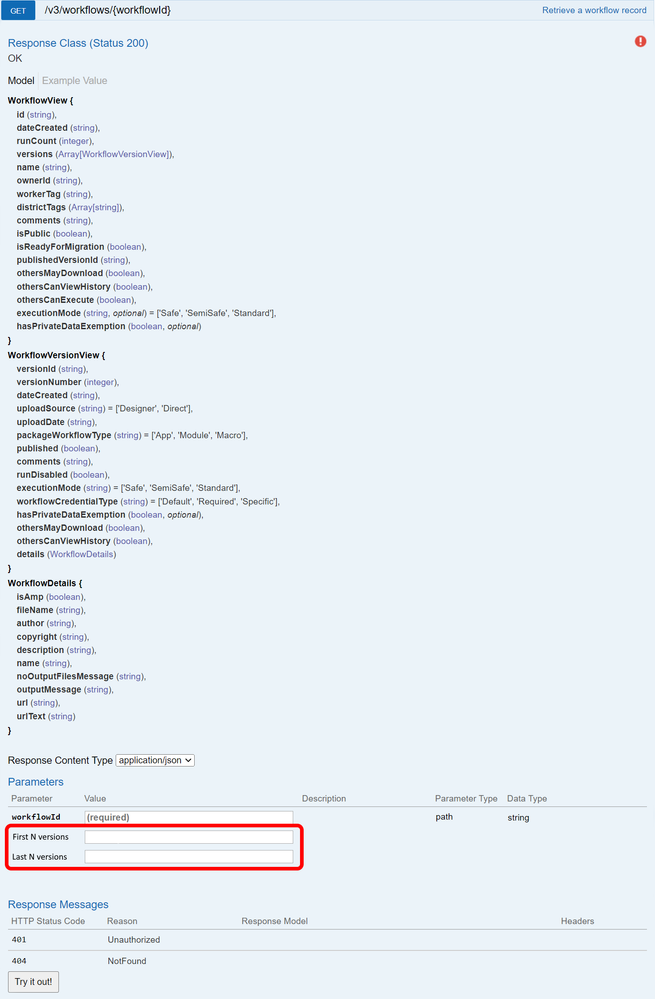
Enhance the v3 APi for workflows - /v3/workflows/{workflowid} - to get information for first n versions and/or last n versions of the workflow.
The problem
The current API will return information about all versions of a workflow. If a workflow has several hundred versions, you'll get all version information, much of which is useless and can take a long time to process.
The (potential) solution
Allow the API to take parameters like first n versions and last n versions. This will allow the API to return only the respective version information that would be of interest to the user.
The red box in the image is the enhancement in swagger:
I'm not sure if this is too similar to this server idea
but I'd love to see the ability to add webhooks to Alteryx Server to launch a workflow. I believe that is how Flow (now PowerAutomate) can run an event. I had to spend hours figuring out how to build a "Flow" workflow which would have taken me minutes in Designer. For example, when I receive a new MS Forms Survey submission, I can shape the data and build a sharepoint list, rather than waiting for whatever interval I set in the scheduler.
Hi all,
I've found, i guess, a bug on the Gallery. It's not really an issue as we've found a workaround for it.
Whenever you're in need to delete a workflow that is owned by your co-worker, the Gallery doesn't let you instantly delete it (yes, we're in the same private studio) (screenshot 1).
To work around this issue, you just have to replace the specific workflow by a random workflow you own (basically i just upload a workflow with a browse tool in it, screenshot 2).
When replaced, you get the god power to delete the workflow and thus also deleting the workflow of your co-worker.
It would be convenient if i could just delete the workflow without this workaround tough :-)!.
Screenshot 1 - Not being able to delete a workflow owned by a co-worker.

Screenshot 2 - After replacing the workflow by a random workflow....

Greetings,
Seb
As an Admin, I would like to be able to see, from the Gallery, a single place where the history of workflows that have been run is displayed. Right now I can only see workflows running or queued. I would like to be able to look back at past executions and see status, runtime, errors, etc.
This data is currently available in Designer on our Alteryx Server. But right now our system is just one environment. I'm not sure if when we expand to multiple Gallery and Worker machines where I will have to look for workflow history.
Also, Workflow schedules can only be seen in Gallery, and not Designer. So it would be nice to have everything in one place.
- New Idea 386
- Comments Requested 4
- Under Review 73
- Accepted 32
- Ongoing 2
- Coming Soon 1
- Implemented 75
- Not Planned 46
- Revisit 16
- Partner Dependent 0
- Inactive 65
-
Admin UI
35 -
Administration
68 -
AdminUI
7 -
ALS
1 -
Alteryx License Server
8 -
AMP Engine
1 -
API
46 -
API SDK
1 -
Apps
20 -
Category Data Investigation
1 -
Collections
22 -
Common Use Cases
11 -
Configuration
32 -
Data Connection Manager
13 -
Database
18 -
Documentation
8 -
Engine
9 -
Enhancement
196 -
Feature Request
3 -
Gallery
235 -
General
71 -
General Suggestion
1 -
Installation
12 -
Licensing
3 -
New Request
132 -
Permissions
22 -
Persistence
3 -
Public Gallery
10 -
Publish
10 -
Scaling
29 -
Schedule
1 -
Scheduler
72 -
Server
557 -
Settings
114 -
Sharing
16 -
Tool Improvement
1 -
User Interface
31 -
User Settings
1 -
UX
89
- « Previous
- Next »
-
 gawa
on:
Improve Customisability of Workflow Validation Run...
gawa
on:
Improve Customisability of Workflow Validation Run...
-
TheOC
on:
Read All Button for Notification
- seven on: BUG: Server API for workbook versions always downl...
-
TheOC
on:
Deletion of Logs files from Engine, Service and Ga...
- yuriy on: Option to notify users when schedule fails
- moinuddin on: Enable Multi tenancy by Installing Multiple Altery...
- simonaubert_bd on: Expand the v3/jobs API endpoint
-
TheOC
on:
Favorite Workflows
-
Kenda
on:
Display Commas in Gallery for Numeric Up Down
- Poge on: Ability to increase the default for 'Rows Per Page...
| User | Likes Count |
|---|---|
| 1 | |
| 1 | |
| 1 | |
| 1 | |
| 1 |


