Alteryx Server Ideas
Share your Server product ideas - we're listening!Submitting an Idea?
Be sure to review our Idea Submission Guidelines for more information!
Submission Guidelines- Community
- :
- Community
- :
- Participate
- :
- Ideas
- :
- Server: Top Ideas
Featured Ideas
Hello all,
This may be a little controversial. As of today, when you buy an Alteryx Server, the basic package covers up to 4 cores :
https://community.alteryx.com/t5/Alteryx-Server-Knowledge-Base/How-Alteryx-defines-cores-for-licensing-our-products/ta-p/158030
I have always known that. But these last years, the technology, the world has evolved. Especially the number of cores in a server. As an example, AMD Epyc CPU for server begin at 8 cores :
https://www.amd.com/en/processors/epyc-7002-series

So the idea is to update the number of cores in initial package for 8 or even 16 cores. It would :
-make Alteryx more competitive
-cost only very few money
-end some user frustration
Moreover, Alteryx Server Additional Capacity license should be 4 cores.
Best regards,
Simon
Following up on this post (https://community.alteryx.com/t5/Alteryx-Server-Discussions/Server-logs-do-not-include-download-tool... ), inclusion of the activity of the download tool in the Server logs would be very useful in monitoring this high-risk capability within an enterprise tech environment.
Hello,
I think there should be option to test save data connection during setup and after. Perfectly, if there was possibility to schedule connectivity check, however, just adding option to test it manually will be the step forward.
Best,
Piotr
Hello,
I can't find an option in Alteryx Server wizard to enable redirection from http to https. Alteryx Service occupies both ports so I can't (and I don't want) to deploy a redirection on port 80. Such feature would be really helpful if it comes out of the box.
Best,
Piotr
We have installed Server on Azure VM and have looked into options such as a replica AD Domain Controller in the Azure environment for authentication, however, we would like to have Server authenticated using Azure AD.
When you create an App/Macro locally and give it a custom icon, that icon should follow the App/Macro when you load it into the Gallery.
As a Curator, I need Artisans to be able to create & maintain their own Gallery connections (rather than only Curators)
- My Artisans use their own credentials in their connections
- Their credentials are subject to a periodic reset policy, so they need a self-service capability to update their connection credentials (and sharing settings)
Right now, with LSS, the only thing you can query who has taken seats on licenses (you get user's email and host name). This is OK, but it would be great if we could get more information than that. Primarily
- What was the date/time that the user first grabbed that license
- When was the last date/time the user connected to the license
As you know, there is no way to forcefully remove a license from the LLS (you either have to have user deactivate from Designer, or wait 7 days). Knowing this information would help admin's know who is actually using the licenses and if someone leaves the company, you can get a countdown until that license is released.
For historical tracking and auditing, I would also like to setup an Alteryx Workflow that puts licensed user information into a table or DB so we have a log of who is using the licenses.
I'd love the ability to have one schedule for a workflow at specific times.
Currently you have to create 4 different schedules if you'd like a workflow to run at 10 am, 3 pm, 5:30 pm and 11:30 pm and doing this makes the "Scheduled Workflow" section of the server not only cluttered, but a lot more difficult to manage. (like spotting accidentally duplicated schedules- which also happens more often than i'd like :)
Thanks!
Having the option to disable schedules within the Designer application would be advantageous for we support staff. Especially when multiple service restarts or server reboots are required. When we perform migrations or restores or even upgrades or when conducting server maintenance actions. As we know starting of the Alteryx service immediately queues up workflows to be run based against there schedule times. When maintenance is being performed we do not want workflows to run, and/or having to wait for completions or have the user to rerun the workflow. The option to temporarily disable schedules globally with a click of a button is far better then changing the parameters of the schedule or even deleting it. To go a step further = an internal mongodb administration command to disable/enable schedules would also be helpful at the database level
Idea:
Using a few designers and registering to the Alteryx Gallery are good fits for micro and small enterprises, from investment vs capability stantd point.
Alteryx Server is suitable for medium to large enterprises with at least 45K USD budget yearly and many alteryx users possibly more than 20...
Don't you think there is a need for something in between? I propose Alteryx mini-server (well we can find a better name hopefully :)
Rationale:
Many Alteryx clients seem to utilize Alteryx designer for ETL,
then some of them further enrich data and model forecasting or predictive modelling.
Before even considering a server they output to a BI server like
- Qlik server or
- Tabelau server or
- PowerBI
If there is a need for automation Alteryx designer + Scheduler does all the trick needed.
Once you update everything in a repetitive fachion 100s to 1000s of Qlik or Tableau users can reach to the most uptodate content and discover dashboards...
I believe we can do a similar thing with a mini server...
What to do:
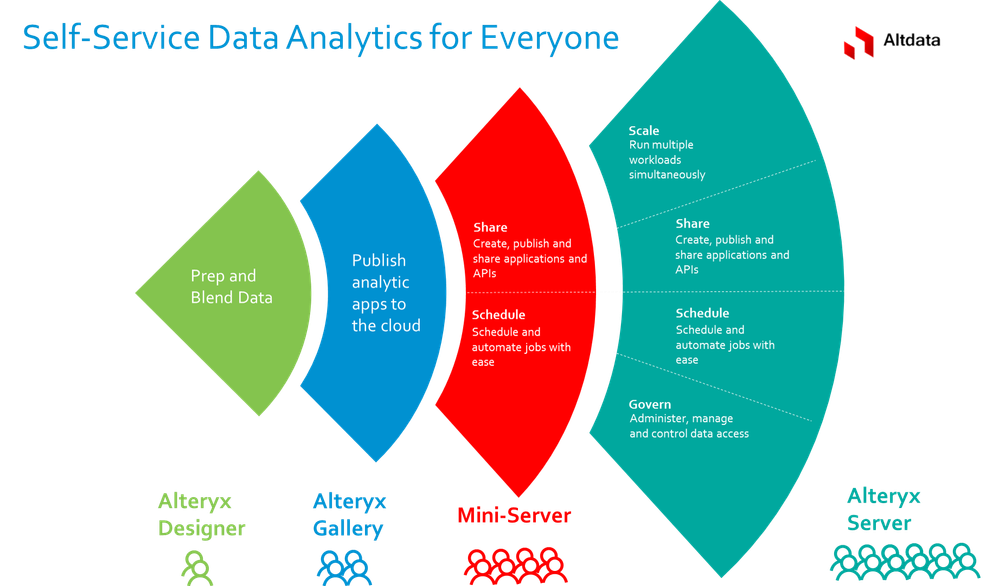
Currently, many of our most useful apps in the gallery utilises blocked tools (download tool, R tool etc). Every deployment or even minor updates to these apps require emailing the Alteryx Curator account for exception requests. This process is quite cumbersome, although the need for it is understandable. However, given that not a single app from us was ever rejected (and we submitted dozens of requests) , it would be great to have a process in place to apply for a permanent whitelisted status. This would give trusted app authors the ability to deploy apps with blocked tools without emailing the Curator.

One of our biggest areas of confusion for new users of our Gallery is the Download button. They often click it thinking that will give them their information right away. It would be great if the person didn't see that or the scheduler option if they were not an Artisan, since they can't use the workflow anyway. It would be even better if selecting the workflow took them straight into the question portion.
As we continue to build Alteryx Workflows for the business, there is a continued need for an organizational structure for saving and storing Alteryx Workflows within the Alteryx Gallery. Organizing the workflow repository through a "folder hierarchy" will allow users to quickly navigate and find the appropriate workflow. Currently, the workflows are listed in alphabetical order and requires the user to remember the Alteryx Workflow name and click to the proper page.
Any enhancements to the Alteryx Gallery organization structure would be greatly appreciated!
Thank you,
KK
We are using the DCM handler feature released in Alteryx 24.1 to help us manage our SDLC. We use the migration tool to move workflows from a dev to prod environment and then the handler manages the DCM connections between those two environments. In the dev Alteryx server all connections point to dev sources, and in the production environment all connections point to prod sources. This works well in RDBs because we just have both environments setup the same at a DB, Schema, Table level.
We have run into a situation with S3 buckets, where because S3 buckets have a unique global name, we can't have an S3 dev environment switch to an S3 prod environment. The S3 tool is wired to look for a very specific bucket name. If in the DCM handler, we could also map dev bucket names to a prod bucket name that also gets switched at run time, that would solve my problem.
In the meantime, we have to adjust the workflow migration tool to make those changes when the workflow moves from dev to prod.
Thank you,
Treyson Marks
Hello Alteryx Team,
I've developed a workflow and successfully uploaded it to our Alteryx Gallery. This workflow requires an Excel file as input, which the user should select interactively via a File Browse Tool.
To achieve this, I've used the following configuration:
- An Input Data Tool is connected to a sample Excel file and reads a specific sheet (e.g., "Sheet1" or "Data").
- A File Browse Tool allows the user to select the Excel input file.
- An Action Tool connects the File Browse Tool to the Input Data Tool to dynamically update the Excel file path
Every time a user runs the workflow in the Gallery and selects an Excel file, a pop-up window appears, prompting the user to select the Excel sheet.
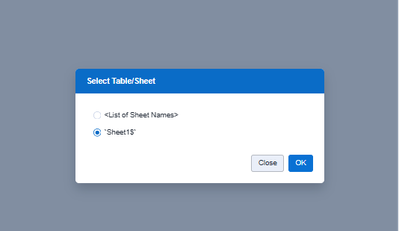
I do not want to have the option of selecting "<List of Sheet Names>". I only want to be able to select the Sheet itself.
I would suggest to add an option that allows the creator of the App to deselect the field "<List of Sheet Names>", so that the User on the Server can not see and select this field.
Thank you in advance for your help!
Best regards, Felix
We do NOT want all users to be able to share their DCM connections. The only way to do this is to disable the options on User Profile as it defaults to enabled for all new users.
Admins should be able to control this and all user profile setting defaults by role.
Example, New Artisans should all have access to create new Collections and Schedules, but DCM sharing is disabled.
Hello,
Maybe it's time to have a better licensing model. In addition of the current and restricted core-base model, why not having a user-based model?
Best regards,
Simon
We have the need to bulk-add users, and to bring in their information (full name; location; etc) from Active directory.
Right now, adding users is a 1:1 process which is highly painful.
Desire is to be able to take a list of Kerberos IDs, and bulk add them as users - and then select a group of them and permission either for the gallery; or for designer licenses.
The workflow result window shows the Name/workflow, AMP, Priority, Assigned worker, Run as, Completed at, Runlenght, and Runtyp of the workflow. The following feature would also be useful on the page.
1. Showing the creation date of the workflow without taking queue time into consideration
2. The option to change the time zone would make it easier to analyze the logs
3. Detailed insight about the particular workflow results, such as average execution time, failure count, and success count with date filtering.
Hello!
I found a weird bug in my travels today.
The TL:DR is that when a date input tool within the interface tool is used within a collapsing radio button, it defaults to "dd/mm/yyyy", breaking any app when this is not filled out:

Both values are default - i have not edited these values. The weirdest part is, this is Server/Private Gallery specific. When this workflow is downloaded and run within Designer:

And the workflow runs fine.
I have not tested this with any of the other interface tools, however I suspect this to not be the only tool this issue resides within.
I have attached the workflow I used (not that it would take long to recreate) for testing.
- New Idea 386
- Comments Requested 4
- Under Review 73
- Accepted 32
- Ongoing 2
- Coming Soon 1
- Implemented 75
- Not Planned 46
- Revisit 16
- Partner Dependent 0
- Inactive 65
-
Admin UI
35 -
Administration
68 -
AdminUI
7 -
ALS
1 -
Alteryx License Server
8 -
AMP Engine
1 -
API
46 -
API SDK
1 -
Apps
20 -
Category Data Investigation
1 -
Collections
22 -
Common Use Cases
11 -
Configuration
32 -
Data Connection Manager
13 -
Database
18 -
Documentation
8 -
Engine
9 -
Enhancement
196 -
Feature Request
3 -
Gallery
235 -
General
71 -
General Suggestion
1 -
Installation
12 -
Licensing
3 -
New Request
132 -
Permissions
22 -
Persistence
3 -
Public Gallery
10 -
Publish
10 -
Scaling
29 -
Schedule
1 -
Scheduler
72 -
Server
557 -
Settings
114 -
Sharing
16 -
Tool Improvement
1 -
User Interface
31 -
User Settings
1 -
UX
89
- « Previous
- Next »
-
 gawa
on:
Improve Customisability of Workflow Validation Run...
gawa
on:
Improve Customisability of Workflow Validation Run...
-
TheOC
on:
Read All Button for Notification
- seven on: BUG: Server API for workbook versions always downl...
-
TheOC
on:
Deletion of Logs files from Engine, Service and Ga...
- yuriy on: Option to notify users when schedule fails
- moinuddin on: Enable Multi tenancy by Installing Multiple Altery...
- simonaubert_bd on: Expand the v3/jobs API endpoint
-
TheOC
on:
Favorite Workflows
-
Kenda
on:
Display Commas in Gallery for Numeric Up Down
- Poge on: Ability to increase the default for 'Rows Per Page...
| User | Likes Count |
|---|---|
| 1 | |
| 1 | |
| 1 | |
| 1 | |
| 1 |


