Alteryx Server Ideas
Share your Server product ideas - we're listening!Submitting an Idea?
Be sure to review our Idea Submission Guidelines for more information!
Submission Guidelines- Community
- :
- Community
- :
- Participate
- :
- Ideas
- :
- Server
Featured Ideas
Hello all,
This may be a little controversial. As of today, when you buy an Alteryx Server, the basic package covers up to 4 cores :
https://community.alteryx.com/t5/Alteryx-Server-Knowledge-Base/How-Alteryx-defines-cores-for-licensing-our-products/ta-p/158030
I have always known that. But these last years, the technology, the world has evolved. Especially the number of cores in a server. As an example, AMD Epyc CPU for server begin at 8 cores :
https://www.amd.com/en/processors/epyc-7002-series

So the idea is to update the number of cores in initial package for 8 or even 16 cores. It would :
-make Alteryx more competitive
-cost only very few money
-end some user frustration
Moreover, Alteryx Server Additional Capacity license should be 4 cores.
Best regards,
Simon
Option to Zip All Outputs
For workflows that produce various different output files, I think it would be nice if the Gallery had the functionality to create a single zip file containing all outputs. The user would opt in or out of this functionality using a checkbox in the Gallery workflow settings (for apps, this checkbox could also appear as an additional setting above "Questions"). After the workflow has been run, the user would only see the zip file in the output preview instead of each individual output file.
This functionality would create a more user-friendly experience as it would eliminate the need for zip file creation workarounds, such as using the Run Command Tool or the "zipfile" Python library to create zip files (these options also do not generate a zip file in the Gallery output preview).
In the gallery you have the ability to replace a workflow with another, however when doing so the version history only indicates "Package Replaced" (see image below)
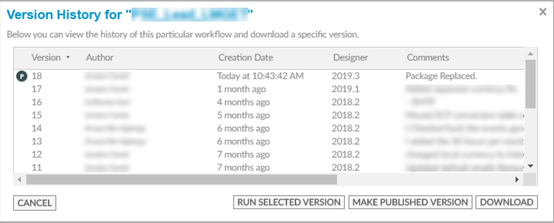
Would it be possible to change the default text and input something more meaningful, since in my case I use this field for version control/auditing so it would be good to know what changes came with the replaced version.
Second ask, but maybe not as important as the first.
Sometimes the package we are replacing with itself might have several versions, but these are completely lost when the files are combined.
Would it be possible to keep that version history when the package is replaced.
Eg. Original File is at Version 10. This will be replaced by a package that is at Version 3.
Possible solution would be to have the new version be Version 13 which includes the 10 versions from the original file and the 3 from the new.
Thanks!
When a workflow is run manually in the gallery the user is able to enter input parameters. However when using the schedule functionality this option is not available and a separate workflow needs to be developed to dynamically derive input parameters. Effectively two separate versions of the workflow need to be created and maintained.
If this functionality could be built into a future version of Alteryx this would be of significant benefit.
It would be nice having the ability to alter the timeout of the file upload on Alteryx Analytic Apps uploading to the Gallery. Having it restrained by time and not file size makes it so that users with poorer internet speeds will not even be able to upload moderate sized files.
It would be nice to have workflow version information on the Workflow Results page for every running status.
The reason for that is after workflow was scheduled and then the published version has been changed, there is no way to follow versions.
Our Organization uses a Password Manager to automate the update of service account credentials used in Windows Services.
Would like to request the ability to leverage that functionality with the Run As user inside of Alteryx Server Settings used with Workflows.
This would increase application security, while ensuring the process is automated, thereby limiting issues from human interaction.
Examples of these types of application are ERPM(Enterprise Random Password Manager), Thycotic Secret Server, and I am sure there are others.
The job timeout function is a perinate issue on the the Alteryx server because scheduling workflows on the server that overlap with another workflow can cause bottleneck issues. Depending on the number of workers and the other workflows, the workflow in question could fail to run or not complete running at the desired date and time. I recommend a view option of the Schedule Forecast feature for all users, so as to allow all users to effectively schedule workflows on the Alteryx server that do no conflict with other workflows.
Apparently I click too fast sometimes when saving a project, but there are a number of times where the workflow name hasn't populated when saving to the gallery and it ends up saving a blank file name. This is a pain because I can't do anything with the one in the gallery because there is nowhere to click on it, so I can't use the replace function and have to re-save it and re-add it back into any collections that it was in.
I realize that I just need to slow down, but I do this frequently enough where it absolutely drives me crazy. Being able to change file names in the gallery would be a big plus instead of just using the replace option.
We have situations where some workflows that are scheduled end up having intermittent connection issues to other databases that result in the workflow running to timeout. The timeout settings are set in the server, but it would be nice if you could set an override value for a lesser timeout in the runtime settings for individual workflows and basically use the server setting as a not to exceed value. We have a multi-node environment with multiple worker nodes and about 250 artisans. We have some regularly scheduled workflows taking the full amount of time in the timeout setting and obviously if a couple of normally quick running workflows ran to timeout that causes issues with the queue.
We really like the idea of the Server Usage Report. But the PDF is somewhat limited and we use Power BI instead of Tableau. It would be great if the Workflow had an option for outputting to Power BI.
When rerunning a failed manual job, the same Priority is used, but the Optional Job Name is not and cannot be re-entered on submit. User has to go to Workflow results page and Edit to add the Optional Job Name for a rerun.
I suggest the Optional Job Name text box be added to the rerun submit page.
Prefill using the original job's value if one exists.
Thanks,
MJ

As we look at upgrading Alteryx Server - one of the challenges is that it's an all-or-nothing approach; and there doesn't seem to be a guided wizard approach to upgrading.
The upgrade process would be much less intimidating if we could create a Migration tool which can work across versions - similar to Microsoft SQL Server which has the. This would allow us to:
- Migrate a subset of assets up or down versions
- Migrate across servers to do consolidation or to split loads into different servers for the purpose of segregation
- Progressively migrate over time to limit the risk.
cc: @JohnPelletier
The workflow result window shows the Name/workflow, AMP, Priority, Assigned worker, Run as, Completed at, Runlenght, and Runtyp of the workflow. The following feature would also be useful on the page.
1. Showing the creation date of the workflow without taking queue time into consideration
2. The option to change the time zone would make it easier to analyze the logs
3. Detailed insight about the particular workflow results, such as average execution time, failure count, and success count with date filtering.
We have a lot of Alteryx users that generate their workflows in Private Studios and set them up as scheduled Workflows, but the assigned Workers/job tags in Private Studio aren't carrying over to the scheduled workflow, which has to be updated by someone with higher access. This is creating a time consuming task for our administrator who have to update these scheduled workflows to make sure our unassigned Worker node isn't overloaded.
Apologies for posting this in the community ideas forum - couldn't find a better location.
There are a rich collection of Alteryx Tools which are housed in the public Gallery - and a sub-set of these are created by and certified by Alteryx. Could we provide a mechanism to filter to only show these Alteryx Certified assets so that we can see which have the high level of trust?
Many thanks
Hello!
I found a weird bug in my travels today.
The TL:DR is that when a date input tool within the interface tool is used within a collapsing radio button, it defaults to "dd/mm/yyyy", breaking any app when this is not filled out:

Both values are default - i have not edited these values. The weirdest part is, this is Server/Private Gallery specific. When this workflow is downloaded and run within Designer:

And the workflow runs fine.
I have not tested this with any of the other interface tools, however I suspect this to not be the only tool this issue resides within.
I have attached the workflow I used (not that it would take long to recreate) for testing.
Workflows which are scheduled and continuously failing in a row 5 times need to stop/disable the schedule. Sent a mail to the workflow owner stopped schedule due to continuous error.
For Administrating the schedule workflows this feature helps a lot. Many users create workflows and dump into server and schedule it and forgot it if we implement this strategy, it will be helpful to both users and Admin team.
Hello Alteryx team,
I would like to propose idea that was mentioned on the community but there is no solution either.
It was mentioned at https://community.alteryx.com/t5/Alteryx-Designer-Discussions/Data-Cleansing-tool-suddenly-stopped-w...
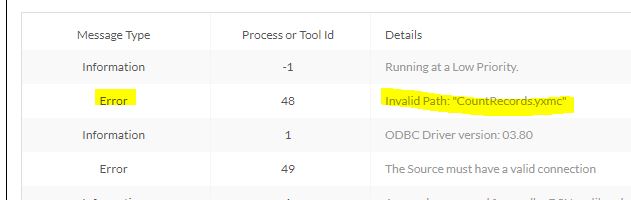
The issue is related to Qlik Analytics Samples and error that it is causing with wrong path error for default macros like eg.CountRecords.
Some of our artisans are unable to publish straight from designer and it would be great if there was an "Upload workflow" button in the private studio just like there is for curators in the admin panel.
I would like to see some functionality in the Alteryx Gallery in which you can select multiple schedule workflows to disable/enable. Currently as an admin if I have many schedules I need to enable/disable I need to go into each schedule manually to disable or enable. This is okay for one or two, but I have about 20-30, it is very time consuming. I would like to see maybe some checkbox functionality next to the workflow to select and then an option to either disable all selected or enable all selected.
- New Idea 386
- Comments Requested 4
- Under Review 73
- Accepted 32
- Ongoing 2
- Coming Soon 1
- Implemented 75
- Not Planned 46
- Revisit 16
- Partner Dependent 0
- Inactive 65
-
Admin UI
35 -
Administration
68 -
AdminUI
7 -
ALS
1 -
Alteryx License Server
8 -
AMP Engine
1 -
API
46 -
API SDK
1 -
Apps
20 -
Category Data Investigation
1 -
Collections
22 -
Common Use Cases
11 -
Configuration
32 -
Data Connection Manager
13 -
Database
18 -
Documentation
8 -
Engine
9 -
Enhancement
196 -
Feature Request
3 -
Gallery
235 -
General
71 -
General Suggestion
1 -
Installation
12 -
Licensing
3 -
New Request
132 -
Permissions
22 -
Persistence
3 -
Public Gallery
10 -
Publish
10 -
Scaling
29 -
Schedule
1 -
Scheduler
72 -
Server
557 -
Settings
114 -
Sharing
16 -
Tool Improvement
1 -
User Interface
31 -
User Settings
1 -
UX
89
- « Previous
- Next »
-
 gawa
on:
Improve Customisability of Workflow Validation Run...
gawa
on:
Improve Customisability of Workflow Validation Run...
-
TheOC
on:
Read All Button for Notification
- seven on: BUG: Server API for workbook versions always downl...
-
TheOC
on:
Deletion of Logs files from Engine, Service and Ga...
- yuriy on: Option to notify users when schedule fails
- moinuddin on: Enable Multi tenancy by Installing Multiple Altery...
- simonaubert_bd on: Expand the v3/jobs API endpoint
-
TheOC
on:
Favorite Workflows
-
Kenda
on:
Display Commas in Gallery for Numeric Up Down
- Poge on: Ability to increase the default for 'Rows Per Page...
| User | Likes Count |
|---|---|
| 2 | |
| 1 | |
| 1 | |
| 1 | |
| 1 |