Alteryx Designer Desktop Ideas
Share your Designer Desktop product ideas - we're listening!Submitting an Idea?
Be sure to review our Idea Submission Guidelines for more information!
Submission Guidelines- Community
- :
- Community
- :
- Participate
- :
- Ideas
- :
- Designer Desktop
Featured Ideas
Hello,
After used the new "Image Recognition Tool" a few days, I think you could improve it :
> by adding the dimensional constraints in front of each of the pre-trained models,
> by adding a true tool to divide the training data correctly (in order to have an equivalent number of images for each of the labels)
> at least, allow the tool to use black & white images (I wanted to test it on the MNIST, but the tool tells me that it necessarily needs RGB images) ?
Question : do you in the future allow the user to choose between CPU or GPU usage ?
In any case, thank you again for this new tool, it is certainly perfectible, but very simple to use, and I sincerely think that it will allow a greater number of people to understand the many use cases made possible thanks to image recognition.
Thank you again
Kévin VANCAPPEL (France ;-))
Thank you again.
Kévin VANCAPPEL
Hello
Alteryx Desktop 2018.4 has a new interface which looks nice, but the labels and texts of its interface is difficult to read (as seen in the below screenshot).
It's seem that the interface's font type or size is not appropriate!
(Knowing that we didn't have any problem with the previous versions of Alteryx Desktop 11.7, 2018.2, & 2018.3)
So, I suggest to change the interface's font type or size of Alteryx Desktop 2018.4 as it was in the previous versions or to another font which is easy to read,
or at least having an option that allow the user to adjust the interface's font type and size.
My solution now is to downgrade to version 2018.3 where I have no problem at all regarding the interface's font.

Good afternoon,
If any one of you have had to create Column Rules in the Table Tool for multiple Table Tools you'll know how much of a pain it is to set the same rules over and over and over.
It would be an amazing addition if we had the functionality to copy column rules to apply to other Table Tools.
What are yalls thoughts?
-Nick

The Dynamic Input tool fails when attempting input a set of Excel files with the following error:
Error: Dynamic Input (1): The file "Test2.xlsx|||<List of Sheet Names>" has a different schema than the 1st file in the set.
Each spreadsheet contains two tabs and all tabs contain the same columns.
The root cause of the schema error is that maximum sheet name length in the two spreadsheets is different. The first spreadsheet uses "East" and "West" for sheet names. The second spreadsheet uses "North" and "South" for sheet names. The Dynamic Input tool uses the longest sheet name when defining the effective Schema.
Excel limits sheet name length to 31 characters. It would be helpful if the Dynamic Input tool used 31 as the minimum string length when defining a schema from Excel sheet names.
The Input Data tool exhibits similar behavior when using a wildcard in the filename and the "Import only the list of sheet names" option.
A batch macro can be used as a workaround.
With the release of 2018.3, cache has become an adhoc task. With complex workflow and multiple inputs we need a method to cache and save the cache selection by tool. Once the workflow runs after opening, the cache would be saved at the latest tool downstream.
This way we don't have to create adhoc cache steps and run the workflow 2X before realizing the time saving features of cache.
This would work similar to the cache feature in 11.0 but with enhanced functionality...the best of the old cache with the new cache intent.
Embed the cache option into tools.
Thanks!
Motivation:
I have an app that a team at my company uses to (sort of) quickly verify transactions. Our legacy VBA application was pretty slick, but in Alteryx it is fairly clunky.
Problem:
I can not figure out, after a reasonable amount of searching, how to get the Alteryx app to display data before inputs are added. This seems like such an obvious feature-- I have written many Shiny apps that do exactly this. The current Alteryx app is very inefficient. The user must run one app to select a case to review. That app downloads a pdf with the info on it. The user must then run another app that closes the case with the needed information. This process is very slow and inefficient and the users are starting to migrate back towards 2 excel spreadsheets.
Solution:
We need a way to display a data table or spreadsheet (or whatever) on the app itself. The workflow needs to be: Open app, select case, data pops up, off-app work, cases are updated and saved into the ledger. If this solution is available, please show me how to do this. If this is not available can the feature request be considered.
Thank you,
Bryan
I really like the Tool Container. I also really like to have neat and tidy modules. Sometimes though, the two are in conflict because the Tool Container automatically sizes itself so I end up playing around with tool placement to get my containers the same.
Could you please add the option to make the Tool Container a sizeable object (like the Explorer Box) or give width and height value boxes in the tool properties?
I would like to see a Run Workflow Tool implemented which can run a specified workflow directly from the Designer. This tool would work similar to the Run Command Tool , but instead you can select the Analytical App Filename (.yxmc etc) and optional Analytical AppValues Filename (.yxwv) as parameters.
Currently you would need the Scheduler or Server licence to run a workflow via AlteryxEngineCmd.exe with the Run Command Tool, but there are legitimate uses which require a workflow to be dynamically determined within a larger workflow. I am aware of the CReW Runner Macros, but these require an additional Executable to be installed which is difficult for locked-down environments.
My example is a workflow which downloads a file list from a Web Service, there are a large number of interface items and 80% of the workflow is standardized. However the initial processing of the files is not, so either you create a workflow for each file type and map all the interface items again, include all the handled file types in one massive workflow, or, create sub workflows which transform the files which allows the minimum amount of repeating code.
It would be nice to have Directory tool working for ftp. I would like to have the list of files on a ftp server including sub folders
The ability to integrate a HTML page as content in the layout, insight and render process. At the moment I create a range of advanced visualisations in Python and save them as HTML. I would like the ability to open these pages and treat them as specialised content which I can apply reporting workflow to including:
- Layout: arrange in a page layout
- Report Text: add report text as heading or comments
- Render: include in a render process
- Insight: include in an interactive dashboard as a standalone widget
One of the tools that I use the most is the SELECT tool because I normally get large data sets with fields that I won't be using for a specific analysis or with fields that need re-naming. In the same way, sometimes Alteryx will mark a field in a different type than the one I need (e.g. date field as string). That's when the SELECT comes in handy.
However, often times when dealing with multiple sources and having many SELECT tools on your canvas can make the workflow look a little "crowded". Not to mention adding extra tools that will need later explanation when presenting/sharing your canvas with others. That is why my suggestion is to give the CONNECTION tool "more power" by offering some of the functionality found in the SELECT tool.

For instance, if one of the most used features of the SELECT tool is to choose the fields that will move through the workflow, then may be we can make that feature available in the CONNECTION tool. Similarly, if one of the most used features (by Alteryx users) is to re-name fields or change the field type, then may be we can make that available in the CONNECTION tool as well.

At the end, developers can benefit from speeding up workflow development processes and end-users will benefit by having cleaner workflows presented to them, which always help to get the message across.
What do you guys think? Any of you feel the same? Leave your comments below.
Currently saving file output as PowerPoint is possible only doing workaround as in Megan's article (link below) using Render Tool. It might be more intuitive to implement PowerPoint to supported options in "Output Mode" dropdown.
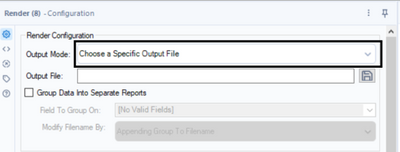
Cheers,
Pawel
This one may be a slightly niche request, but it has popped up a couple of times in my work so I thought I would submit. When importing multiple sheets from an Excel workbook using either the Dynamic Input or wildcard in the Input Data tool, I sometimes get an error that the schemas don't match. While this initially seems like the headers may be different, it can often occur because Alteryx is casting the columns as different data types (as I understand it, based on a sample of the incoming data). While this is often helpful, in this case it becomes problematic.
This has been asked several times on the discussion board including here and here. To workaround this issue, I have gone the batch macro route, but this could be solved more simply for the end user by adding an additional checkbox to the Input Data configuration when an Excel file is selected that imports all fields as strings (similar to the standard CSV input). Then the schema could be specified using a Select tool by the user once all of data is brought in.
I'm not sure if this would be valuable for other input data types where a schema is more explicitly specified, but for any where Alteryx is guessing the schema, I feel like it could be helpful to give the user a bit more control.
Currently the Databricks in-database connector allows for the following when writing to the database
- Append Existing
- Overwrite Table (Drop)
- Create New Table
- Create Temporary Table
This request is to add a 5th option that would execute
- Create or Replace Table
Why is this important?
- Create or Replace is similar to the Overwrite Table (Drop) in that it fully replaces the existing table however, the key differences are
- Drop table completely removes the table and it's data from Databricks
- Any users or processes connected to that table live will fail during the writing process
- No history is maintained on the table, a key feature of the Databricks Delta Lake
- Create or Replace does not remove the table
- Any users or processes connected to that table live will not fail as the table is not dropped
- History is maintained for table versions which is a key feature of Databricks Delta Lake
- Drop table completely removes the table and it's data from Databricks
While this request was specific to testing on Azure Databricks the documentation for Azure and AWS for Databricks both recommend using "Replace" instead of "Drop" and "Create" for Delta tables in Databricks.


 SeanAdams
on
02-02-2020
10:18 AM
SeanAdams
on
02-02-2020
10:18 AM
the SQL Editing screen has recently been changed (thank you @JPoz and team!) - and now has syntax indenting and keyword coloring.
Could I ask that you make a minor change in the indenting, where the on part is indented underneath the Join?
Select
Field1,
Field2,
field3
from
Table1
inner join table2
On Table1.key = table2.key
and table1.keyb = table2.keyb
inner join table3
on table3.key = table1.key
and table3.date = table1.date
It would be really useful to select a default date for Date interface tools for the end user. Really useful in other interface tools and would save a lot of time in testing.
 BenMoss
on
08-28-2020
05:47 AM
BenMoss
on
08-28-2020
05:47 AM
I've recently been playing with the 'Encrypt Workflow' capability within the platform, and it's great, apart from the fact that it is not possible to edit an encrypted asset, meaning users will have to store an unecrypted version of the file.
It would be great if the 'Serial Numbers' could be extended to allow certain users to be able to not only run the workflow but also edit the workflow.
Pretty simple one, but one that would be hugely valuable, preventing the need to maintain an unecrypted version of the workflow on your machine.
Ben
Would it be possible to have the text wrap inside the box when we are creating new formulas?
I am trying to generate the multiple sheets in the same Excel using Render tool. one of the sheet having around 100 columns and other two sheets are having only 20 columns. If am configuring paper size to 50 inches in render tool, its affecting the other sheets too and Report doesn't look good since columns width are getting extended to some extent.
So, it will more helpful if there is an option to configure each sheet paper size or a rule kind of thing.
Please let me know if there are any option to that.
Thanks in advance...
Alteryx Designer should automatically save my modules on a regular basis so that if I have a failure of some sort, my hard work will not be lost.
- New Idea 395
- Accepting Votes 1,783
- Comments Requested 20
- Under Review 181
- Accepted 47
- Ongoing 7
- Coming Soon 13
- Implemented 550
- Not Planned 106
- Revisit 56
- Partner Dependent 3
- Inactive 674
-
Admin Settings
22 -
AMP Engine
27 -
API
11 -
API SDK
230 -
Bug
1 -
Category Address
13 -
Category Apps
114 -
Category Behavior Analysis
5 -
Category Calgary
21 -
Category Connectors
252 -
Category Data Investigation
79 -
Category Demographic Analysis
3 -
Category Developer
220 -
Category Documentation
82 -
Category In Database
215 -
Category Input Output
658 -
Category Interface
246 -
Category Join
109 -
Category Machine Learning
3 -
Category Macros
156 -
Category Parse
78 -
Category Predictive
79 -
Category Preparation
406 -
Category Prescriptive
2 -
Category Reporting
205 -
Category Spatial
83 -
Category Text Mining
23 -
Category Time Series
24 -
Category Transform
93 -
Configuration
1 -
Content
2 -
Data Connectors
985 -
Data Products
4 -
Desktop Experience
1,615 -
Documentation
64 -
Engine
136 -
Enhancement
421 -
Event
1 -
Feature Request
219 -
General
307 -
General Suggestion
8 -
Insights Dataset
2 -
Installation
26 -
Licenses and Activation
15 -
Licensing
15 -
Localization
8 -
Location Intelligence
82 -
Machine Learning
13 -
My Alteryx
1 -
New Request
229 -
New Tool
32 -
Permissions
1 -
Runtime
28 -
Scheduler
26 -
SDK
10 -
Setup & Configuration
58 -
Tool Improvement
210 -
User Experience Design
165 -
User Settings
87 -
UX
228 -
XML
7
- « Previous
- Next »
-
Carolyn
on:
Blob output to be turned off with 'Disable all too...
- MJ on: Add Tool Name Column to Control Container metadata...
-
fmvizcaino
on:
Show dialogue when workflow validation fails
- ANNE_LEROY on: Create a SharePoint Render tool
- jrlindem on: Non-Equi Relationships in the Join Tool
- AncientPandaman on: Continue support for .xls files
- EKasminsky on: Auto Cache Input Data on Run
- jrlindem on: Global Field Rename: Automatically Update Column N...
- simonaubert_bd on: Workflow to SQL/Python code translator
- abacon on: DateTimeNow and Data Cleansing tools to be conside...
| User | Likes Count |
|---|---|
| 7 | |
| 3 | |
| 3 | |
| 3 | |
| 3 |


