Alteryx Designer Desktop Ideas
Share your Designer Desktop product ideas - we're listening!Submitting an Idea?
Be sure to review our Idea Submission Guidelines for more information!
Submission Guidelines- Community
- :
- Community
- :
- Participate
- :
- Ideas
- :
- Designer Desktop
Featured Ideas
Hello,
After used the new "Image Recognition Tool" a few days, I think you could improve it :
> by adding the dimensional constraints in front of each of the pre-trained models,
> by adding a true tool to divide the training data correctly (in order to have an equivalent number of images for each of the labels)
> at least, allow the tool to use black & white images (I wanted to test it on the MNIST, but the tool tells me that it necessarily needs RGB images) ?
Question : do you in the future allow the user to choose between CPU or GPU usage ?
In any case, thank you again for this new tool, it is certainly perfectible, but very simple to use, and I sincerely think that it will allow a greater number of people to understand the many use cases made possible thanks to image recognition.
Thank you again
Kévin VANCAPPEL (France ;-))
Thank you again.
Kévin VANCAPPEL
It seems that version 10.6 (still in beta) will have easy to use linear programming tool... We'll be able to allocate assets optimally, optimize our marketing decisions by inputting the predictions we had with predictive tools etc.
But when it comes to Non-linear models what happens? The idea is to add Alteryx designer an evolutionary optimization capability as well...
I've used a similar tool in excel which was very useful called Evolver; http://www.palisade.com/evolver/ It will be awesome to see that in the coming versions...
To note that one optimisation method does not rule them all and evolutionary algorithms are the slowest probably,
But I believe it will enable us to optimize hyperparameters of our models and greatly get better results...

 SeanAdams
on
04-18-2017
08:49 PM
SeanAdams
on
04-18-2017
08:49 PM
Hi there,
Apologies if Alteryx already does this - but I'd be curious to see if it would be possible to automatically add items to your favourites bar based on usage.
To test this, I've been doing a lot of macro work over the last few days, and given the frequency of using the Macro input and Macro output, I'd expect that they would have elected themselves onto my favourites list.
Again, apologies if the designer already does this
Sean
Often we run into two pretty common situations:
- You want to move a Select, Formula, or Filter to a different point in your workflow
- You want to remove a tool entirely, without affecting the workflow in any other way.
In both cases, I would prefer that I can set the default behaviour of ctrl-x or delete like the way 'Delete and connect around' behaves.
Thanks,
Ruud
Hi,
I wasted a good old chunk of time dealing with non-breaking spaces, and Alteryx could be improved by handling this automatically.
A space is a space, right? Nope, there are spaces (ASCII value decimal 32) and there are non-breaking spaces (ASCII value decimal 160). They look the same, but have slightly different behaviour in certain circumstances, like when text is auto-wrapped.
The DataCleansing tool cleans spaces, but leaves non-breaking spaces.
The Data Grid puts a warning on cells with leading or trailing spaces, but remains silent for non-breaking spaces.
I was trying to match two strings, that looked identical. I had DataCleansed my cells, and the grid was showing me nothing wrong with the data. In desperation, I copied the two data cells that I expected to match to a text editor (Textpad), and then examined the binary ASCII values of the data. One cell had a trailing non-breaking space, and that caused the failure to match.
This was hard to find. For someone less hopelessly nerdy, it would be practically impossible.
As a small change, it might be really useful for Alteryx to include non-breaking spaces in it's definition of "space", such that DataCleansing tool removes it, and the Data Grid flags up the cell as having a leading or trailing space.
You could pick up non-breaking spaces from HTML, or from Excel. I think mine came from a SQL script but I am not sure how it was there. They are out there, and they will bite.
I know this has been suggested before, but it would be great if calculations and transformations could be cached between workflow executions. Perhaps the browse tools could be configured as caches. Any spot that has a browse tool fixes the value of that node between runs provided that there are no upstream tool changes. The cache could be optional (or flushed) to allow for dynamic input data that could change between executions, even if the tool chain didn't.
In the Formula Tool, there is an Average() function which can be used to take the average/mean of multiple columns or expressions. This function treats null values as zeroes. This was a surprise/dissapointment to me as I am used to other applications & systems where nulls are ignored, for example Excel. It would be useful to have either an AverageIgnoreNulls() function or an optional extra parameter to Average() which specifies that nulls should be ignored rather than treated as zeroes.
When wishing to average a small number of columns and ignore nulls, a formula can be constructed using Iif(IsNull([Column1]),0,[Column1]) for each column to calculate the total, and Iif(IsNull([Column1]),0,1) for calculating the count. This quickly becomes unwieldy for more than 2 or 3 columns.
I recently did some extensive work on using the download tool to invoke Restful Web Services. A lot of the initial effort was around ensuring that the data being passed in the header and body for the request was as the service required. Following review of experiences on the community I used a tool called Fiddler to directly view what was being sent to identify the problems in my transformations of the data going into the Download tool. The idea is that the raw HTTP request and reply messages are available directly in Alteryx in the Results window when running a workflow, preventing the need to use another tool.
Alteryx does not currently have to email tool that is configurable to use SMTP Authentication for Microsoft Office 365 or any server requiring authentication. Our office printer can authenticate over SMTP and with TLS enabled why not my Alteryx mail tool - 'mic drop!'.
Further explained, Alteryx is a tool that needs to live within abide by the policies and security standards in the organization not vice versa. Therefore, it shouldn't be a big surprise, or a big ask for that matter, that a mail client should have the ability to authenticate prior to sending email of SMTP. I'm very surprised this tool is so arcane. Please implement quickly. Thank you
Sometimes I want to copy just the Name and Type fields from the metadata in the Results window. Even when selecting this option, however, all 5 available fields still get copied and pasted. I would like to see this change to work as expected and only copy those cells selected.

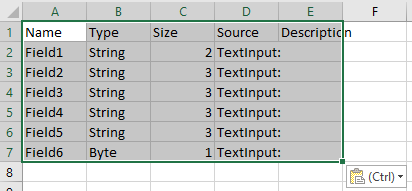
Cc @DultonM
It seems that currently the Python tool is raising a `FileNotFoundError` exception in Python when there is not data incoming on an input connection. I have, for example, a Filter tool before the Python tool and sometimes there is just no data coming to Python tool - as it is intended.
Unfortunately, the Python tools gives my an error message in those cases with this message before the error:
This is only the case when there is no data incoming. In all other cases, the tool works fine.
Since this is not really an error, a way to either catch this before using `Alteryx.read("#1")` or just having `Alteryx.read()` return an empty data.frame (as I would expect it to do) would be appreciated.
To embed the "Not ok" filter option in the browse tool
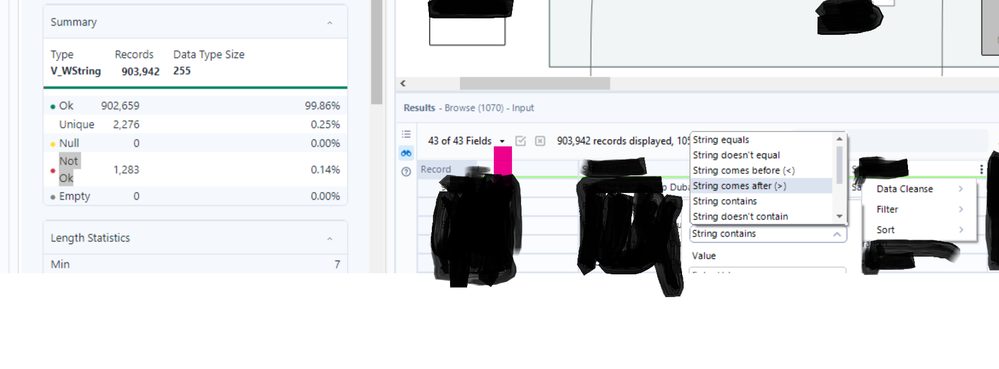

Both Input and Output tools should have the ability to read or write any file type from/into standard compression types (ZIP and GZIP). This would be helpful when managing large files.
It would be cool to have annotations that dynamically update. E.g. a record count would be displayed in the annotation and update after a run if changes occurred.
MarqueeCrew
on
02-01-2018
05:10 AM
My use case is simple. I place an explorer tool on the canvas pointed to a local htm file. During the workflow run, I update the htm file and want to update the canvas to display the results.
Cheers,
Mark
I would like an separate tool for rendering excel file, or more options in the render tool. Currently you have to manually give the size of the output sheet, and it makes all of the columns on the spreadsheet look odd. Having additional options like "Auto page size" would be tremendous.
SeanAdams
on
12-26-2021
07:50 AM
When you have a wide recordset - it often takes dozens of clicks to get a field from the bottom of the select order to the top - to the point where many users resort to going into the XML Editor, copying the XML; popping it into Notepad++ and then editing the XML by hand

Could we instead have an option to "Move to position" with a keyboard shotcut - for example - if I want the "Max BeaconID" column to move to position 1 in the select list, I hit ctrl-shift-M - then press 1 and this / these fields move to the top of the select list.
This should be a relatively easy win for the dev team, and a big win for the users - dozens of mouse-clicks eliminated.
Thank you
cc: @Hollingsworth
Looking for a tool to replicate the Goal seek functionality built into Excel.
Seems it could be solved by using R or iterative macros however a tool would make life much easier,
Hi currently the s3 upload tool only allows file format of *.yxdb , *.json, *.csv and *.avro
In order to optimize loading to redshift, it would be good to have a few more functions
1. Ability to s3 upload with *.gz format
eg: Reading in a file using the input tool -> s3 upload tool (which has a gzip function with the following options - record limit, delimiter, UTF8)
http://docs.aws.amazon.com/redshift/latest/dg/t_loading-gzip-compressed-data-files-from-S3.html
2. Change max record limit, delimiter, UTF8 format
3. Change the objectName to 'take file/table name from field' with filename containing filename or part of filename similar to the 'Output tool'
Adrian
Recently my trial license expired, and after receiving our activation licenses, I needed to upgrade from the 'User' version to the 'Admin' version.
When uninstalling the previous 'User' version, it appeared to complete successfully, and I then started installing the 'Admin' version from the installer.
After installation completed, I noticed that three versions of Alteryx appeared in my Windows 'Programs and Features' in Control Panel - Alteryx (Remove Only), Alteryx (Admin), and Alteryx (User).
When attempting to uninstall the 'User' version, it appeared to complete as expected, but did nothing when examining the application or root directory location, and I could still access and open and use the 'User' version of Alteryx.
To make a long story short, after going into regedit and removing all registry keys named 'Alteryx' including the SRC source key for Alteryx, I was able to manually remove all three of these versions and reinstall the 'Admin' application successfully.
Some kind of an uninstaller to wipe out all Alteryx directories, installations/versions, etc. to perform a clean uninstall/reinstall would be super valuable and probably save some folks a ton of time who are evaluating the product and moving from a Trial(User) version to an activated Admin license.
- New Idea 395
- Accepting Votes 1,783
- Comments Requested 20
- Under Review 181
- Accepted 47
- Ongoing 7
- Coming Soon 13
- Implemented 550
- Not Planned 106
- Revisit 56
- Partner Dependent 3
- Inactive 674
-
Admin Settings
22 -
AMP Engine
27 -
API
11 -
API SDK
230 -
Bug
1 -
Category Address
13 -
Category Apps
114 -
Category Behavior Analysis
5 -
Category Calgary
21 -
Category Connectors
252 -
Category Data Investigation
79 -
Category Demographic Analysis
3 -
Category Developer
220 -
Category Documentation
82 -
Category In Database
215 -
Category Input Output
658 -
Category Interface
246 -
Category Join
109 -
Category Machine Learning
3 -
Category Macros
156 -
Category Parse
78 -
Category Predictive
79 -
Category Preparation
406 -
Category Prescriptive
2 -
Category Reporting
205 -
Category Spatial
83 -
Category Text Mining
23 -
Category Time Series
24 -
Category Transform
93 -
Configuration
1 -
Content
2 -
Data Connectors
985 -
Data Products
4 -
Desktop Experience
1,615 -
Documentation
64 -
Engine
136 -
Enhancement
421 -
Event
1 -
Feature Request
219 -
General
307 -
General Suggestion
8 -
Insights Dataset
2 -
Installation
26 -
Licenses and Activation
15 -
Licensing
15 -
Localization
8 -
Location Intelligence
82 -
Machine Learning
13 -
My Alteryx
1 -
New Request
229 -
New Tool
32 -
Permissions
1 -
Runtime
28 -
Scheduler
26 -
SDK
10 -
Setup & Configuration
58 -
Tool Improvement
210 -
User Experience Design
165 -
User Settings
87 -
UX
228 -
XML
7
- « Previous
- Next »
-
Carolyn
on:
Blob output to be turned off with 'Disable all too...
- MJ on: Add Tool Name Column to Control Container metadata...
-
fmvizcaino
on:
Show dialogue when workflow validation fails
- ANNE_LEROY on: Create a SharePoint Render tool
- jrlindem on: Non-Equi Relationships in the Join Tool
- AncientPandaman on: Continue support for .xls files
- EKasminsky on: Auto Cache Input Data on Run
- jrlindem on: Global Field Rename: Automatically Update Column N...
- simonaubert_bd on: Workflow to SQL/Python code translator
- abacon on: DateTimeNow and Data Cleansing tools to be conside...
| User | Likes Count |
|---|---|
| 7 | |
| 3 | |
| 3 | |
| 3 | |
| 3 |


