Alteryx Designer Desktop Ideas
Share your Designer Desktop product ideas - we're listening!Submitting an Idea?
Be sure to review our Idea Submission Guidelines for more information!
Submission Guidelines- Community
- :
- Community
- :
- Participate
- :
- Ideas
- :
- Designer Desktop
Featured Ideas
Hello,
After used the new "Image Recognition Tool" a few days, I think you could improve it :
> by adding the dimensional constraints in front of each of the pre-trained models,
> by adding a true tool to divide the training data correctly (in order to have an equivalent number of images for each of the labels)
> at least, allow the tool to use black & white images (I wanted to test it on the MNIST, but the tool tells me that it necessarily needs RGB images) ?
Question : do you in the future allow the user to choose between CPU or GPU usage ?
In any case, thank you again for this new tool, it is certainly perfectible, but very simple to use, and I sincerely think that it will allow a greater number of people to understand the many use cases made possible thanks to image recognition.
Thank you again
Kévin VANCAPPEL (France ;-))
Thank you again.
Kévin VANCAPPEL
 SeanAdams
on
11-24-2021
11:40 AM
SeanAdams
on
11-24-2021
11:40 AM
We frequently have issues where users report slowness from an Alteryx installation on a particular machine; or where a specific tool or package fails to install correctly.
For our admin teams - this becomes a debugging exercise to go through different permutations to understand the cause - and if this is escallated to Alteryx Support, this becomes even tougher.
Could we think about including a basic "Self Diagnostic" in to Alteryx which runs through the basic functionalities of Alteryx with some basic timings; checks that Python is working correctly; checks the memory allocation and temporary disk space - and then either persists this to disk and/or sends to a central environment for analysis?
Given a large deployed environment like ours (over 10 000 seats deployed) - self-checkout-telemetry like this would provide the central team with massive increase in their ability to manage the deployed base; and at the same time signficantly reduce the time to resolve support issues.
Salesforce Input connector tool currently uses REST API.
Can we please enhance this tool to use BULK API?
Use Case:
We are sourcing about 2 million rows of opportunity data from Salesforce do to some insight analysis. This Alteryx workflow takes over an hour to run. The same dataset when pulled using a different ETL tool (Informatica) produces the dataset within 2 min! That makes a HUGE difference when you have a number of process to run in a limited amount of time. Enabling BULK API functionality on Salesforce input tool will help solve this problem.
I've seen a few older threads on this but wanted to bring it up again.
I have numerous workflows in which I have built in "fail safes" to prevent passing bad data out to downstream databases/reports. I have Message tools that provide a specific message on whether the fail safe was triggered or the new/refreshed data was passed through. The problem with the Message tool is that it is very easy for the message to get lost in the myriad log results so you don't automatically see it. The same is true for using the Browse tool to view a dynamic and more easy-to-read message/result, you still have to make the overt decision to click the Browse tool to review the result/message.
Admittingly, on their own, these "issues" seem minor. However, when running multiple workflows as part of a group or on a regular basis, some of which can be very large and complex, its easy for these "minor issues" to become major inconveniences to utilize as they are intended or they just get lost in the static of everything that happens when a workflow runs.
Having something similar to a Report Text tool that can render an image and formula-driven text/conditions (font and background color controls) directly and conspicuously on the canvas would be AWESOME and go a long way to providing immediate/easy-to-see information regarding the results of the workflow.
I ask/encourage the Alteryx team to explore providing this capability.
SeanAdams
on
07-30-2017
11:14 AM
In the community and in mixed teams - it's very common for people to be caught on the error that "This document was created in a more recent version". Although there are several workarounds (e.g. this one from @WayneWooldridge here https://community.alteryx.com/t5/Alteryx-Knowledge-Base/Adjusting-Alteryx-Files-for-Different-Versio...), this seems like it may be an easy problem to solve more permanently.
Could we add an option to Alteryx to save the file with the lowest compatible version number?
So - for example - if i'm only using components that shipped with version 10, then please mark the file as version 10. If I've used a tool that shipped in 11.0.6 then that needs to be the version number.
This way - files will be back-compatible as far as is possible by default unless using newer components.
Many thanks
Sean

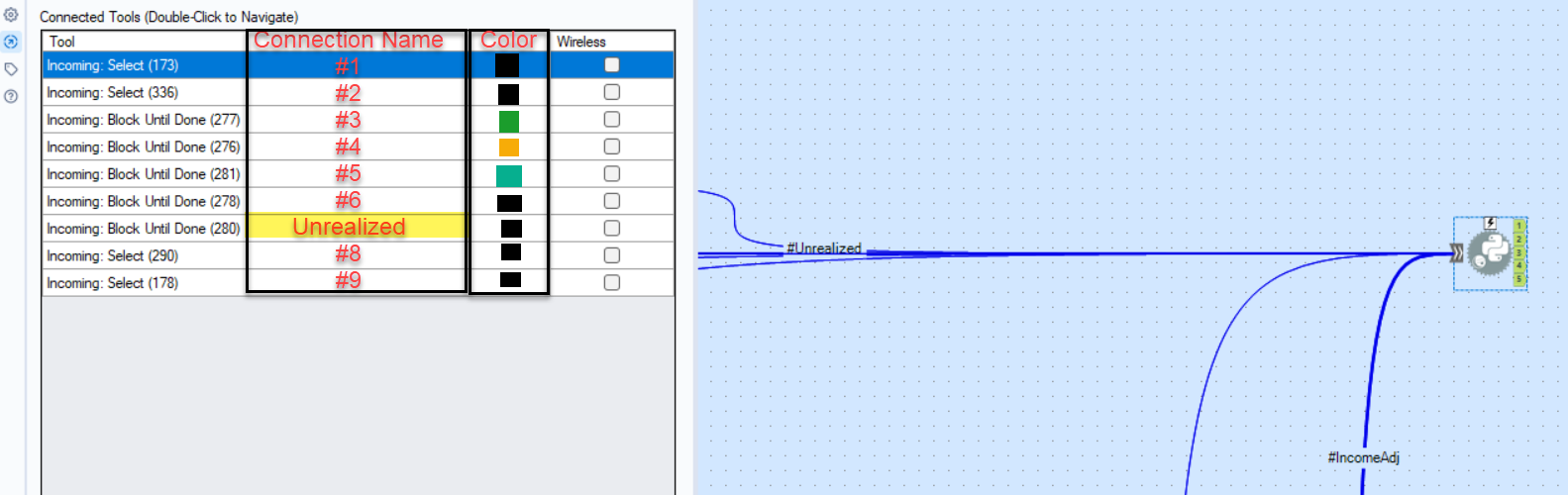
I only have 2023.2, hoping to get 24.2 soon, so I haven't been able to try the newest color feature, but my idea is additional columns in the Navigation panel of a tool to update multiple connection features in one place (names and color at the moment). I'm using Python, and I have a variety of data inputs I would like to be able to easily reference in my code. Currently default names are #1, #2, based on order of connection. Similarly, I know for tools that accept multiple inputs, like Union and Join Multiple, this could also be useful if needing to reorder based on the connection names. I'm also not sure how this ties in to the color feature as described in Connection Configuration, but this could also be a good place to change colors of multiple connections at once instead of clicking into each connection. This would also require this list to allow for multiple selection at the same time, as right now you can't hold shift and select multiple lines.
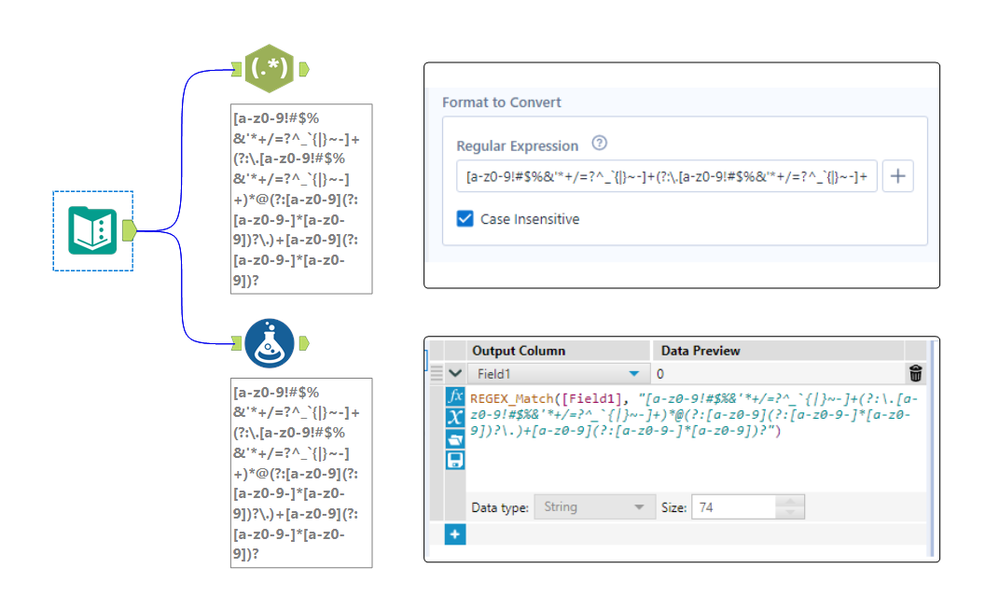
The expression editor in the RegEx tool is only a single line, which makes it really hard to edit long regular expressions. See attached photo comparing the expression editor in the RegEx tool compared to the formula tool for the same expression. Please make the RegEx editor box either wrap to multiple lines, have a pop-out expression editor, or something so we can see long expressions.
For in-DB use, please provide a Data Cleansing Tool.

The introduction fo a rank tool would be hugely beneficial. Whilst there are currently means to rank using a combination of other tools formula/running total/multirow etc... a specific "Rank Tool" would be provide a seemless and smoother way to rank your data either for further analysis or purely to output this field.
This tool should include a sort by and group by functionaility as well as options for ranking (such as dense ranking or unique ranking) and in addition multi levels of ranking (ie. Rank by "Field A" Then By "Field B" etc...).
There needs to be a way to step into macro a which is component of parent workflow for debugging.
Currently the only way to achieve to debug these is to capture the inputs to the macro from the parent workflow, and then run the amend inputs on the macro. For iterative / batch macros, there is no option to debug at all. This can be tedious, especially if there are a number of inputs, large amounts of data, or you are have nested macros.
There should be an option on the tool representing the macro in the parent workflow to trigger a Debug when running the workflow, this would result in the same behavior when choosing 'Debug' from the interface panel in the macro itself: a new 'debug' workflow is created with the inputs received from the parent workflow.
On iterative / batch macros, which iteration / control parameter value the debug will be triggered on should be required. So if a macro returns an error on the 3 iteration, then the user ticks 'Debug' and Iteration = 3. If it doesn't reach the 3rd iteration, then no debug workflow is created.
We build some pretty robust maps with multiple connections and it would be great to copy the map tool and paste it with all of the connections when we want to tweak the map slightly but keep our original map. It is a regular occurrence for us to have a very detailed map grouping by trade area name and then may want to have an overview map with all of the same connections but slightly different layout. Tracking down the connections, reconnecting them and naming them accordingly takes a substantial amount of time even in the most organized of workflows. This function would be a huge time-saver. It would also be of value with joins and unions - anywhere you have multiple streams coming in.
Hi!
Just thought up a simple improvement to the US Geocoder macro that could potentially speed up the results. I'm doing an analysis on some technician data where they visit the same locations over & over again. I'm doing a full year analysis (200k + records) & the geocoder takes a bit to churn thru that much data. In the case of my data though, it's the same addresses over & over again & the geocoder will go thru each one individually.
What I did in my process & could be added to the macro is to put a unique tool into the process based off address, city, state, zip, then Geocode the reduced list, then simply join back to the original data stream using a join based off the address, city, state, zip fields (or use record id tool to created a unique process id to join off).
In my case, the 200k records were reduced to 25k, which Alteryx completed in under a minute, then joined back so my output was still the 200k records (all geocoded now).
Not everyone will have this many duplicates, but I'd bet most data has a few, & every little bit of time savings helps when management is waiting on the results haha!
We have Alteryx running in AWS which seems to be a common setup.Our AWS instances are set-up with IAM roles which has been one of the security measures applied in order to finally allow our enterprise company to allow some development in the cloud. IT will not allow the sharing of Access keys to connect to S3.
- Would like to use the AWS S3 Tools from the connectors palette as the AWS CLI has limited ability to handle/report exceptions or issues with any detail. At the moment, we are limited on what goes into production as we are using CLI for what we can.
- Ideally, an option would be to add to the S3 Tools allowing the user to select IAM Roles rather than Key Access. Refer the screen attached.
for iterative macro, generally it had 2 anchors, one if it is for iterative, and it normally no output (whether got error or not)
it good to have option to remove this anchor when using it in workflow.
so other user no need to identify which one is the True output and which one is just iteration.
additional, if this can apply to input anchor.
(i just built one macro where i don't need the start input, but the input need to be iterate input)
I am having to render my Alteryx formatted reports to Excel and then upload the report to Google Sheets
It would be very useful (and improve the less well known Alteryx Reporting capabilities) to be able to render straight to a Google Sheet and preserve the formatting.
Thanks
Kenda
on
01-06-2021
08:38 AM
Similar to the thoughts in this idea, it would be great if the parenthesis matching functionality could be added to the formula tool as well.
TheOC
on
04-11-2023
09:16 AM
Hello!
I appreciate this is a very underused element of Alteryx Functionality, however, I have noticed a few issues with the description of fields.
Firstly, if you set a description on a field within a select tool:
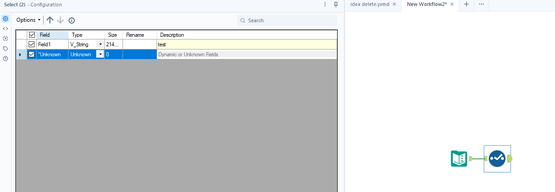
And then attempt to clear the description later in the workflow (in another select tool), you cannot. When you delete the description, it will clear back to the original value (in this case, 'test'):
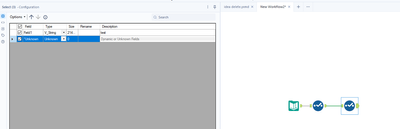
This can be easily recreated, and can be more applicable to yxdb outputs that contain the description of fields. In that scenario, you cannot go back to the previous select tool and remove the description. The closest you can come to easily clearing the description is replacing it with a space ' '.
As a secondary issue, as current the score tool removes field descriptions and overrides the source. For example if I open the Score tool example workflow, and add a select tool/description:
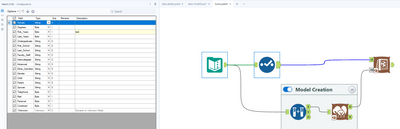
You can see the meta data going into the score tool:
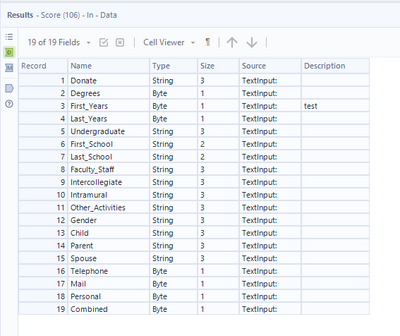
But unfortunately the output of the tool looks like:
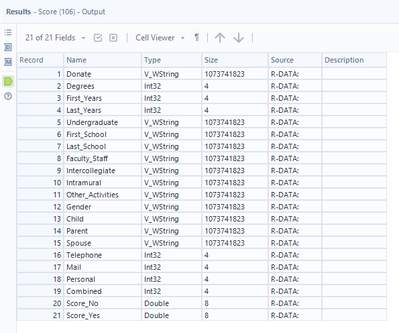
Showing that it has completely removes the descriptions, and also replaced all of the 'source' information. My suggestion for this would be that it would not replace the source information or descriptions.
Thirdly - and quite a niche issue, but an int64 field specifically will break when the description differs between the data and the model.
Again, easy to recreate within the Ccore tool example workflow. Apply a Select tool to both streams, setting 'First_Years' to an int64. Within the bottom stream (the model creation), set a description, in this case, 'test':
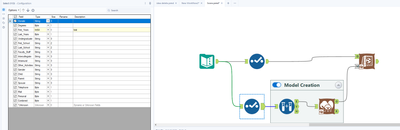
Make sure to leave the top streams description blank.
Run the workflow, observe the error:
Error: Score (106): Score: The variable testFirst_Years is missing from the input data stream.
Interestingly, it seems to be using the description as part of the name within the Score tool, which is causing issue when the descriptions differ. My suggestion for this would be that it would not utilise descriptions at all.
Kind Regards,
Owen
When using the formula tool -- one of the nice features is that when you start typing in a function or variable -- the tool will show formulas/variables that begin with that letter and keep changing as you type in more letters. I believe this is called predictive typing.

However, this does not happen in tools like multi-row or multi-field where a user would have to search for functions and variables if they weren't sure what they are.

Can predictive typing be added to the multi-row and multi-field tools? If I want to take it further, any tool that allows a user to use the formula functionality should be able to see predictive typing.
Thanks,
Seth Moskowitz
SeanAdams
on
12-26-2019
06:51 AM
Could you expose a link to the Keyboard Shortcuts (which is here: https://help.alteryx.com/2019.4/HotKeys_Shortcuts.htm?Highlight=keyboard%20shortcuts) on the primary help menu (screenshot below)
This will allow people to get quicker in Alteryx by exposing these shortcuts to more users.

Hi,
Currently loading large files to Postgres SQL(over 100 MB) takes an extremely long time. For example writing a 1GB file to Postgres SQL takes 27 minutes! This is serious impacting our ability to use Alteryx as an ETL tool for loading our target Postgres Data Warehouse. We would really like to see the bulk load capacity to Postgres supported by Alteryx to help alleviate the performance issues.
Thanks,
Vijaya
 Nick612Haylund
on
04-16-2019
11:31 AM
Nick612Haylund
on
04-16-2019
11:31 AM
I really like that I can scroll -- using my mouse -- between the tool groups in Alteryx. Can this UX be added to scroll through my workflows? I usually have a bunch open, and this functionality would be awesome to have there, too! 🙂
PS: Yes, I know I can do Ctrl+Tab...but mouse scrolling is more efficient.

- New Idea 396
- Accepting Votes 1,783
- Comments Requested 20
- Under Review 181
- Accepted 47
- Ongoing 7
- Coming Soon 13
- Implemented 550
- Not Planned 106
- Revisit 56
- Partner Dependent 3
- Inactive 674
-
Admin Settings
22 -
AMP Engine
27 -
API
11 -
API SDK
230 -
Bug
1 -
Category Address
13 -
Category Apps
114 -
Category Behavior Analysis
5 -
Category Calgary
21 -
Category Connectors
252 -
Category Data Investigation
79 -
Category Demographic Analysis
3 -
Category Developer
220 -
Category Documentation
82 -
Category In Database
215 -
Category Input Output
658 -
Category Interface
246 -
Category Join
109 -
Category Machine Learning
3 -
Category Macros
156 -
Category Parse
78 -
Category Predictive
79 -
Category Preparation
406 -
Category Prescriptive
2 -
Category Reporting
205 -
Category Spatial
83 -
Category Text Mining
23 -
Category Time Series
24 -
Category Transform
93 -
Configuration
1 -
Content
2 -
Data Connectors
985 -
Data Products
4 -
Desktop Experience
1,616 -
Documentation
64 -
Engine
136 -
Enhancement
422 -
Event
1 -
Feature Request
219 -
General
307 -
General Suggestion
8 -
Insights Dataset
2 -
Installation
26 -
Licenses and Activation
15 -
Licensing
16 -
Localization
8 -
Location Intelligence
82 -
Machine Learning
13 -
My Alteryx
1 -
New Request
229 -
New Tool
32 -
Permissions
1 -
Runtime
28 -
Scheduler
26 -
SDK
10 -
Setup & Configuration
58 -
Tool Improvement
210 -
User Experience Design
165 -
User Settings
87 -
UX
228 -
XML
7
- « Previous
- Next »
-
Carolyn
on:
Blob output to be turned off with 'Disable all too...
- MJ on: Add Tool Name Column to Control Container metadata...
-
fmvizcaino
on:
Show dialogue when workflow validation fails
- ANNE_LEROY on: Create a SharePoint Render tool
- jrlindem on: Non-Equi Relationships in the Join Tool
- AncientPandaman on: Continue support for .xls files
- EKasminsky on: Auto Cache Input Data on Run
- jrlindem on: Global Field Rename: Automatically Update Column N...
- simonaubert_bd on: Workflow to SQL/Python code translator
- abacon on: DateTimeNow and Data Cleansing tools to be conside...
| User | Likes Count |
|---|---|
| 7 | |
| 3 | |
| 3 | |
| 3 | |
| 2 |