Alteryx Designer Desktop Ideas
Share your Designer Desktop product ideas - we're listening!Submitting an Idea?
Be sure to review our Idea Submission Guidelines for more information!
Submission Guidelines- Community
- :
- Community
- :
- Participate
- :
- Ideas
- :
- Designer Desktop
Featured Ideas
Hello,
After used the new "Image Recognition Tool" a few days, I think you could improve it :
> by adding the dimensional constraints in front of each of the pre-trained models,
> by adding a true tool to divide the training data correctly (in order to have an equivalent number of images for each of the labels)
> at least, allow the tool to use black & white images (I wanted to test it on the MNIST, but the tool tells me that it necessarily needs RGB images) ?
Question : do you in the future allow the user to choose between CPU or GPU usage ?
In any case, thank you again for this new tool, it is certainly perfectible, but very simple to use, and I sincerely think that it will allow a greater number of people to understand the many use cases made possible thanks to image recognition.
Thank you again
Kévin VANCAPPEL (France ;-))
Thank you again.
Kévin VANCAPPEL
 Hollingsworth
on
07-28-2017
07:37 AM
Hollingsworth
on
07-28-2017
07:37 AM
Idea: Create a UX feature to provide a cursor area magnification.
Problem: One of the challenges of working with Alteryx is quickly navigating around the canvas. Traditional software editors have bookmarks or anchors that let you quickly jump to predefined parts of the code.
Alteryx does not have these. Instead, the tools available are the Find tool, Zoom tools, and the Overview window. While capable, they still require a lot of typing and clicking, panning, zooming, etc.
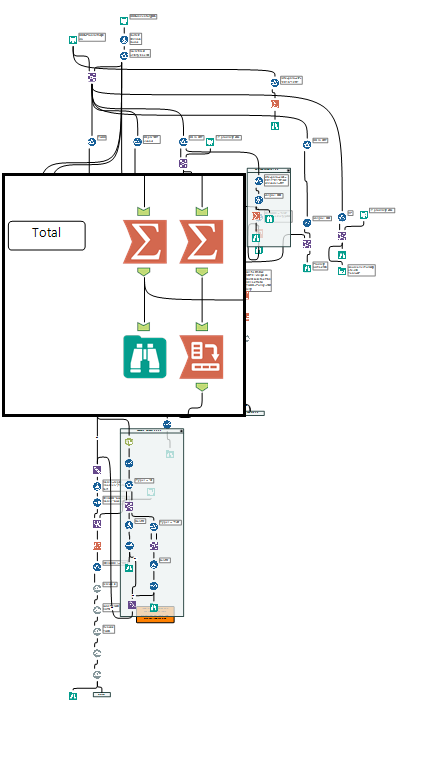
Solution: Create a small magnification window that would follow the cursor around the canvas. This is commonly known as a Loupe feature in many image editing software such as Aperture.
Benefits: This would allow a user to have a full view of their entire workflow and yet be able to see and configure a specific tool with ease.
Activation: I think this feature could be activated in two ways.
1 - The user could toggle the feature by clicking a keyboard shortcut
2 - The feature would automatically enable once the zoom was out beyond a predetermined level.
Options: The user would be able to shrink or enlarge the size of the magnification window.
Example: I've mocked up an image of what this might look like below.
Hi All,
I think this suggestion would be be ideal for the Join tool and it's related cousins (Join Multiple etc.) and would improve the experience of data blending for all users.
I am going to rely on Qlik Sense for this explanation as this functionality is native to that product.
When we bring in two data sources and use the join tool to blend we are required to select the field or fields upon which we want to base our join.
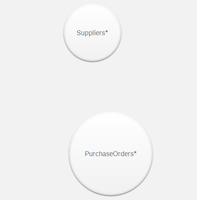
In Qlik Sense we can see our two data sources:
We can then drag them together and it will form suggestions based on data association density:
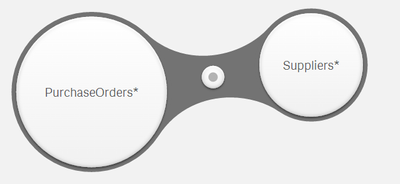

This helps with identifying how tables should be joined, and at the very least shows commonalities between data streams, based on the data within the tables and not any naming conventions.
It would be nice to have the functionality to generate suggestions based on association density between two data streams, and then to apply the join from a selection.
Thoughts?
In the old charting tool, you could change the order of the series by moving them up or down. This feature has been eliminated from the new charting tool. I want sales percent to be the top bar, but despite which 'series' I put it in, inventory percent is the top bar, as the order appears to be alphabetic. It would be nice to have that option added back in.
In the new charting tool, you can adjust the number of decimal places for your series, which is great. Adding '%' as a suffix to the series label would be nice. There is an option to add prefix/suffix to the axis label, but not to the series.
Horizontal axis (x-axis) displays at an angle. Having an alignment option (center; vertical; horizontal; etc.) is preferable.
 jdunkerley79
on
03-09-2016
12:58 PM
jdunkerley79
on
03-09-2016
12:58 PM
Field Summary is a great tool, but would be nice to have a count and count not null on it.
Having an easy selection and filtering of data values is essential in big data environs as well...
I'm sure preparing such an in-db tool for Alteryx guys and gals will be pretty easy...
Looking forward to it...
jdunkerley79
on
02-08-2016
01:59 AM
Would love a tool where I could do Weighted Averages etc.
Ideally be able to write: SUM(Price * Volume) / SUM(Volume) and it would work.
As per this discussion, I'd like to create constants that stay with me as I create new workflows rather than creating a user constant across multiple workflows.
This could perhaps be done by editing an xml file in the bin.
Please asses the value of using d3js javascript library to create vizualisation.
Thank you.
Regards,
Cristian.
For the love of god. Put the key to use doing exactly what the name suggests....escaping from windows.
It would be extremely handy to be able to close any open window or dialogue box with the escape key.
This should be an extremely easy fix...
What do you guys think?
-Nick
I am in a corporate environment where our proxy settings are centrally managed and I do not have the ability to change them locally.
Our proxy requires authentication to access the Internet.
Many applications that read the system settings for proxies have a way to let the user enter her credentials, either in a configuration dialog beforehand or with a pop-up for each connection.
Having at least one of these options would save me a number of steps I must currently take manually, out side of Alteryx.
I cannot get an exception on the proxy for my IP address or MAC because that violates our security policy. I am sure I'm not the only one in that situation.
A request, to have a screen shot auto generated as like tableau have.
When we want to share/document the workflow, people has to use third party tools to get the screen shots. I believe its worth to have a screenshot as thumbnails, like tableau has as part of the twb files.
I'm sure we can do this with snipping tools, but i believe its worth to auto-generate an thumbnails and have as part of the alteryx files when user save the document as like tableau does.
thanks
arasu.b
Alteryx's spatial tools are really powerful and offer a lot of value for analysis. However, when rendering a map for output, there is currently no way to place an image inside of a polygon. This feature would be very useful for customized layers on maps and other spatial-based processes.
My rough suggestion would be to scale a selected image to the size of the polygon's bounding rectangle, and then trim the edges of the image to fit inside the polygon itself.
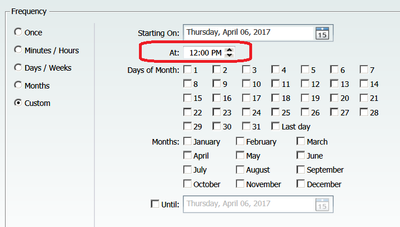
Currently Alteryx Designer Custom schedule window only support specifying 1 hour. I would like to request it be changed to Hours of the Day with checkboxes from 0 to 23, similar to Days of the Month.
The Listbox (interface macro) is currently populated statically when sourcing values through a Connected tool. Whatever, I configure in the macro is retained. When I use the macro in a workflow the LIstbox values are not updated when the fields in the connected tool are changed. This practically limits my capabilities to build a truely dynamic macro/app.
The Listbox should be able to show dynamically the fields coming in through the connected app.
It would be nice to have the ability to double click the top area of a container to either show or hide the container's objects. Only being able to show or hide containers using the arrow icon in the top right is quite cumbersome for large containers because it requires a lot of horizontal scrolling in order to change the desired view of the modules workflow.
There are a several ways to store the Avro schema in Hive:
- Literal JSON string stored in the Hive table properties (Alteryx currently supports)
- Reference to the schema file stored elsewhere
- Pass in the schema as a run-time property in Hive
Alteryx only supports Option #1, but that runs into a 4000 Character Limitation which is the default schema limit in Hive’s internal DB. Is it possible to have Alteryx support the other two options to be able to support data sets with large schema definitions?
Give me the ability to show/hide, enable/disable user interface tools via a control parameter.
Currently the Throttle Tool allows control to a number of calls per minute. Some APIs include a limit to the calls per hour and a combination of throttles. I would love to see the option to choose the number of calls per hours and have 2 limit controls (eg 100calls per minute and 100calls per hour)
With the increase number of JSON feeds and the need to properly define the data type for date and date/time fields. It would be useful to have the Auto Field tool detect common date and date/time formats from Strings and assign the Date, Date Time, or Time data type.
Given the following input data:
The select tool confirms is a String
If we use the Auto Field as:
The result is still a String data type (2nd Select Tool)
I would expect this to be Date Time.
One solution would be to create a formula and parse it, but this is not suitable for situations that the field names are unknown.
It would be much easier to have the work done by Auto Field.
- New Idea 395
- Accepting Votes 1,783
- Comments Requested 20
- Under Review 181
- Accepted 47
- Ongoing 7
- Coming Soon 13
- Implemented 550
- Not Planned 106
- Revisit 56
- Partner Dependent 3
- Inactive 674
-
Admin Settings
22 -
AMP Engine
27 -
API
11 -
API SDK
230 -
Bug
1 -
Category Address
13 -
Category Apps
114 -
Category Behavior Analysis
5 -
Category Calgary
21 -
Category Connectors
252 -
Category Data Investigation
79 -
Category Demographic Analysis
3 -
Category Developer
220 -
Category Documentation
82 -
Category In Database
215 -
Category Input Output
658 -
Category Interface
246 -
Category Join
109 -
Category Machine Learning
3 -
Category Macros
156 -
Category Parse
78 -
Category Predictive
79 -
Category Preparation
406 -
Category Prescriptive
2 -
Category Reporting
205 -
Category Spatial
83 -
Category Text Mining
23 -
Category Time Series
24 -
Category Transform
93 -
Configuration
1 -
Content
2 -
Data Connectors
985 -
Data Products
4 -
Desktop Experience
1,615 -
Documentation
64 -
Engine
136 -
Enhancement
421 -
Event
1 -
Feature Request
219 -
General
307 -
General Suggestion
8 -
Insights Dataset
2 -
Installation
26 -
Licenses and Activation
15 -
Licensing
15 -
Localization
8 -
Location Intelligence
82 -
Machine Learning
13 -
My Alteryx
1 -
New Request
229 -
New Tool
32 -
Permissions
1 -
Runtime
28 -
Scheduler
26 -
SDK
10 -
Setup & Configuration
58 -
Tool Improvement
210 -
User Experience Design
165 -
User Settings
87 -
UX
228 -
XML
7
- « Previous
- Next »
-
Carolyn
on:
Blob output to be turned off with 'Disable all too...
- MJ on: Add Tool Name Column to Control Container metadata...
-
fmvizcaino
on:
Show dialogue when workflow validation fails
- ANNE_LEROY on: Create a SharePoint Render tool
- jrlindem on: Non-Equi Relationships in the Join Tool
- AncientPandaman on: Continue support for .xls files
- EKasminsky on: Auto Cache Input Data on Run
- jrlindem on: Global Field Rename: Automatically Update Column N...
- simonaubert_bd on: Workflow to SQL/Python code translator
- abacon on: DateTimeNow and Data Cleansing tools to be conside...
| User | Likes Count |
|---|---|
| 7 | |
| 3 | |
| 3 | |
| 3 | |
| 3 |


