Alteryx Designer Desktop Ideas
Share your Designer Desktop product ideas - we're listening!Submitting an Idea?
Be sure to review our Idea Submission Guidelines for more information!
Submission Guidelines- Community
- :
- Community
- :
- Participate
- :
- Ideas
- :
- Designer Desktop
Featured Ideas
Hello,
After used the new "Image Recognition Tool" a few days, I think you could improve it :
> by adding the dimensional constraints in front of each of the pre-trained models,
> by adding a true tool to divide the training data correctly (in order to have an equivalent number of images for each of the labels)
> at least, allow the tool to use black & white images (I wanted to test it on the MNIST, but the tool tells me that it necessarily needs RGB images) ?
Question : do you in the future allow the user to choose between CPU or GPU usage ?
In any case, thank you again for this new tool, it is certainly perfectible, but very simple to use, and I sincerely think that it will allow a greater number of people to understand the many use cases made possible thanks to image recognition.
Thank you again
Kévin VANCAPPEL (France ;-))
Thank you again.
Kévin VANCAPPEL
Given redshift prefers accepting many small files for bulk loading into redshift, it would be good to be able to have a max record limit within the s3 upload tool (similar to functionality for s3 download)
The other functionality that is useful for the s3 upload tool is ability to append file names based on datetimestamp_001, 002, 003 etc similar to current output tool
Hey Community,
How many times do you need to follow a Text to Columns tool with a data cleanse tool? For me it seems almost every time
Wouldn't it be great if Alteryx could incorporate some of the data cleanse functionality into the the Text to Columns?
If you agree VOTE NOW!
Part time Tableau, Part Time Alteryx. Full Time Awesome

Looks like several users are losing floating panes when they go from dual monitors to one when undocking from a workstation:
 jdunkerley79
on
09-23-2015
02:57 PM
jdunkerley79
on
09-23-2015
02:57 PM
Would be nice if could use something like $Field rather than repeating the field name in the Condition and Loop expression within the Generate Rows tool
 patrick_mcaulif
I have several .yxdb files that I’ve been appending to daily from a SQL Server table in order to extend the length of time that data is retained.
They’re massive tables, but I may only need one or two rows.
I had hoped to decrease the time it takes to get data from them by running a query on them (or a dynamic query/input) as opposed to using a filter or joining on an existing data set which would have equal values that would produce the same result as a filter.
Essentially, the input of .yxdb would have the option of inputting the full table or a SQL query just like a data connection.
Hollingsworth
on
08-03-2015
09:51 PM
In my environment, installing Core Data Bundle to network drive ("prepare a network install") runs for hours or days due to network factors. If interrupted, I need to start from scratch again.
These changes would greatly improve the installation:
- Maintain verbose installer log to track progress and confirm that all selected files are successfully installed.
- Add a repair mode to the installer to repair interrupted installations. When run in this mode, only missing/corrupt data files will be re-installed as necessary (much faster than fresh install).
- Support use of a shortcut like "CURRENT" on my network drive to the real installation directory (say "Q3_2017"). This would allow me to point to the latest release and users who "register from a network location" via "CURRENT" shortcut path will always get the latest data files. As an administrator, I have no way to know if my Alteryx users are configured to use an obsolete data set that I want to clean up from my network drive.
- When I prepare a network installation, I'd like to specify an expiry date and warning message that users will see in their workflows if they access obsolete data sets. Example: "Core data set XXX is obsolete as of 12/31/2017. Register current version via \\my-network-drive\alteryx\???\DataInstall.exe...". Nice to have would be a warning date and an error date to provide grace period. This would be similar to the CASS data set expiry date.
Request: Currently Alteryx does not support a connector to SharePoint lists if those lists are on SP sites with claims-based authentication. Please add in this functionality so data can be imported directly into a workflow.
Rationale: Claims-based authentication can be used in situations where two workgroups (or companies) want to collaborate on information housed in a SharePoint list. The claims-based authentication allows for both "internal" and "external" consumers of the information to access the SharePoint site, perhaps with different permission levels.
However, if information is placed in a claims-based authenticated site, it cannot be accessed directly in Alteryx. Using the data in workflows becomes extremely difficult without cumbersome workarounds. The power and flexibility of Alteryx workflow scheduling, analysis, reporting, and notifications should be extended to cover data in all SharePoint sites.
Sample Use Case: I maintain a SharePoint site / list for vendors to report in on the status of projects we have assigned them. The site uses claims-based authentication to enable the vendors, who are not employees of our company, to access and update the list.
SharePoint's built-in workflows are adequate for notification and updating when a new item is added, or an item changes. However, I often want to obtain and send out snapshots of the data as they stand: how many items are open, how many have recently been closed within SLA, etc. This cannot be done within the SharePoint platform without extremely convoluted means and potentially tying up resources on the SharePoint server.
Alteryx has the perfect tools for easily performing this analysis and sending notifications to stakeholders -- and when using the Gallery scheduler, it can do so on an automated basis. However, without direct import into Alteryx from SharePoint, I need to have scheduled exports to an intermediary Excel file. Said intermediate export has issues with authentication, which would be resolved with a SharePoint connector that authenticates with saved credentials every time.
To navigate through XML document you need several parse tools to drill down to an element because you can only use element names
It would be nice if you case use an xml path (xpath) because of the rich syntax.
With xpath, we could specify ship_to/address/city or bill_to/address/city
Currently working through an assignment on the Udacity Nano-degree related to A/B testing (thank you for the great course content @PatrickN )
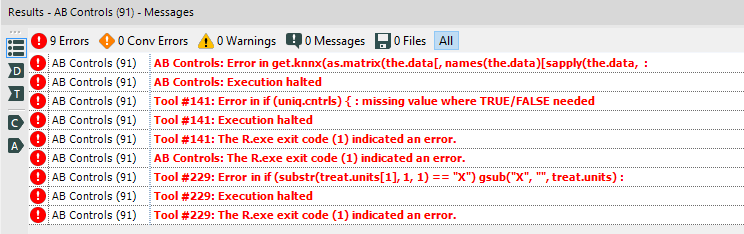
Unfortunately - when using the AB testing tools for the first time, I encountered several cryptic error messages.
This request is not to help diagnose this error message, but rather to wrap these error messages in a way that gives users some useful info so that they can solve this problem themselves.
As you can see from the error message below - the error provided does not give the user any hints on how to go about fixing the problem.
I've attached the workflow with embedded data so this should be replicatable

I would like to see additional input tools for common raster formats such as .BIL, .IMG, etc. Functionality similar to the inputs for MapInfo Vertical mapper .grc and .grd (which are not very common) would be great, but an added feature would be to provide an option to load the data as centroids or centroid lat/longs only. I have found that aligning multiple grc/grd layers based on centroid lat/long allows for cross-file analysis that is much more intuitive than other methods (i.e. R or ESRI), but it takes significant time to parse individual boxes and then calculate the centroid as a second step.
A super added bonus would be the ability to output raster files.
Like PDF Reader and Tableau Reader wherein things can't be edited but users (at large scale) can execute pre-designed content and business logic can interactively use it; I'd like to propose Alteryx Executor as free platform for the end users. Once the business logic has been designed on the designer, the alteryx wizard/ app/ workflow can be handed over to the clients for easier adaptability.
These days I get my work done easily though Alteryx and it creates client delight and once they also want to have it for their production usage - they push me to convert it all into MS Office/ SQL/ Python platforms. Which ends up into very inefficient usage as well as drop in adoption of Alteryx. I've significantly dropped using Alteryx and have stopped encouraging others to use as end state is extrememly painful.
What's Alteryx is doing about it? USD 3500 is a lot of money to shed for data blending and analysis tool each year for the license whereas lot of freeware like Sisense/ Pentaho/ Python is available to the clients for their usage.
Hi there,
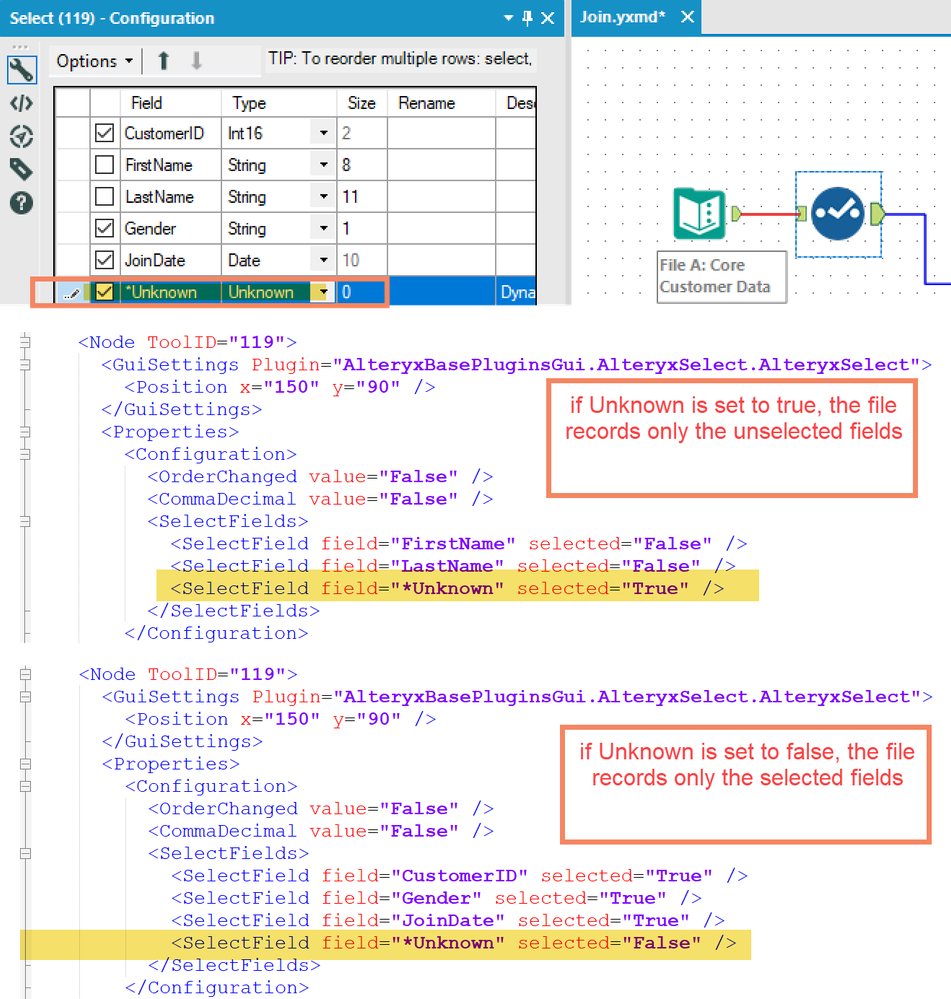
The select tool writes a different configuration to the underlying XML file for the Alteryx flow depending on whether the "Unknown" value is selected.
- if unknown is true:
- Only fields that are deselected (or renamed /modified) are written to the XML file. This is understandable since if no field is de-selected, and "Unknown" is true, then whatever goes through the tool is passed on
- if unknown is false:
- Only fields that are selected (or modified) are written to the XML file. Again, this is logically understandable.
However - we are hoping to scan our Alteryx jobs to spot where fields are not used and should be trimmed out earlier - and because of this behaviour of select-type tools (Select; join; etc), we cannot get a full view of all the fields known by the tool.
Can we please give the user an option to write ALL fields to the XML file irrespective of the "Unknown" flag? This will give the added benefit of enabling every tool to know its fields on a fresh reload without having to rerun.
Example:
Desired State:
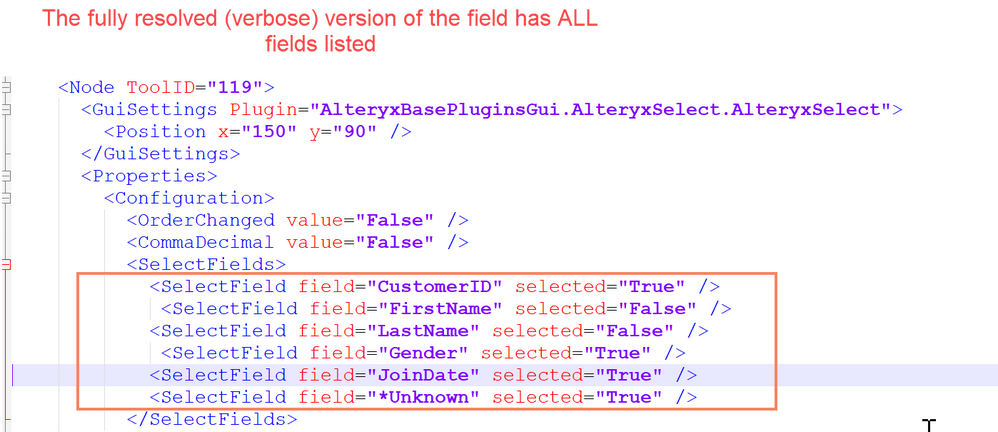
cc: @Ned
Hi,
I have a suggestion for selecting multiple tools. You currently have it to where the user can hold down Ctrl and select multiple tools one at a time. Could you take it the next step and allow the user to hold Ctrl and then click and drag over multiple tools, then go to another area while still holding Ctrl and click and drag to select multiple tools again.
For example, I would first click and drag over these tools:
Then hold down Ctrl and click and drag over these tools (I’m trying to select the 5 tools without grabbing the Filter tool and it’s 2 Browses):
Currently if a user has multiple connections in a workflow that connect to a password-protected source, and that password changes, the user will be locked out of their account by login attempts as Alteryx attempts to validate the connection.
Today I had to manually edit the XML of another user's workflow in order to remove references to their server, so they could correct their password without locking the account for a third time today.
While I understand that aliases are a good workaround to this problem, the issue still has potential to occur.
Having an option to load a workflow in a "SECURE" or "SAFE" mode, where it would not validate a query until runtime, or refreshing the metadata manually, would help to significantly reduce lockouts which would improve the usability of the tool.
For those with large web and streaming-media server logs, the ability to geocode IP addresses be an excellent feature, similar to Alteryx's ability go geocode street addresses. Several IP geocoding services exist, with different levels of accuracy and cost. Ideally, the user should be able to choose their own service if they have one, in addition to a default service built-in to Alteryx.
A proof of concept is documented in this post.
The IP geocoding tools should include:
- IP address to IP number conversion, and the reverse
- IPv4 and IPv6
- Output for postal code, country, city, state, latitude/longitude centeroids
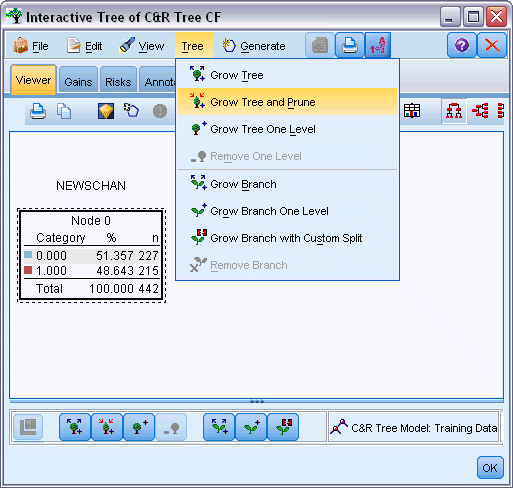
The existing decision tree node is automatic
but business users need to mingle with the decision tree, prune the tree and grow certain parts of the tree using their domain expertise...
SPSS has a nice facility as you can see below... Desperately looking forward for an Alteryx version...
We uncovered a possibility in which the user may potentially output a huge file into the Alteryx database without specifying an external system to house it - which could possibly take up a lot of space in the database we use for running Alteryx (store schedules, user and run data to name a few), this may even bring down the environment and sure doesn't seem like a good practice.
Can you please include a check to ensure that this can be disabled or capped ( specify a limit on the size) ?
The number 1 issue I have with training Excel/SQL users on wonderful Alteryx is that "<>" isn't valid as an operator - I also struggled with this.
Why should users have to learn old ANSI SQL operators, <> seems unambiguous.
Apologies if this has been posted previously, but couldn't find it with the limited Search capability, but that's another post =)..
Hi,
Recently in Feb 2016, Australia released the geocoded national address file to the public for no extra cost and will continually update this each quarter.
I think It would be a game changer to build this functionality natively into the alteryx product to enable any alteryx user simple access to it. also I think it would drive a lot of sales for the alteryx product.
http://www.data.gov.au/dataset/geocoded-national-address-file-g-naf
adrian
- New Idea 395
- Accepting Votes 1,783
- Comments Requested 20
- Under Review 181
- Accepted 47
- Ongoing 7
- Coming Soon 13
- Implemented 550
- Not Planned 106
- Revisit 56
- Partner Dependent 3
- Inactive 674
-
Admin Settings
22 -
AMP Engine
27 -
API
11 -
API SDK
230 -
Bug
1 -
Category Address
13 -
Category Apps
114 -
Category Behavior Analysis
5 -
Category Calgary
21 -
Category Connectors
252 -
Category Data Investigation
79 -
Category Demographic Analysis
3 -
Category Developer
220 -
Category Documentation
82 -
Category In Database
215 -
Category Input Output
658 -
Category Interface
246 -
Category Join
109 -
Category Machine Learning
3 -
Category Macros
156 -
Category Parse
78 -
Category Predictive
79 -
Category Preparation
406 -
Category Prescriptive
2 -
Category Reporting
205 -
Category Spatial
83 -
Category Text Mining
23 -
Category Time Series
24 -
Category Transform
93 -
Configuration
1 -
Content
2 -
Data Connectors
985 -
Data Products
4 -
Desktop Experience
1,615 -
Documentation
64 -
Engine
136 -
Enhancement
421 -
Event
1 -
Feature Request
219 -
General
307 -
General Suggestion
8 -
Insights Dataset
2 -
Installation
26 -
Licenses and Activation
15 -
Licensing
15 -
Localization
8 -
Location Intelligence
82 -
Machine Learning
13 -
My Alteryx
1 -
New Request
229 -
New Tool
32 -
Permissions
1 -
Runtime
28 -
Scheduler
26 -
SDK
10 -
Setup & Configuration
58 -
Tool Improvement
210 -
User Experience Design
165 -
User Settings
87 -
UX
228 -
XML
7
- « Previous
- Next »
-
Carolyn
on:
Blob output to be turned off with 'Disable all too...
- MJ on: Add Tool Name Column to Control Container metadata...
-
fmvizcaino
on:
Show dialogue when workflow validation fails
- ANNE_LEROY on: Create a SharePoint Render tool
- jrlindem on: Non-Equi Relationships in the Join Tool
- AncientPandaman on: Continue support for .xls files
- EKasminsky on: Auto Cache Input Data on Run
- jrlindem on: Global Field Rename: Automatically Update Column N...
- simonaubert_bd on: Workflow to SQL/Python code translator
- abacon on: DateTimeNow and Data Cleansing tools to be conside...
| User | Likes Count |
|---|---|
| 7 | |
| 3 | |
| 3 | |
| 3 | |
| 3 |


