Alteryx Designer Desktop Ideas
Share your Designer Desktop product ideas - we're listening!Submitting an Idea?
Be sure to review our Idea Submission Guidelines for more information!
Submission Guidelines- Community
- :
- Community
- :
- Participate
- :
- Ideas
- :
- Designer Desktop
Featured Ideas
Hello,
After used the new "Image Recognition Tool" a few days, I think you could improve it :
> by adding the dimensional constraints in front of each of the pre-trained models,
> by adding a true tool to divide the training data correctly (in order to have an equivalent number of images for each of the labels)
> at least, allow the tool to use black & white images (I wanted to test it on the MNIST, but the tool tells me that it necessarily needs RGB images) ?
Question : do you in the future allow the user to choose between CPU or GPU usage ?
In any case, thank you again for this new tool, it is certainly perfectible, but very simple to use, and I sincerely think that it will allow a greater number of people to understand the many use cases made possible thanks to image recognition.
Thank you again
Kévin VANCAPPEL (France ;-))
Thank you again.
Kévin VANCAPPEL
When running an app (not in the Gallery), the status bar appears to complete for each tool, then start over for the next tool. It'd be great if while it was doing that, the tool name that it was running displayed. Now, I know for most processes this will be instantaneous and your eye won't even catch it. But if we have, for example, several join/sort tools with lots of data going through them, it would be nice to know which one it's on.
My users love having the ability to pick objects from a reference file in the Map tool in the Interface palette. However, usually they need to pick objects that are interspersed amongst others. The Control + Left Click works great, until they pick an incorrect object. The only option is to clear the selection and start over.
Please add something as simple as Control + Left Click on a selected object will deselect it.
Best,
David
Chaos reigns within. Repent, reflect and reboot. Order shall return.
For those of us really old school, this would be a novel Easter egg to add

I think a lot of us have run into this problem at some point. We are running a longer workflow and right at the end everything will stop with an error. The problem is that someone has a file Alteryx is reading or writing to open in another program. When this happens, it will stop with an error and the whole process will need to be started again from the beginning. I think it would be great for Alteryx to be able to halt, alert the user of the problem, and give the option to retry reading or writing.
The issue : we have to regurlary change our passwords. It implies changing it for all the connections alias (at least for standard connections).
What I'm looking for :
A commande line to execute like :
alteryxpw.exe -connection {alias name} -connection_type {user/system} -connection_mode {standard/indb} -pw {new password}
This command line could be executed by a powerhsell script.
I've seen the question in the community and have had the need to cascade fields in a record. On certain conditions, field 2 moves to field 1 and field 3 moves to field 2 etcetera. This can be a complicated process remembering if the moves were made and which field contents should be where.
One solution might be to define the cascade condition as an expression and then map the fields as FROM TO and allow for defaulting into a field (ie: Null()).
Another solution might be to reference the input data directly. You could get field values from the input stream before enhancements to data were made.
At the end of a process, Delta Flags (fields changed during the formula) could be created if input/output of selected variables were changed.
A stream of thoughts....
I've found that double-clicking in the expression builder results in varying behavior (possibly due to field names with spaces?)
It would be great if double-clicking a field selected everything from bracket to bracket inclusive, making it simpler to replace one field with another.
For instance:
Current:
IF [AVG AGE] >=5 THEN "Y" ELSE "N" ENDIF
Desired:
IF [AVG AGE] >=5 THEN "Y" ELSE "N" ENDIF
Hi,
I recently had a project that involved clipping the spatial polygon from one record with the spatial polygon of a different dataset. Currently, the only way I know how to use Alteryx to do this is to use a Spatial Match tool to get both spatial objects in the same record line, which allows me to use the Spatial Process tool. In my case, I was trying to trim polygons to the US, so my second spatial object was a polygon for the entire US, which then got attached to every record of my data in order to do the Spatial Process.
My suggestion is simple, make the Spatial Process tool have an option that would allow for two Inputs. I bring my target data in on one stream, chose the process method I want, and use the second Input as my "clip" data. This would allow people to trip/clip their data without having to append the clip data to every single record in the target dataset.
Same concept applies for the Distance tool, currently have to have both spatial objects in one record. My suggestion is to allow the Distance tool to also allow two inputs, I understand there is the Find Nearest tool and that as two inputs, but I'm not always just wanting the nearest, or to have a cutoff distance. Sometimes, I just want to know the distance in my target data to the location in my secondary file, for every record..
It would be great to make R tool in Alteryx closer in interface to, let's say, RStudio. By this I mean - can we please have code auto completions, color highlighting of formulas/dataset names, and other useful interface details that make coding easier?
When working with large amount of data the browse tool profiling causes the program to stop responding.
A feature to disable the profiling per browse tool.
or even better
After a set threshold (e.g. amount of rows), the auto profiling is disabled and requires an action to run.
This suggestion is particularly relevant for macros and custom tools created with the Python SDK, but I think it can apply to other tools as well.
When searching for tools in Alteryx, I can easily find tools I want fairly quickly. However, I often don't know which tool category it is in, which can sometimes slow me down (it is sometimes faster/easier for me to go to the tool category, rather than search for the tool I want).
As a quick example, I just installed the Word Cloud tool that @NeilR shared here: https://community.alteryx.com/t5/Dev-Space/Python-Tool-Challenge-BUILD-a-Python-tool-and-win-a-prize... . I was able to find the tool really easily using search once it was installed, but in order to find the tool category, I either had to unzip the .yxi file and find out where it was, or click around through the tool categories until I found it (it was in the Reporting tools, which makes a lot of sense).
Could we add something either to the search window or to the description/config of tools which calls out where a given tool is in the Tool Palette?
Hello,
It was be nice if we could see the Regex Tool be a little more interactive. I am thinking a little more similar to the Formula tool where you can have expression display. I often use this site first https://regex101.com/ to practice a Regex formula before applying it. I love how this site highlights the data as you build the expression and also provide a comprehensive quick reference. Just an idea to make it easier for those non Regex experts.
Thanks,
Derek
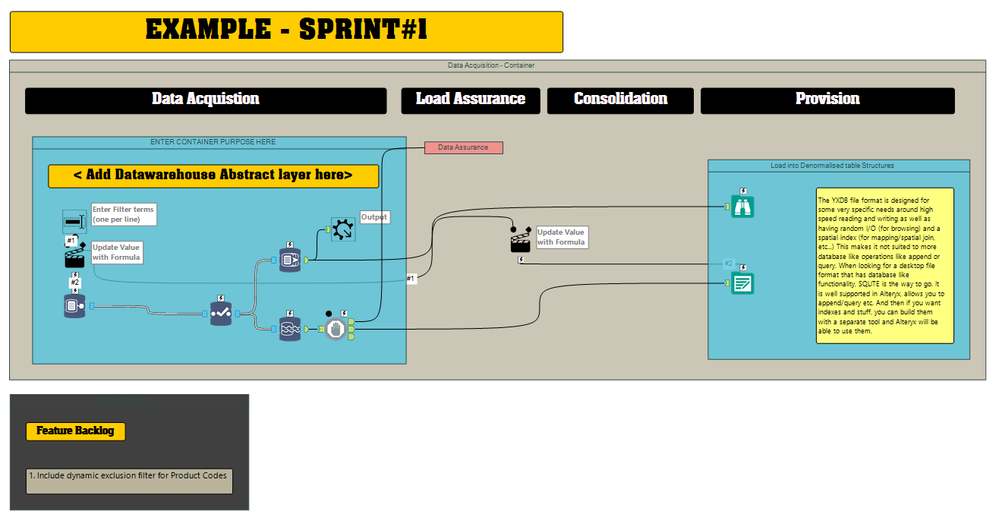
I am frequently using comments within my containers to tell an engaging story to my business Audience about the workflow I have built. However, whenever I start adding, removing, moving tools etc within containers these comments don't remain static within the relative position of the container and drift into positions that I have to manually adjust.
From a time saving perspective it would be great if I could:
1. fix the position of comment within a container and
2. Group comments in a way similar to how you can group objects in Visio and Photoshop
All your tools should have a mirror rotate feature.
As a good housekeeping practice, I want to create a workflow where connection lines are crystal clear and do not overlap or mess up with other lines.
Expected:
I want to create my workflows in both directions to make it tidy, as shown here:


Give me the ability to select a date range that limits the available selections for a date tool.
The limitations should include:
Future dates only
Past dates only
Dates between [startdate] and [enddate]
Future/Previous # years
Future/Previous # months
Future/Previous # weeks
Future/Previous # days
Recently we had a situation where installing the data packages was expected to take over 20 hours! We do not have the ability to run a machine undisturbed for this length of time at the office, and VPN automatically times out after 12 hours. Okay, so these items are company-specific, but how nice would it be to be able to download/install the data in smaller portions so you don't have to worry about setting up shop for 8-10 hours?!
I was able to copy the DataInstall.ini and name only the portions of the data I wanted to install in each session. But then I had to separate the installs into different network folders otherwise you end up overwriting the DataInstall.exe file, which users need for each install in order to register from a network location (for each install).
Needless to say, it took SEVERAL weekends and quite a few mistakes before I was able to do it this way successfully!
Please vote for data installs in smaller portions!
Currently with Alias Manager you can only create Aliases for database connections.
We use HDFS Connections to write files to HDFS so it would be really useful to use an Alias especially when promoting workflows to Alteryx Server.
Would be nice to select a bunch of consecutive fields, and cut them and paste them to a different area. Currently, the only options are to Move to Top or Move to Bottom. If you want to move somewhere in between, you have to scroll through the whole list.
When choosing "In List" values in a CYDB input, the normal Windows functions do not work (shift+click, ctl+A, ctl+click, etc.).
When having to choose, say, 20 values, it is a big annoyance to have to click each value (20 clicks).
Have been told this is a bug so I wanted to put it on your radar for a fix.
Hi
While the download tool, does a great job, there are instances where it fails to connect to a server. In these cases, there is no download header info that we can use to determine if the connection has failed or not.
Currently the tool ouputs a failure message to the results window when such a failure occurs.
Having the 'failed to connect to server' message coming into the workflow in real time would allow for iterative macro to re-try.
Thanks
Gavin
- New Idea 395
- Accepting Votes 1,783
- Comments Requested 20
- Under Review 181
- Accepted 47
- Ongoing 7
- Coming Soon 13
- Implemented 550
- Not Planned 106
- Revisit 56
- Partner Dependent 3
- Inactive 674
-
Admin Settings
22 -
AMP Engine
27 -
API
11 -
API SDK
230 -
Bug
1 -
Category Address
13 -
Category Apps
114 -
Category Behavior Analysis
5 -
Category Calgary
21 -
Category Connectors
252 -
Category Data Investigation
79 -
Category Demographic Analysis
3 -
Category Developer
220 -
Category Documentation
82 -
Category In Database
215 -
Category Input Output
658 -
Category Interface
246 -
Category Join
109 -
Category Machine Learning
3 -
Category Macros
156 -
Category Parse
78 -
Category Predictive
79 -
Category Preparation
406 -
Category Prescriptive
2 -
Category Reporting
205 -
Category Spatial
83 -
Category Text Mining
23 -
Category Time Series
24 -
Category Transform
93 -
Configuration
1 -
Content
2 -
Data Connectors
985 -
Data Products
4 -
Desktop Experience
1,615 -
Documentation
64 -
Engine
136 -
Enhancement
421 -
Event
1 -
Feature Request
219 -
General
307 -
General Suggestion
8 -
Insights Dataset
2 -
Installation
26 -
Licenses and Activation
15 -
Licensing
15 -
Localization
8 -
Location Intelligence
82 -
Machine Learning
13 -
My Alteryx
1 -
New Request
229 -
New Tool
32 -
Permissions
1 -
Runtime
28 -
Scheduler
26 -
SDK
10 -
Setup & Configuration
58 -
Tool Improvement
210 -
User Experience Design
165 -
User Settings
87 -
UX
228 -
XML
7
- « Previous
- Next »
-
 Carolyn
on:
Blob output to be turned off with 'Disable all too...
Carolyn
on:
Blob output to be turned off with 'Disable all too...
- MJ on: Add Tool Name Column to Control Container metadata...
-
fmvizcaino
on:
Show dialogue when workflow validation fails
- ANNE_LEROY on: Create a SharePoint Render tool
- jrlindem on: Non-Equi Relationships in the Join Tool
- AncientPandaman on: Continue support for .xls files
- EKasminsky on: Auto Cache Input Data on Run
- jrlindem on: Global Field Rename: Automatically Update Column N...
- simonaubert_bd on: Workflow to SQL/Python code translator
- abacon on: DateTimeNow and Data Cleansing tools to be conside...
| User | Likes Count |
|---|---|
| 7 | |
| 3 | |
| 3 | |
| 3 | |
| 3 |


