Alteryx Designer Desktop Ideas
Share your Designer Desktop product ideas - we're listening!Submitting an Idea?
Be sure to review our Idea Submission Guidelines for more information!
Submission Guidelines- Community
- :
- Community
- :
- Participate
- :
- Ideas
- :
- Designer Desktop
Featured Ideas
Hello,
After used the new "Image Recognition Tool" a few days, I think you could improve it :
> by adding the dimensional constraints in front of each of the pre-trained models,
> by adding a true tool to divide the training data correctly (in order to have an equivalent number of images for each of the labels)
> at least, allow the tool to use black & white images (I wanted to test it on the MNIST, but the tool tells me that it necessarily needs RGB images) ?
Question : do you in the future allow the user to choose between CPU or GPU usage ?
In any case, thank you again for this new tool, it is certainly perfectible, but very simple to use, and I sincerely think that it will allow a greater number of people to understand the many use cases made possible thanks to image recognition.
Thank you again
Kévin VANCAPPEL (France ;-))
Thank you again.
Kévin VANCAPPEL
Alteryx 2019.4 introduced support for Tableau's .hyper extract format, however it only supports single table extracts. .hyper files have supported multiple tables since mid-2018, so I'd like Alteryx to support that as well.
Here are a couple of current use cases (as of February 2020) and one future one.
- We have malaria incidence data that is joined to multiple sets of spatial data. Doing all of the joins in the extract creation process to build a single table extract is not possible due to processing time & memory constraints, so we use a multiple-table extract.
- There are multiple ways to do row level security in Tableau. A common way is to have separate tables for the data & the entitlements and then use calculations at run-time to filter the data, and for that having a multiple table extract is ideal.
- In 2020 Tableau will be introducing new data modeling capabilities (this was first demoed at the 2018 Tableau Conference, there were sessions on it at the 2019 Tableau Conference) where one goal is vastly improved performance for large fact table to fact table joins where previously we'd have to do much more data preparation. This is another case where multiple table extracts would be useful.
I've attached a sample Hyper file with two tables in the extract (it's zipped because the Community site doesn't accept .hyper files).
Supporting alternative schema and table names in Hyper extracts https://community.alteryx.com/t5/Alteryx-Designer-Ideas/Input-tool-Support-more-than-Extract-Extract... is a prerequisite for this because by definition multiple table extracts have multiple table names.
A related idea is supporting multiple table extracts for the Output tool: https://community.alteryx.com/t5/Alteryx-Designer-Ideas/Support-multiple-table-extracts-in-the-Table...
Jonathan
Alteryx 2019.4 added support in the Input tool for Tableau .hyper extract files. The tables stored in the .hyper files have a schema and a table name. Tableau's old .tde files and Hyper files created by Alteryx & Tableau Desktop use "Extract.Extract" as the schema.tablename. However when using Tableau's Hyper API the default schema is "public" and the table name is arbitrarily specified by the user or application.
This has two impacts:
1) Without this support Alteryx can't open many .hyper files created by other applications. By way of example I've attached a sample .hyper file (in a .zip because the community software doesn't allow .hyper files) that has the schema.tablename "public.table1".
2) Also support for names beyond Extract.Extract is required in order to support multiple table extracts (submitted as a separate Idea).
Please update the Input tool so the user can select the particular schema and table name from the .hyper file.
Jonathan
Assuming some source control or versioning is in place, a formal compare tool would be a nice addition. This would be useful for determining what is different between two versions of a workflow, and that knowledge is very useful when modifying a production process: when formally moving a new (modified) process into production, part of the checks and balances would be to run a formal comparison against the workflow being replaces, and ensure that all differences are accounted for.
This sort of audit is notoriously difficult when the differences are buried deep in the configuration settings of various tools within Alteryx. I do see that the .yxmd files are XML based, so perhaps we could create our own compare tool based thereon, but it would be better (more trustworthy) to have one formally provided by Alteryx. Thanks!
At the moment if a part of your python code takes more than 30s to run, Jupyter times out and Alteryx cancels the workflow. This makes the Python Tool unusable for anything intensive and the timeout should be removed by default or be configurable per workflow.
I've made this idea as none of the solutions in these threads feel satisfactory:
Hi All,
Was very happy to see the Bulk Loader introduced for Snowflake during last release. This bulk loader is specifically available for Snowflake environments that are hosted on AWS, but does not provide functionality for those environments using Azure. As Snowflake continues to build momentum, I imagine this will be a common request. Is there something in the pipeline to add this functionality?
For an interim solution, we will be working toward developing some generic scripts/snowsql to mimic that bulk load, but ultimately we'd love to have this as part of the tool.
Best,
devKev
Hello,
As of today, only English is available. But it's hard to convince French Customers with french language data to buy the AIS if it cannot work with their data.
Best regards,
Simon
The guide line of Shape File is below. They recommend that you use only letters and numbers.
"Spaces and certain characters are not supported in field names. Special characters include hyphens such as in x-coordinate and y-coordinate; parentheses; brackets; and symbols such as $, %, and #. Essentially, eliminate anything that is not alphanumeric or an underscore."
But many GIS tools can read and write 2 byte field name at Shape File.
(e.g. QGIS https://qgis.org/en/site/index.html)
And Esri Japan says Shape file can use 2 byte field name.
https://www.esrij.com/gis-guide/esri-dataformat/shapefile/
We want to use 2 byte field name at Shape File on Alteryx Designer.
(e.g. UTF-8 , Shift-JIS )
Thanks,
Kajitani
Hello all,
From https://www.sqltutorial.org/sql-triggers/
Introduction to SQL Triggers
A trigger is a piece of code executed automatically in response to a specific event occurred on a table in the database.
A trigger is always associated with a particular table. If the table is deleted, all the associated triggers are also deleted automatically.
A trigger is invoked either before or after the following event:
- INSERT – when a new row is inserted
- UPDATE – when an existing row is updated
- DELETE – when a row is deleted.
When you issue an INSERT, UPDATE, or DELETE statement, the relational database management system (RDBMS) fires the corresponding trigger.
In some RDMBS, a trigger is also invoked in the result of executing a statement that calls the INSERT, UPDATE, or DELETE statement. For example, MySQL has the LOAD DATA INFILE, which reads rows from a text file and inserts into a table at a very high speed, invokes the BEFORE INSERT and AFTER INSERT triggers.
On the other hand, a statement may delete rows in a table but does not invoke the associated triggers. For example, TRUNCATE TABLE statement removes all rows in the table but does not invoke the BEFORE DELETE and AFTER DELETE triggers.
So basically, I would like to create some triggers from in db tools in Alteryx.
Best regards,
Simon
Hi,
This is a small thing but it really messes with my OCD. It would be great if we could manually move the connection lines between tools , this would make large workflows a lot nicer to look at and easier to follow.
I am aware of the wireless tool but i like to see connections, just want them a bit neater.
Thanks
Imagine the scenario where you have an input that has new columns everyday, like the one that can be seem above. But with millions of rows. And you need to build the Total column. This cannot be achieved with the formula tool, because the columns of the input are dynamic.
| Client | 20220101 | 20220102 | 20220103 | 20220104 | 20220105 | 20220106 | 20220107 | 20220108 | 20220109 | Total |
| 0000001 | 356 | 223 | 454 | 542 | 827 | 321 | 614 | 759 | 977 | 5628 |
...
The default way that i use and see people using to solve this type of problem is transposing the data/summarizing/joining back the data. I tested this with the Enable Performance Profiling for 10 million rows (workflow attached), and as expected, when you transpose/summarize/join back a large volume of rows, you spend too much computing power. For this test, at least 5x more time than by just using the formula tool (workflow attached):
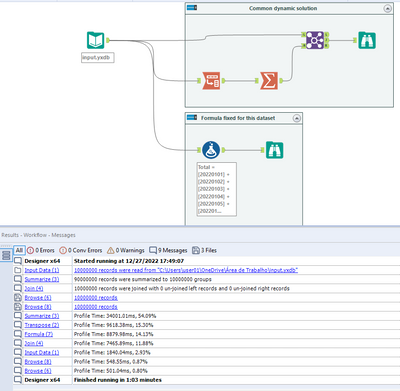
So, what i propose here is:
1) That the Multi-Field formula could be able to evaluate a set of columns dynamically and generate just one new column (the sum of the evaluated columns, the concatenation of it...).
Example of Designer Discussion that would be benefit from it: https://community.alteryx.com/t5/Alteryx-Designer-Discussions/Transposing-Filtering-and-Summarizing-...
2) That the Multi-Field formula could be able to reference column-1, column-2, column+1, column+2, like the Multi-Row formula is.
Example of Designer Discussion that would benefit from it: https://community.alteryx.com/t5/Alteryx-Designer-Discussions/Copy-Field-and-create-two-mor-fields-w...
Thanks.
Originally posted here: https://community.alteryx.com/t5/Data-Sources/Input-Data-Tool-Can-we-control-use-of-Cursors/m-p/5871...
Hi there,
I've profiled a simple query using SQL Server Profiler (Query: Select * from northwind.dbo.orders; row limit: 107; read Uncommitted: true) and interestingly it opens up a cursor if you connect via ODBC or SQL Native; but not by OleDB - full queries and profile details are on the discussion thread above.
However - in some circumstances a cursor is not usable - e.g. https://community.alteryx.com/t5/Data-Sources/Error-SQL-Execute-Cursors-Not-supported-on-Clustered-C... because SQL doesn't allow cursors on columnstore indexed tables & columns
Is there any way (even if we need to manually adjust via the XML settings) to ask Alteryx not to create the cursor and execute directly on the server as written?
Thank you
Sean
Due to different file formats whether it is .xlsb or any other formats, sometimes it requires end user to install additional drivers/engine.
Some of these driver installations require installations of outdated software e.g. Microsoft Access 2013 (Microsoft Access Database Engine 2013), which poses unnecessary security risk.
Therefore we recommend that in the future version should take note and incorporate such drivers into the installation package so that there is no need to install them separately.
Hi Alteryx Devs -
Doing a simple, but cumbersome workflow with a lot of database inputs. It was going slow, and every time I tried to paste something into it from another workflow, I'd get lock ups. Get the 'Workflow must be run for field meta info to be accurate' error. Google tells me that I need to check the 'Disable Auto Configuration' option. OK. It is in user settings, but this means for my other workflows that don't have problems like this (i.e., 99% of my workflows), I'll have that functionality applied when it really is only a problem for the minority.
Should be a relatively simple fix to give this option at workflow properties time instead of user settings time.
Thanks.
brian
Tableau v2018.3 introduced multiple table extracts. These are particularly useful for fact table to fact table joins and fact table to entitlement table joins for row-level security where the number of rows created by the join and/or size of join results would be prohibitively large. Also they are useful for fact table to spatial joins where we might have multiple spatial objects (for example custom province/district/health facility catchment) for each row of fact table data.
So in Alteryx I'd like to be able to specify 2+ tables & their join keys and then write out a .hyper multiple tables extract.
Jonathan
As we do more work analyzng the canvasses that our folk are producing - it's becoming more and more necessary to have a well documented definition and schema for the XML that is used for Alteryx Canvasses.
Please could you publish the full XML definition and schema for Alteryx canvasses - this will allow groups to perform deeper analytics on how people are using Alteryx, automate quality checks; look for learning gaps; scan for dependencies etc?
Note: this relates to an idea from @dataprep here: https://community.alteryx.com/t5/Alteryx-Designer-Ideas/Documentation-tool-list-fileformat/idi-p/184...
The idea is to store credentials, login/pw in a "credential alias".
Then, those credential aliases can be used in :
-traditional aliases/connection
-in database aliases/connection
-hdfs aliases/connection
-API
-on user aliases for connected controllers/gallery
...etc.
The idea is that I only have to change the credentials once for all the connection type (on Hive, I have the in db alias, the traditional alias and even an HDFS alias using exactly the same credentials !! and I have to change all that manually).
With the continued growth of Graph Databases, it would be nice for Alteryx to creates a new tool set that would allow input/output connectors for Graph Databases like Neo4j which software tools like Pentaho and Talend already have.
Keith.
I've used the Table tool with large data sets to make tables with conditional formatting etc. There's a couple of suggestions I'd like to see.
1. I noticed an issue where if you disconnect from the tool prior to the Table tool before it forgets your settings quite easily and you may need to redo them. This is quite frustrating if you have lots of columns
2. The controls for sorting and interacting with columns aren't very good, if they were more like the select tool controls that would be fantastic. Perhaps this could be resolved with a select tool beforehand but I still think it is worth putting on the table tool itself.
3. Render output. when making excel outputs with multiple sheets of varying sizes, its very difficult to control. The sheets all stretch to the largest size. I've found I've had to put in white space in Report Text tools on one side of a table tool in order to make up the space and prevent stretching. (I found that solution on the forums)
Thanks.
Frank
I would like Alteryx to create an internship support program that provides a license similar to a trial but for an extended period, say 6 to 8 weeks, and tied to core certification. you could repackage much of the existing training into a curriculum aimed at educating new users sufficiently on the elements necessary to pass the Core certification within a short time frame.
Our organization just launched an internship program and had our first group of interns start 5 weeks ago. I had to come up with a plan that provided the intern a valuable experience. I decided to make Alteryx Core certification a key objective and put him on a spare license we had for the duration and worked with him to get his core.
I think this could be a great marketing tool for Alteryx. It would get more people entering the workforce educated about your product so that no matter where they end up they might already be a fan and suggest the tool as a solution in a new job that doesn’t currently know about you. Conversely it gives interns a certification that shows they know more than the other applicants for a job where Alteryx is already a tool. I am sure there are tax benefits to Alteryx as well for each license used.
This is kind of how we discovered Alteryx, we had issues with volume of data and technology limitations (Excel) and someone had used Alteryx at a prior company and suggested we try it out. We purchased a couple licenses, then within a couple years we had 16 licenses. You can’t sell someone who doesn’t know you exist…the internship type license is a good idea to expand the list of people in the workplace who know you exist. Even better they will have have reached a level of knowledge, core certification, to have a basic appreciate your value.
While I was trying to integrate Alteryx workflows into modern data catalogues got me thinking about the transformation lineage. To integrate the transformations into those applications, an understanding of what transformations are happening and in what order is needed. Why not take this one step further for documentation use?
So my suggestion is:
Create a natural language description of the transformations and sequencing of a workflow. This could be used as the default descriptions and exported as a readme file for reviewing (e.g. during workflow handover activities), adding workflows to version control or project plans.
- New Idea 395
- Accepting Votes 1,783
- Comments Requested 20
- Under Review 181
- Accepted 47
- Ongoing 7
- Coming Soon 13
- Implemented 550
- Not Planned 106
- Revisit 56
- Partner Dependent 3
- Inactive 674
-
Admin Settings
22 -
AMP Engine
27 -
API
11 -
API SDK
230 -
Bug
1 -
Category Address
13 -
Category Apps
114 -
Category Behavior Analysis
5 -
Category Calgary
21 -
Category Connectors
252 -
Category Data Investigation
79 -
Category Demographic Analysis
3 -
Category Developer
220 -
Category Documentation
82 -
Category In Database
215 -
Category Input Output
658 -
Category Interface
246 -
Category Join
109 -
Category Machine Learning
3 -
Category Macros
156 -
Category Parse
78 -
Category Predictive
79 -
Category Preparation
406 -
Category Prescriptive
2 -
Category Reporting
205 -
Category Spatial
83 -
Category Text Mining
23 -
Category Time Series
24 -
Category Transform
93 -
Configuration
1 -
Content
2 -
Data Connectors
985 -
Data Products
4 -
Desktop Experience
1,615 -
Documentation
64 -
Engine
136 -
Enhancement
421 -
Event
1 -
Feature Request
219 -
General
307 -
General Suggestion
8 -
Insights Dataset
2 -
Installation
26 -
Licenses and Activation
15 -
Licensing
15 -
Localization
8 -
Location Intelligence
82 -
Machine Learning
13 -
My Alteryx
1 -
New Request
229 -
New Tool
32 -
Permissions
1 -
Runtime
28 -
Scheduler
26 -
SDK
10 -
Setup & Configuration
58 -
Tool Improvement
210 -
User Experience Design
165 -
User Settings
87 -
UX
228 -
XML
7
- « 前へ
- 次へ »
-
 Carolyn
場所:
Blob output to be turned off with 'Disable all too...
Carolyn
場所:
Blob output to be turned off with 'Disable all too...
- MJ 場所: Add Tool Name Column to Control Container metadata...
-
fmvizcaino
場所:
Show dialogue when workflow validation fails
- ANNE_LEROY 場所: Create a SharePoint Render tool
- jrlindem 場所: Non-Equi Relationships in the Join Tool
- AncientPandaman 場所: Continue support for .xls files
- EKasminsky 場所: Auto Cache Input Data on Run
- jrlindem 場所: Global Field Rename: Automatically Update Column N...
- simonaubert_bd 場所: Workflow to SQL/Python code translator
- abacon 場所: DateTimeNow and Data Cleansing tools to be conside...


