Alteryx Designer Desktop Ideas
Share your Designer Desktop product ideas - we're listening!Submitting an Idea?
Be sure to review our Idea Submission Guidelines for more information!
Submission Guidelines- Community
- :
- Community
- :
- Participate
- :
- Ideas
- :
- Designer Desktop
Featured Ideas
Hello,
After used the new "Image Recognition Tool" a few days, I think you could improve it :
> by adding the dimensional constraints in front of each of the pre-trained models,
> by adding a true tool to divide the training data correctly (in order to have an equivalent number of images for each of the labels)
> at least, allow the tool to use black & white images (I wanted to test it on the MNIST, but the tool tells me that it necessarily needs RGB images) ?
Question : do you in the future allow the user to choose between CPU or GPU usage ?
In any case, thank you again for this new tool, it is certainly perfectible, but very simple to use, and I sincerely think that it will allow a greater number of people to understand the many use cases made possible thanks to image recognition.
Thank you again
Kévin VANCAPPEL (France ;-))
Thank you again.
Kévin VANCAPPEL

Random forest doesn't go well with missing values and create gibberish error results for Alteryx users.
Here are two quick options better to add the new version;
1) na.omit, which omits the cases form your data when tere a re missing values... you loose some observations though...
na.action=na.omit
2) na.roughfixreplaces missing values with mean for continuous and mode for categorical variables
na.action=na.roughfix
Best
It would be nice if we could use our gallery with a mobile app. We like to run demographics on site and have to pull up on the ipad.
Also, if instead of typing in an address, we could use the iphones "current location" option.
There is MD5 hashing capability,using MD5_ASCII(String) and MD5_UNICODE(String) found under string functions
it seems to be possible to encrypt/mask sensitive data...
BUT! using the following site it's child's play to decrypt MD5 --> https://hashkiller.co.uk/md5-decrypter.aspx
I entered password and encrypt it with MD5 giving me 5f4dcc3b5aa765d61d8327deb882cf99
Site gave me decrypted result in 131 m/s...
It may be wise to have;
SHA512_ASCII(String) and
SHA512_UNICODE(String)
Best
Altan Atabarut @Atabarezz
 jdunkerley79
on
02-26-2016
03:19 AM
jdunkerley79
on
02-26-2016
03:19 AM
Regularly put true in or false in expecting it to work in a formula.
 Hollingsworth
on
02-10-2017
12:46 PM
Hollingsworth
on
02-10-2017
12:46 PM
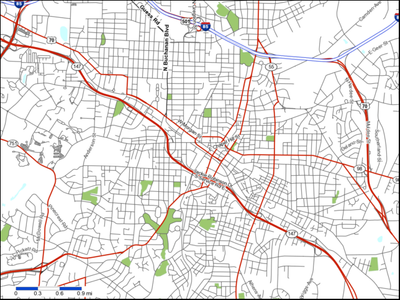
When I put a map snippet into a report, there is no border. Therefore, road segments just terminate into whitespace.
Please add an option to create a border around the map snippet.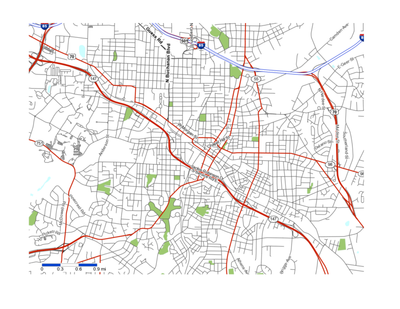
When moving external data into the database, the underlying SQL looks like:
CREATE GLOBAL TEMPORARY TABLE "AYX16020836880b41e08246b59ee8c"
...
My client would like to add a prefix to the table as:
CREATE GLOBAL TEMPORARY TABLE MMMM999_DM_USER."AYX16020836880b41e08246b59ee8c"
where MMMM999_DM_USER is supplied in the configuration.
A service account automatically sets the current session to something like MMMM999 (alter session set curent schema=MMMM999;)
I saw this article (Oculus App Makes Programming Tangible To Non-Coders) and immediately thought of Alteryx.
How about a virtual reality based version where the user can be in the canvas and reach out and touch their data directly?
Hi Folks
So have been using the fuzzy match function quite a bit of recently. Love the tool, however it could benefit form being able to wire in a list of 'Don't generate' keywords.
At the moment we can enter them manually, however where for example i might want to exclude city or area names etc... from the do not generate list this becomes quite a tedious manual entry task, so being able to load in keyword data from pre-existing lists etc.. would be a time saver.
Cheers
Gavin
There is a lot of usage of calendar events in business world. Having a native sync and input functions for popular calendar formats like ical or google calendars will save a lot of time
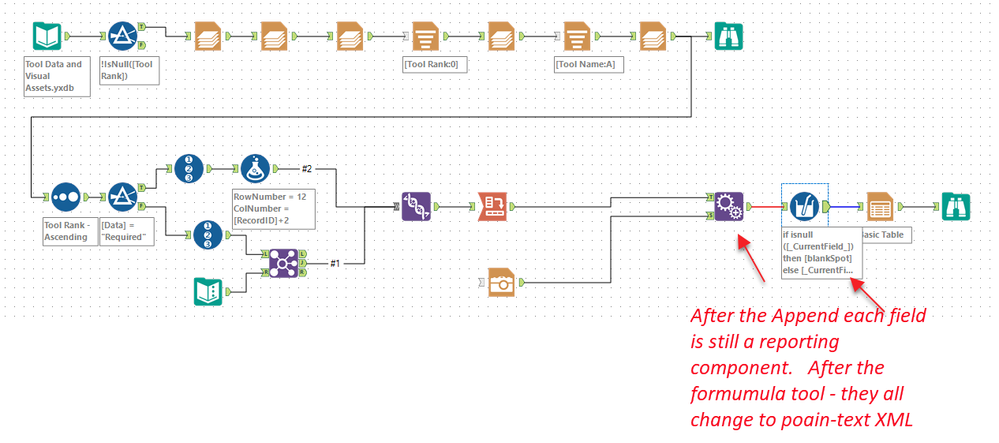
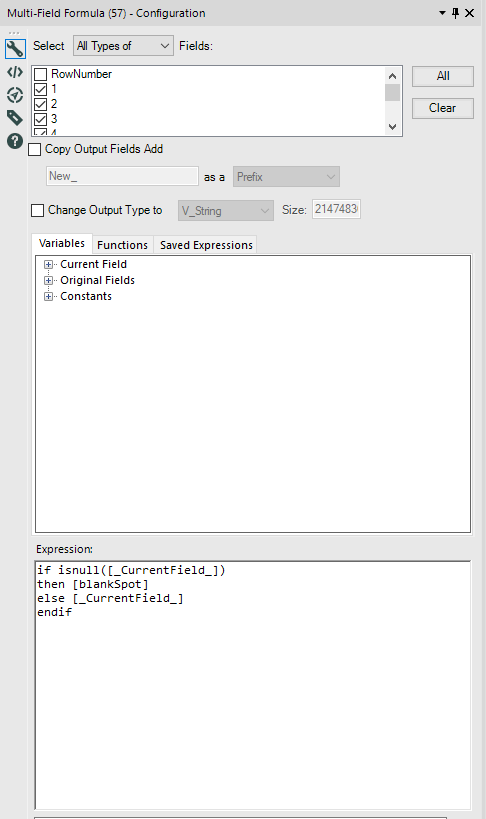
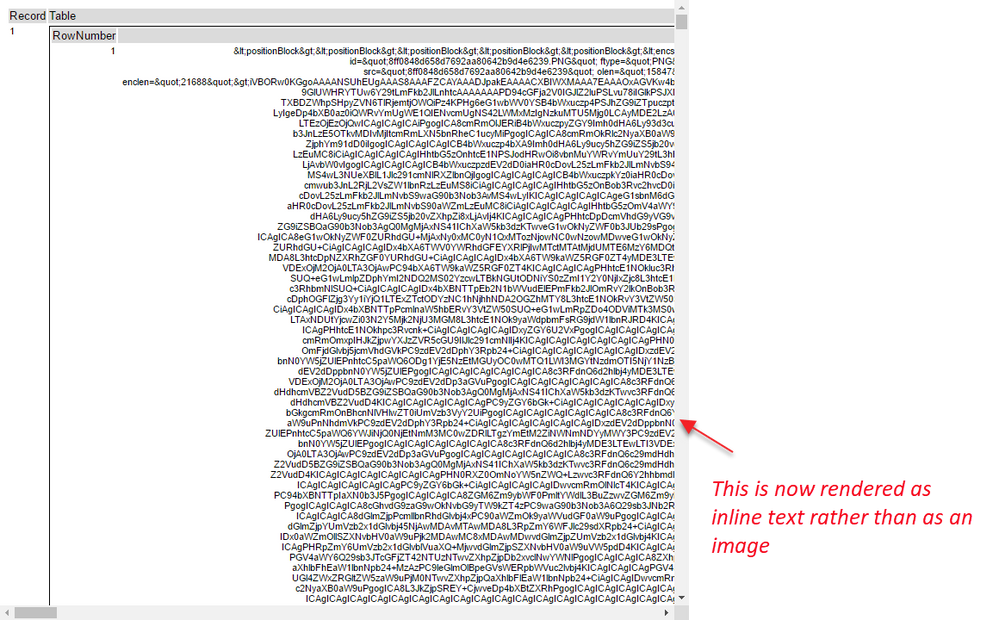
While completing the weekly challenge number 98, @patrick_digan and I noticed some unexpected behaviours while processing images.
Details:
When doing basic functions on fields containing reporting snippets - these fields lose their type and cease to work as reporting snippets. Detail in screenshots below.


Ideas:
- In the workspace (i.e. the white space) the perimeter is not fixed so when working with tool containers near a border and you place a tool inside the container the container expands outside the workspace, which makes the container useless since you can't select it
- The ability to disable multiple tool containers at once
R
The Workflow configuration window currently has "Canvas" as the default tab when clicking on whitespace in a workflow.
Since workflow orientation, annotation settings, and progress settings tend to be consistent for a user, I think it makes more sense to have the default tab on something that might be more relevant to the user.
Workflow provides information that is useful...location of the workflow and constants related to the workflow.
Runtime has settings that can change often as the user is developing out the workflow.
So either of these would provide better access to more important info that that found on the Canvas tab.
Hi there,
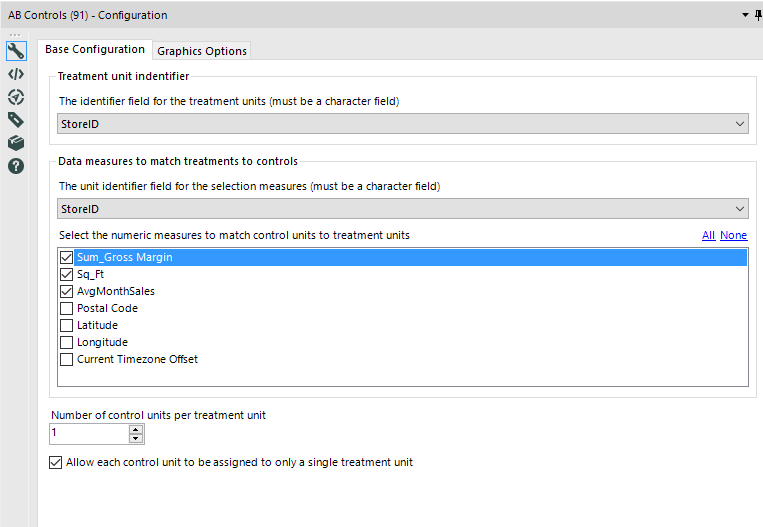
In working through the Udacity assignment on AB testing (again, thank you @PatrickN ), it seems that there's no obvious way to use location directly as a distance factor for selecting control units.
Additionally - the identifier field for a unit has to be a character field.
It seems that here would be a lot of value in making 2 changes to this tool:
a) allowing for integer unit identifiers (like store ID - not sure why a character is required)
b) using an actual point (location) to determine closest potential control unit.
- This is particularly important in the US where two towns may be very close to each other although they are in different states
- So the actual distance on the earth's surface would be a better indicator of closeness between test & control units than state or county.
Hi,
Would it be possible to add additional sections to the 'Summarise Tool' such as one for dates so that you might be able to group by Year, Month, Quarter, Week or a combination of all these. There are other extensions that could also be considered such as group with nulls or without that would make this tool far more usable and not dependent on data manipulation prior to it; you might offer to have all nulls grouped and called something else for readability and this shouldn't be very hard at all to implement.
Kind regards,
Peter
Cheers,
Mark
Idea:
Let's add the universal PMML predictive markup language to rapidly deploy our predictive models.
Rationale:
Most of the predictive models created are essentially built to be deployed into well known enterprise level decisioning tools.
These decisioning tools are working at banks, non bank financial institutions, credit card issuers, insurers on a daily basis.
If Alteryx want's to replace SAS, SPSS and similar competitor this PMML addition seems to be a must.
They all have a common markup language and even with the newer version we can deploy almost all data pre-processing steps too...
Current status in Alteryx as I'm aware of:
Only case where Alteryx and PMML comes close is the following link; http://www.alteryx.com/topic/pmml promising including PMML in the upcoming releases in 2012. And then no word of it. The writer is retired already and no word since 2012 (3 yrs is a long time span).
What to do:
On easy way is already done for R, this is a Java library for converting R models to PMML https://github.com/jpmml/jpmml-converter
Clients:
FICO is one of the well known credit bureaus worldwide and also the vendor of decisioning software. They also have an Analytics Modeler Suite. All FICO systems are PMML compliant. Chek it out: http://www.decisionmanagementsolutions.com/2014/10/17/first-look-fico-analytic-modeler-suite-jtonedm...
Also Experian is one of the other big software vendors in the Analytics space with decision management tools and they are actually a partner of Alteryx too... Their well known widely implemented Powercurve tool has PMML language import too... Check it out: http://jtonedm.com/2014/05/13/first-look-experian-powercurve-update/
IBM ODM is a nother vendor for decisioning tools in the enterprise level. They also have PMML integration, look; http://www.prolifics.com/blog/odm-integration-spss-predictive-analysis-suite-part-1-pmml-import
Competitor status:
SAS supports PMML export from SAS Enterprise Miner
IBM SPSS products (Modeler and Statistics) offer a great deal of support for PMML
KNIME is one of the leaders in processing PMML documents
RapidMiner has a PMML extension
MicroStrategy strongly supports the standard
So when you double click a word in Any other program it only highlights that word, for fast easy replacement
ex. [Field Number One]
If you double clicked any of these words in any other program you would only highlight JUST the word.
In Alteryx if you double click the same word you're gonna grab the space to the right of the word AND THE BRACKET on the left making the double click functionality useless.
Please fix.
Hollingsworth
on
08-24-2016
10:41 AM
Description: I have configured a number of customized MapServer files rather than having to manually configure each layer in the ReportMap tool.
For reference, these are stored in the <Alteryx Data Install Folder>\AlteryxMap\TomTom_US_2015_Q3, for the TomTom US - Current Vintage reference base map. Below is a picture of the many versions of the .map configuration file I have created.
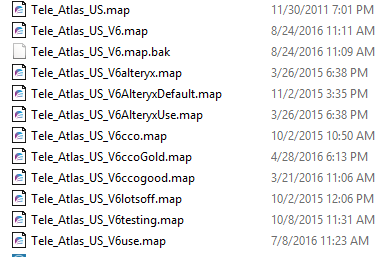
Rationale: Using these different files is cumbersome and inefficient. To switch out a map file, I have to rename the current .map file to a dummy name. Then I have to rename the desired file to be the name that the existing file was. Additionally, I can only have one .map file in use at any one time and all of the workflows running use the same one.
Idea: Allow user to choose which .map file to use from within the Report Map tool.
it would be nice Street Geocoding tool can be capable of accepting Latitude and Longitude and spit out the address like Reverse Geo Coding . The reverse Geo coding currently using TomTom is too slow to process hundred thousands records.. if the data is already local to our system in form of CASS or Street Geocoder that will be certainly faster.
I'm converting some old macros that were built in 8.6 for use in 10.6 and found something that could potentially be changed about the Alteryx .xlsx drivers. Specifically this refers to the field types passed from a Dynamic Input tool when the data fields are blank when using an .xlsx file as the data source template.
When the new .xlsx file has fields populated, it works fine. If data is not populated in the new file, the field types are converted to Double[8]. This doesn’t cause a problem for the Dynamic Input, but it can cause problems for downstream tools. In the second case below, the field names are retained but the downstream Join tool errors when trying to join this now double field to a string (rather than returning no results from the join output as desired). This also occurs when a single field is empty, only that field will be converted to a Double[8] field. When the legacy .xlsx drivers are used, the field types are retained from the data source template.
File Source Template vs. file that is returned upon running
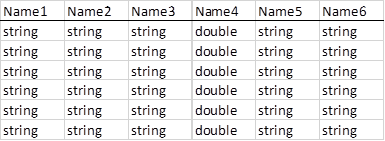
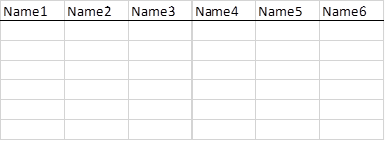
There are other solutions for this scenario such as using a Select tool with a loaded .yxft file of the correct field types, or selecting the Legacy .xlsx drivers from the File Format dropdown when configuring the Dynamic Input. However I thought this is something that could be improved about the Alteryx .xlsx drivers.
- New Idea 394
- Accepting Votes 1,783
- Comments Requested 20
- Under Review 181
- Accepted 47
- Ongoing 7
- Coming Soon 13
- Implemented 550
- Not Planned 106
- Revisit 56
- Partner Dependent 3
- Inactive 674
-
Admin Settings
22 -
AMP Engine
27 -
API
11 -
API SDK
229 -
Bug
1 -
Category Address
13 -
Category Apps
114 -
Category Behavior Analysis
5 -
Category Calgary
21 -
Category Connectors
252 -
Category Data Investigation
79 -
Category Demographic Analysis
3 -
Category Developer
219 -
Category Documentation
82 -
Category In Database
215 -
Category Input Output
658 -
Category Interface
246 -
Category Join
109 -
Category Machine Learning
3 -
Category Macros
156 -
Category Parse
78 -
Category Predictive
79 -
Category Preparation
406 -
Category Prescriptive
2 -
Category Reporting
205 -
Category Spatial
83 -
Category Text Mining
23 -
Category Time Series
24 -
Category Transform
93 -
Configuration
1 -
Content
2 -
Data Connectors
985 -
Data Products
4 -
Desktop Experience
1,615 -
Documentation
64 -
Engine
136 -
Enhancement
420 -
Event
1 -
Feature Request
219 -
General
307 -
General Suggestion
8 -
Insights Dataset
2 -
Installation
26 -
Licenses and Activation
15 -
Licensing
15 -
Localization
8 -
Location Intelligence
82 -
Machine Learning
13 -
My Alteryx
1 -
New Request
229 -
New Tool
32 -
Permissions
1 -
Runtime
28 -
Scheduler
26 -
SDK
10 -
Setup & Configuration
58 -
Tool Improvement
210 -
User Experience Design
165 -
User Settings
87 -
UX
228 -
XML
7
- « Previous
- Next »
-
Carolyn
on:
Blob output to be turned off with 'Disable all too...
- MJ on: Add Tool Name Column to Control Container metadata...
-
fmvizcaino
on:
Show dialogue when workflow validation fails
- ANNE_LEROY on: Create a SharePoint Render tool
- jrlindem on: Non-Equi Relationships in the Join Tool
- AncientPandaman on: Continue support for .xls files
- EKasminsky on: Auto Cache Input Data on Run
- jrlindem on: Global Field Rename: Automatically Update Column N...
- simonaubert_bd on: Workflow to SQL/Python code translator
- abacon on: DateTimeNow and Data Cleansing tools to be conside...
| User | Likes Count |
|---|---|
| 7 | |
| 3 | |
| 3 | |
| 2 | |
| 2 |


