Alteryx Designer Desktop Ideas
Share your Designer Desktop product ideas - we're listening!Submitting an Idea?
Be sure to review our Idea Submission Guidelines for more information!
Submission Guidelines- Community
- :
- Community
- :
- Participate
- :
- Ideas
- :
- Designer Desktop
Featured Ideas
Hello,
After used the new "Image Recognition Tool" a few days, I think you could improve it :
> by adding the dimensional constraints in front of each of the pre-trained models,
> by adding a true tool to divide the training data correctly (in order to have an equivalent number of images for each of the labels)
> at least, allow the tool to use black & white images (I wanted to test it on the MNIST, but the tool tells me that it necessarily needs RGB images) ?
Question : do you in the future allow the user to choose between CPU or GPU usage ?
In any case, thank you again for this new tool, it is certainly perfectible, but very simple to use, and I sincerely think that it will allow a greater number of people to understand the many use cases made possible thanks to image recognition.
Thank you again
Kévin VANCAPPEL (France ;-))
Thank you again.
Kévin VANCAPPEL
Would love to see the Workflow - Configuration > Runtime > Record Limit for All Inputs option extended to Dynamic Input tools.

Hi!
I opened up WorkflowA and WorkflowB. Later, I went to Windows Explorer, and clicked open WorkflowA, because I wanted to make another change in it. Not realizing that it was already open, I inadvertently forked WorkflowA into two versions.
It is desireable to be able to open a workflow twice. Say, I made several changes and wanted to compare that to the original. However, it would be nice if Alteryx produced a warning saying that the workflow has already been opened. In my case, WorkflowA was pretty complicated, and I don't know if I "un-forked" the workflow correctly. A notice would have prevented this scenario, which has happened to me multiple times.
Thank you,
Joe Kelly
A nice to have :
Possibility to create output directories automatically using a given fieldname in order to organize properly macros outputs
Thanks a lot
Arno
Hi,
I get a lot of adhoc requests where the insturctions are in the actual email. As I'm going through the ask, creating the new workflow, the requester will mention "column C" or "column XY", but I'm viewing the data in Alteryx where that doesn't show. So I have to open the Excel file, find the column, get the name, go back to Alteryx to locate the column I need, run the module but get an error/no results because I forgot to close the Excel file (because the module is using the same file I just opened to validate which column I'm using).
It would be really cool to have an Option in the Input tool to add the Excel column lettering and numbering to show (Ex, Column A, B, C, D going left to right, Row 1, 2, 3, going top to bottom). This would just be visually showing it, not adding it to the data (because then you would lose the actual column names). If this can be done, it would be equally as useful in the Browse tool view. Have a great day!
With more people moving into urban developments, it would be helpful to allow analysts to measure customers within a "walking distance". Similar to drive time analysis, a step up would be to incorporate "walk time" analysis.
It would be good to expose the column metadata (data types) of HIVE tables when viewed using the "Select In-DB" tool, similar to the standard select tool.
As a consumer of hive table from alteryx via the In-DB tools, it adds value to understand the semantics (atleast the field types to start with) of the hive table from alteryx.
Regards,
Sandeep.
Experts:
The Select Tool is great - except when it comes to reordering a large number of fields for a custom output, load etc. Single clicking every time you need to move a field up or down is time consuming (the ability to highlight multiple fields and move them in unison is great - assuming they are already in the right order).
I suggest two improvements to the Select Tool:
1) The ability to select a field and hold down either the "Up" or "Down" arrow so the field keeps moving without requiring one click per row and
2) The ability to drag and drop fields (skip clicking altogether if desired)
The combination of these 2 functionalities (or even one of them) will make field reordering much more efficient when using the Select Tool.
Thanks!
Hello Alteryx Community!
My suggestion is for a ColdFusion connector - specifically Web Services built in *.cfc files....
Perhaps being able to connect to any *cfm webpage to bring in and identify the data from a webpage or Web Service and then import into an Alteryx Workflow & thus be able to output some meaningful informational reports.
Good Afternoon,
Working with the Alteryx Insight tool there are a few functionality features our team believes would be quite useful:
-When you have multiple charts within an Insight the ability to "Drill Out" of an individual graphs versus having to "reset" the entire dashboard would be incredibly useful and save a lot of time
-When drilling into graphs we have found users often forget what particular category they drilled into leading to them having to reset the entire dashboard and start over. Could a "legend" type area be added to drill able graphs to show the user what they have drilled into?
-The ability to "select all" or "de-select all" options in a filter on the right hand side of the Insight
-The ability to drill into your graphs when in the Design Mode or "Configure Insight" to see how any formatting changes impact all layers of your graph once you begin to drill versus having to switch over to Preview Mode and test all layers and then switch back to Design Mode to make necessary changes
-The ability to adjust formatting on individual layers of a drilled graph. For example on the x-axis of your first layer have labels set at font size 10 with no angle, but then on your second layer once you drill have the x-axis font size adjusted to font size of 6 at 45 degree angle in the case where your data labels are longer once you drill
Thanks,
Nathan Brock
Having the ability to minimize the toolbar would allow more screen space. Once minimized, the tools should display when you hover over the tool category tab.
Countless times I've been asked by management how long a process will take to run and I really can't say beyond an educated guess (using input file size and complexity of workflow). Yet, when downloading files off the internet or moving files around in a network, Microsoft will give an estimated time of completion (e.g. 10 minutes remaining till files are downloaded). It would be so great if Alteryx would show something similar with regard to how long a workflow will take to finish running. Not sure if you can create an algoithm based on the nubmer of tools, import file size, network connection etc. to give a ETA on when a workflow may finish running but it would be super helpful for me when working on high priortity project so I can communicate with the business side.
Thanks!
The Text Box tool has a tickbox allowing a multi line "answer" to be supplied for the question.
But it does not allow you to easily setup the question as multi line i.e. with carriage returns
Please allow the ability to enter multi line text for the Question of the Text Box Tool.
At the moment, I force carriage returns to happen, by entering a bunch of space characters in the "Enter the text or question to be displayed" box of of the "Text Box" tool. This is obviously not ideal.
Example of desired layout for App question:
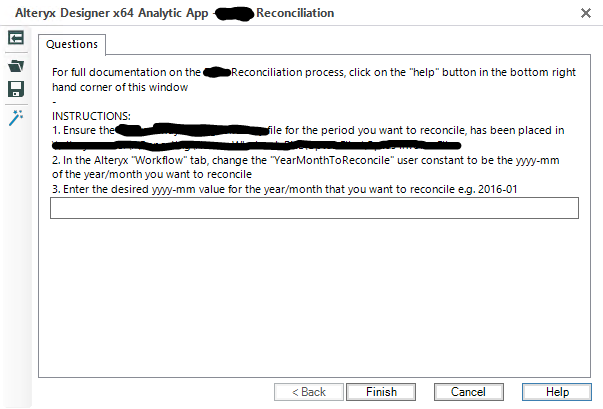
example showing how entering a bunch of spaces can be used to force a carriage return:

Currently, Alteryx can connect to FileMaker via an ODBC connection, and for the most part, it works great. The only issue I've hit thus far is when importing data with foreign text in it - Arabic and Cyrillic text specifically – sometimes the data comes in correctly, and sometimes it’s turned into garbage characters. I’m not sure how widely used FileMaker is, but the full support for it would be greatly appreciated. Thanks!
~Chrispy
Is it possible to have Output like below in Insight?
Ozone | Solar.R | Wind | Temp | Month | Day |
41 | 190 | 7.4 | 67 | 5 | 1 |
36 | 118 | 8 | 72 | 5 | 2 |
12 | 149 | 12.6 | 74 | 5 | 3 |
18 | 313 | 11.5 | 62 | 5 | 4 |
Would it be possible to change the field size so it’s larger than 1 for Anchor Abbreviations?
Some of my macro’s have multiple input/outputs and having more than 1 letter/number designations would be great! I know it’s probably a limitation because of the icon size, so maybe we could have the choice to use larger icons (especially when it’s a complex macro - it would accentuate it's importance).
PS. Wasn't it larger in older version of Alteryx?
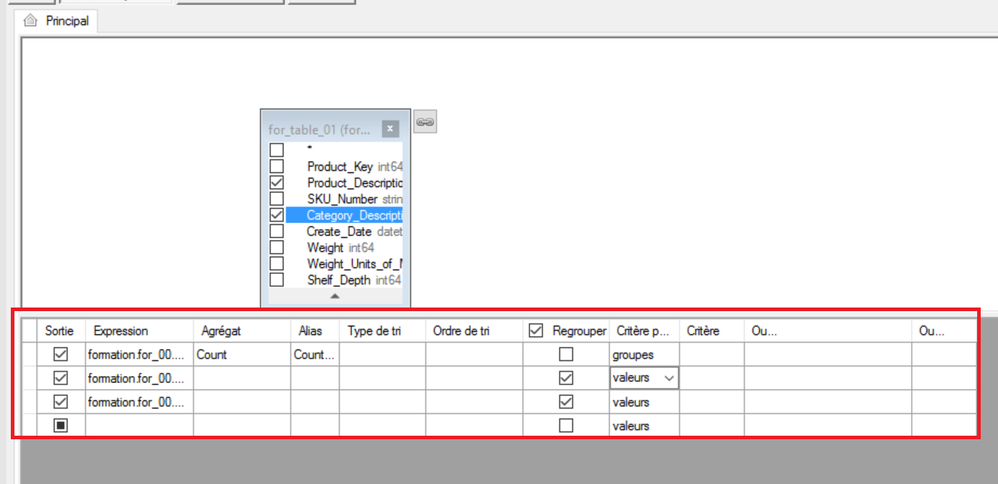
As I have a lot of documentation to write on my Alteryx process, I would like to simple copy the lower table from the Visual Query Builder :
Assume users using AD login/ password to access gallery.
And they are using individual AD account to login database with different access right.
Now, if we want to use individual account in the gallery data connection.
We need to get the user password and create many data connections in gallery
If input data tool can pass the gallery login/password when user try to use gallery data connection to connect the database.
We only need to setup one data connection but have individual access control.
For example, user A and B have different role in a oracle database.
Even they use the same gallery data connection, they will access different table/view.
I noticed when viewing the Browse tool results, the user can now select records, then right click and have options to copy the records. I like this, just thinking it would be even cooler if there were options to open selected records in a new window as well. So the user could select the records, right click, choose open in new window, and then get the expanded viewing window to view the selected records.
I have created a workflow that runs on Alteryx Server for a group of users. If two people were to run the workflow consecutively, chances are one could overwrite the other's file. It would be great when the user adds a description to the Optional Job Name field before hitting run, then that text could be included in the workflow and then used as a pre-append title for the file name.
One way to get around this could be to create a manual input that replaces a dummy string hard coded into the flow. A lot more moving parts, through.
- New Idea 395
- Accepting Votes 1,783
- Comments Requested 20
- Under Review 181
- Accepted 47
- Ongoing 7
- Coming Soon 13
- Implemented 550
- Not Planned 106
- Revisit 56
- Partner Dependent 3
- Inactive 674
-
Admin Settings
22 -
AMP Engine
27 -
API
11 -
API SDK
230 -
Bug
1 -
Category Address
13 -
Category Apps
114 -
Category Behavior Analysis
5 -
Category Calgary
21 -
Category Connectors
252 -
Category Data Investigation
79 -
Category Demographic Analysis
3 -
Category Developer
220 -
Category Documentation
82 -
Category In Database
215 -
Category Input Output
658 -
Category Interface
246 -
Category Join
109 -
Category Machine Learning
3 -
Category Macros
156 -
Category Parse
78 -
Category Predictive
79 -
Category Preparation
406 -
Category Prescriptive
2 -
Category Reporting
205 -
Category Spatial
83 -
Category Text Mining
23 -
Category Time Series
24 -
Category Transform
93 -
Configuration
1 -
Content
2 -
Data Connectors
985 -
Data Products
4 -
Desktop Experience
1,615 -
Documentation
64 -
Engine
136 -
Enhancement
421 -
Event
1 -
Feature Request
219 -
General
307 -
General Suggestion
8 -
Insights Dataset
2 -
Installation
26 -
Licenses and Activation
15 -
Licensing
15 -
Localization
8 -
Location Intelligence
82 -
Machine Learning
13 -
My Alteryx
1 -
New Request
229 -
New Tool
32 -
Permissions
1 -
Runtime
28 -
Scheduler
26 -
SDK
10 -
Setup & Configuration
58 -
Tool Improvement
210 -
User Experience Design
165 -
User Settings
87 -
UX
228 -
XML
7
- « Previous
- Next »
-
 Carolyn
on:
Blob output to be turned off with 'Disable all too...
Carolyn
on:
Blob output to be turned off with 'Disable all too...
- MJ on: Add Tool Name Column to Control Container metadata...
-
fmvizcaino
on:
Show dialogue when workflow validation fails
- ANNE_LEROY on: Create a SharePoint Render tool
- jrlindem on: Non-Equi Relationships in the Join Tool
- AncientPandaman on: Continue support for .xls files
- EKasminsky on: Auto Cache Input Data on Run
- jrlindem on: Global Field Rename: Automatically Update Column N...
- simonaubert_bd on: Workflow to SQL/Python code translator
- abacon on: DateTimeNow and Data Cleansing tools to be conside...
| User | Likes Count |
|---|---|
| 7 | |
| 3 | |
| 3 | |
| 3 | |
| 2 |


