Alteryx Designer Desktop Ideas
Share your Designer Desktop product ideas - we're listening!Submitting an Idea?
Be sure to review our Idea Submission Guidelines for more information!
Submission Guidelines- Community
- :
- Community
- :
- Participate
- :
- Ideas
- :
- Designer Desktop
Featured Ideas
Hello,
After used the new "Image Recognition Tool" a few days, I think you could improve it :
> by adding the dimensional constraints in front of each of the pre-trained models,
> by adding a true tool to divide the training data correctly (in order to have an equivalent number of images for each of the labels)
> at least, allow the tool to use black & white images (I wanted to test it on the MNIST, but the tool tells me that it necessarily needs RGB images) ?
Question : do you in the future allow the user to choose between CPU or GPU usage ?
In any case, thank you again for this new tool, it is certainly perfectible, but very simple to use, and I sincerely think that it will allow a greater number of people to understand the many use cases made possible thanks to image recognition.
Thank you again
Kévin VANCAPPEL (France ;-))
Thank you again.
Kévin VANCAPPEL
Currently zero-width spaces are not removed by the data cleanse tool. This means you can have two visually similar words like Dog and Dog but one is actually longer than the other due to zero width characters. The removal of these zero-width spaces can be added with the formula.
REGEX_Replace([_CurrentField_], "\x{200B}", "")
 SeanAdams
on
05-06-2017
11:09 PM
SeanAdams
on
05-06-2017
11:09 PM
Hi there,
When you connect to a SQL server in 11, using the native SQL connection (thank you for adding this, by the way - very very helpful) - the database list is unsorted. This makes it difficult to find the right database on servers containing dozens (or hundreds) of discrete databases.
Could you sort this list alphabetically?

Hello,
In Alteryx Designer application, in User Settings, please add an option for us to check/uncheck whether we would like to show/hide the Splash Screen upon app launch.
Thanks!
The "Browse HDFS" for the Spark Direct connection does not allow to specify a File Format at "ORC". Could you please add these feature?

It would be great if the interface tools would include a back button that will let the user go back and forth the chained apps.
Hollingsworth
on
05-23-2019
07:54 AM
Can we get the input tool to automatically convert long filenames to the 8.3 convention inside of a macro?
I've written a batch macro that individually opens files in order to trap files that fail to open. However, when I pass in really long file names it bombs because beyond some length the Input tool converts the path to 8.3 but that logic doesn't fire inside of my macro.
Example of filename:
\\ccogisgc1sat\d$\Dropbox (Clear Channel Outdoor)\Mapping\BWI MapInfo\Workspaces\Local\AEs\Archives\Cara\Sunrise Senior Living\Washington+DC_Adults+55++With+HHI+Of+$75,000++Who+Are+Caregiver+Of+Aging+Parent_Relative+Or+Planning+To+Shop+For+Nursing+Care_Assisted+Living_Retirem.TAB
When showing a workflow to colleagues on my desktop or in a presentation setting, it would be really useful to be able to maximise the workflow into fullscreen.
This is currently possible by hiding everything via the View menu (see below) but a one button toggle, say F11, would be nice.
 Aguisande
on
08-01-2022
03:51 PM
Aguisande
on
08-01-2022
03:51 PM
It'll be great to have different icons whether Designer is executed Elevated or not, so it's easy to identify the instance you need to work with.

Only csv is provided (and json etc) but not .xlsx
Let us know when this can be added to Alteryx
Thanks
First: Including mapbox in 2019.4 is GREAT!
That said, one of the great features of mapbox is the ability to customize your own map layers.
It would be great if this was an option to use a custom map as the alteryx reference map similar to what is available within tableau. We in our organization have several custom map styles built with mapbox and I'd love to use them as a reference in the report map tool, or any other scenario where maps become useful.
SeanAdams
on
05-13-2019
01:15 PM
The Python tool has been a tremendous boon in being able to add capability that is not yet available in the Alteryx platform.
It would make the Python Tool much more usable and useful if you can define the inputs explicitly rather than just relying on the good behaviour of both the user; and also the python code that reads the inbound data (Alteryx.Read('#1'))
This is not something that the Jupyter notebook code-interface may handle directly (because the Jupyter notebook has no priveledged knowledge of the workflow outside it); so this may be best handled by the container itself.
The key here is that if my python app requires 2 inputs - it should be possible to define these explicitly so that we can test; and also so that we can prevent errors and make this more bullet-proof.
The same would apply on the outbound nodes for the Python tool.
Similar to being able change the parameters of a tool using the interface tools, it could be very useful if Alteryx Designer had an option where the configuration of a tool can be modified by another tool's output (which can only consist of one row & column and may include line breaks/tab characters, only first row is used if there are multiple rows) while the workflow is running, therefore reducing the need to chain multiple apps.
This feature could be made possible as the "Control Containers" feature is now implemented, and it could work like below:
Suppose you need to write to a database and may need to specify a Pre-SQL statement or Query that needs to be dynamically changed by the result of a previous tool in the workflow.
In this case, as the configuration of a tool in the next container needs to be changed by the result of a previous formula, there would need to be an additional icon below the tools, indicating that the tool's result can be used for configuration change.
This icon which will appear below the tools will only be visible once at least one Control Container and an Action tool is added to the workflow, and will automatically be removed if all the control containers are removed from the workflow. User can change the configuration of the destination tool using an action tool, which must be connected to a tool in a container that will be run after the one it is contained in has finished running, as a tool (or several tools) that is contained in the next CC in the workflow needs to be dynamically modified before the container it is contained in is activated.
If a formula tool containing multiple formula fields is added to the action tool, the user will see all the formula outputs similar to connections (i.e. [#1], [#2]...) that can be used as a parameter.
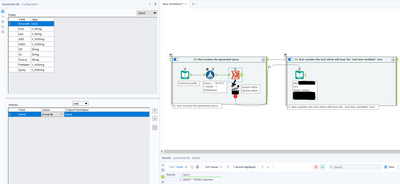
The screenshot below demonstrates the idea, but please note that this is a change where adding an action tool may not mean that this workflow will need to become either a macro or an analytic app, so a new workflow type may or may not have to be defined, such as "Dynamic Configuration Workflow (YXDW)". Analytic Apps and Macros which utilize this feature could still be built without having to define a new workflow type.
Exactly as the subject says: It would be incredibly useful to be able to change the colour, and possibly the line thickness of the connectors between tools.
We have workflows with huge amounts of stuff going on, as I'm sure many people do.
Being able to colour code the connections between tools would help us to trace things from place to place when stepping through the workflow.
So it takes while to download data from in-db (say oracle table) and load it to another...
Why not build an additional in-db tool to migrate data without downloading to local...
Oracle has this capability and here is the Syntax;
COPY Command Syntax
COPY {FROM database | TO database | FROM database TO database} {APPEND|CREATE|INSERT|REPLACE} destination_table [(column, column, column, ...)]
USING query
where database has the following syntax:
username[/password]@connect_identifier
Copies data from a query to a table in a local or remote database. COPY supports the following datatypes:
CHAR DATE LONG NUMBER VARCHAR2
Example;
COPY FROM HR/your_password@BOSTONDB -
TO TODD/your_password@CHICAGODB -
CREATE NEWDEPT (DEPARTMENT_ID, DEPARTMENT_NAME, CITY) -
USING SELECT * FROM EMP_DETAILS_VIEW
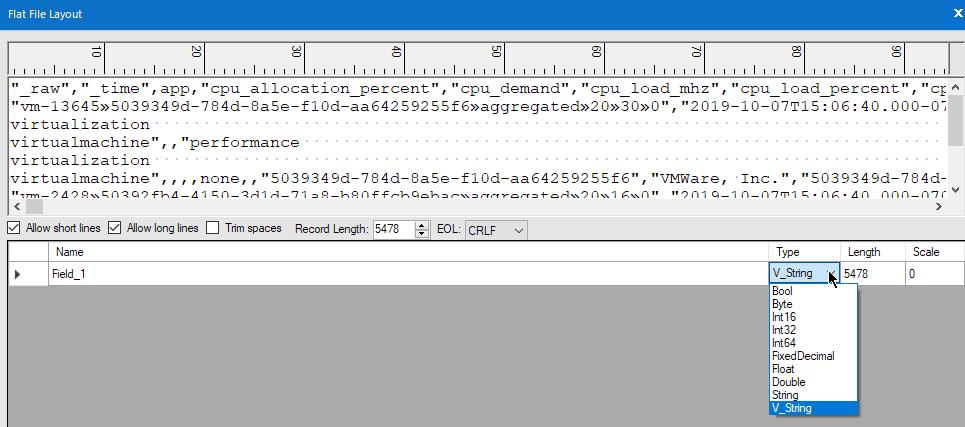
Currently, Input tool, Flat File format, only support String and V_String field data type.
Note: UTF-8 is a supported character set.
I would like to request W_String and VW_String be supported, given UTF-8 is a supported character set.
There is a workaround to do this, meaning Alteryx already does this, albeit through CSV input format, using a non-existent field separate, e.g., | is what I used, or in this link, the NUL or \0 character.
https://community.alteryx.com/t5/Alteryx-Designer/flat-file-import-with-unicode/m-p/537001#M115000
Kenda
on
07-07-2020
12:20 PM
Sometimes, as a sanity check, I would like to be able to model only the mean of my data set, i.e. I would like to use a predictive tool with no predictors included. The result would be a model with only an intercept, and this value would be the mean of the target variable. This would not be an important feature for final models, of course, but when starting to look at a data set and build up a model, it can be useful to first ensure the model is producing the expected output in the simplest case.
Note, this can be achieved when just one predictor is included, but it takes some math (see below), so it would be nice to be able to have this as a built-in option.

While exporting a report to Excel via the Table/Layout/Render tools, it would be helpful to have the ability to manually adjust the size of specific columns within the report table.
Currently, Alteryx auto-corrects the column widths based on the data in the columns and the selected paper size, even if you select specific column widths using the Table tool. This is a great feature for reporting, however in my use-case my output report contains two blank columns which will be manually edited by my team. Because these two "manual update" columns are blank in Alteryx, the column widths on the output are quite small compared to the other columns, and this will require manual column width formatting within the Excel sheet to both accommodate the (often lengthy) manual updates that will be entered into these two columns, and to keep the report within the paper size parameters.
Thanks!
Taryn
With a module that contains a lot of tool containers, it would be nice to have an option (similar to Disable All Tool That Write Output in the RunTime TAB) to disable all Tool Containers and then I can go pick the one or two that I would like to enable.
Please offload map rendering, in Browse Tool, to the video card using DirectX or OpenGL, the software rendering currently used is embarrassingly slow and disruptive.
Joe_Lipski
on
06-30-2020
04:18 AM
I'm really liking the new assisted modelling capabilities released in 2020.2, but it should not error if the data contains: spatial, blob, date, datetime, or datetime types.
This is essentially telling the user to add an extra step of adding a select before the assisted modelling tool and then a join after the models. I think the tool should be able to read in and through these field types (especially dates) and just not use them in any of the modelling.
An even better enhancement would be to transform date as part of the assisted modelling into something usable for the modelling (season, month, day of week, etc.)

- New Idea 395
- Accepting Votes 1,783
- Comments Requested 20
- Under Review 181
- Accepted 47
- Ongoing 7
- Coming Soon 13
- Implemented 550
- Not Planned 106
- Revisit 56
- Partner Dependent 3
- Inactive 674
-
Admin Settings
22 -
AMP Engine
27 -
API
11 -
API SDK
230 -
Bug
1 -
Category Address
13 -
Category Apps
114 -
Category Behavior Analysis
5 -
Category Calgary
21 -
Category Connectors
252 -
Category Data Investigation
79 -
Category Demographic Analysis
3 -
Category Developer
220 -
Category Documentation
82 -
Category In Database
215 -
Category Input Output
658 -
Category Interface
246 -
Category Join
109 -
Category Machine Learning
3 -
Category Macros
156 -
Category Parse
78 -
Category Predictive
79 -
Category Preparation
406 -
Category Prescriptive
2 -
Category Reporting
205 -
Category Spatial
83 -
Category Text Mining
23 -
Category Time Series
24 -
Category Transform
93 -
Configuration
1 -
Content
2 -
Data Connectors
985 -
Data Products
4 -
Desktop Experience
1,615 -
Documentation
64 -
Engine
136 -
Enhancement
421 -
Event
1 -
Feature Request
219 -
General
307 -
General Suggestion
8 -
Insights Dataset
2 -
Installation
26 -
Licenses and Activation
15 -
Licensing
15 -
Localization
8 -
Location Intelligence
82 -
Machine Learning
13 -
My Alteryx
1 -
New Request
229 -
New Tool
32 -
Permissions
1 -
Runtime
28 -
Scheduler
26 -
SDK
10 -
Setup & Configuration
58 -
Tool Improvement
210 -
User Experience Design
165 -
User Settings
87 -
UX
228 -
XML
7
- « Previous
- Next »
-
Carolyn
on:
Blob output to be turned off with 'Disable all too...
- MJ on: Add Tool Name Column to Control Container metadata...
-
fmvizcaino
on:
Show dialogue when workflow validation fails
- ANNE_LEROY on: Create a SharePoint Render tool
- jrlindem on: Non-Equi Relationships in the Join Tool
- AncientPandaman on: Continue support for .xls files
- EKasminsky on: Auto Cache Input Data on Run
- jrlindem on: Global Field Rename: Automatically Update Column N...
- simonaubert_bd on: Workflow to SQL/Python code translator
- abacon on: DateTimeNow and Data Cleansing tools to be conside...
| User | Likes Count |
|---|---|
| 7 | |
| 3 | |
| 3 | |
| 3 | |
| 3 |