Alteryx Designer Desktop Ideas
Share your Designer Desktop product ideas - we're listening!Submitting an Idea?
Be sure to review our Idea Submission Guidelines for more information!
Submission Guidelines- Community
- :
- Community
- :
- Participate
- :
- Ideas
- :
- Designer Desktop
Featured Ideas
Hello,
After used the new "Image Recognition Tool" a few days, I think you could improve it :
> by adding the dimensional constraints in front of each of the pre-trained models,
> by adding a true tool to divide the training data correctly (in order to have an equivalent number of images for each of the labels)
> at least, allow the tool to use black & white images (I wanted to test it on the MNIST, but the tool tells me that it necessarily needs RGB images) ?
Question : do you in the future allow the user to choose between CPU or GPU usage ?
In any case, thank you again for this new tool, it is certainly perfectible, but very simple to use, and I sincerely think that it will allow a greater number of people to understand the many use cases made possible thanks to image recognition.
Thank you again
Kévin VANCAPPEL (France ;-))
Thank you again.
Kévin VANCAPPEL
The actual Mongo output tool does not allow to specify field type (except for the primary _id field). The tool just assumes that all fields are string. Many of our CSV files incorporate string representation of ObjectId (ex: "56df422c08420b523aa00a77").
When we import those CSV we have to run a an additional script that will convert all the id into ObjectId fields. Same thing with the date -> Mongo Date.
If the tool would allow us to do this, it would save us a billion time across all our ETL processes.
Regards,
Currently SharePoint List Input tool can only pull out Date/DateTime values in UTC
DateToLocal formula can be converted back to local time but it has the issue for Date Only values.
It will be great if Alteryx allow user to select to pull Date/DateTime values in UTC or Local Time.
Not sure if this has been submitted... or if this option is already in a newer version.
There should be an option, after correcting an issue/error within a workflow for users to start again at the error point instead of running the entire workflow again.
This option will help users to streamline the process of building workflows and avoid wasted time spent waiting for large complex workflows to complete or error out.
A suggestion for the designer product...
When one right clicks on tab showing a workflow, an option should come up to duplicate workflow/macro/etc.
I have found a post where the grid size in the Grid Tool can be update using an interface tool -- which is really wonderful.
What I would love to see is the grid size text entry box being able to accept a field name/variable, so that this can be modified without needing the interface.
This would be useful because I have users uploading shapes to be analyzed -- they don't necessarily know the size of the shape so I would rather the grid size be automatically calculated based on the square mileage of the shape.
Our development team prefers that we connect to their MongoDB server using a private key through a .pem file, instead of a username/password. Could this option be built into the MongoDB Input?

Create the ability to randomly sample X number of records. For example, randomly select 16 samples from a data set.
For new users (and sometimes even veterans) understanding what an error message means can be a challenge.
I think it would be great to be able to right click on an error message (or warning) in the results window and have the option to "Search Community for error".
There should be a page like this one for every error message:
https://community.alteryx.com/t5/Alteryx-Knowledge-Base/Error-Type-mismatch-in-operator/ta-p/34149
(Nice job @AndrewL )
Or, if the Help had documentation on common error messages and their resolution then an option to "See Help document for this error". Currently the help has nothing that I could find.
Cheers,
Bob
Cheers,
Bob
When testing an app, I always use the Debug Mode.
However, if I have any files in the app that are using a relative reference (and are not being updated by the app), they continue to have that relative reference in Debug mode. But in Debug Mode, this Debug workflow is located in a totally different computer location that my app - C:\Users\username\AppData\Local\Temp
So when I try to run the workflow in Debug mode, it can no longer find my files that used a relative reference path.
Can you make it so that when you are in Debug mode, the relative references are changed to absolute references so the files can be found? I find it really inefficient to have to either:
1 - repoint my files that have a relative reference to their locations so they can be found when the workflow is run
2 - save the debug workflow to where the app is located so the relative reference works.
Thanks
I think it will be useful if I have an option to add field description when new fields are being created (eg. formula tool, transformation tools etc.)
The case for this is I tend to create a lot of calculated fields by combining fields and applying transformations for exploration predictive possibilities, I want to capture description of the fields while they are being created (its not always possible to set the names descriptive enough)
As of now I think I can add description using select tool but that's not optimal
Thanks,
Option to add a description for each newly created filed in all data preparation and transformation steps. Although a description can be added in the select tool but that's an additional tool in already cluttered (most workflows).
My use case for this is I tend to create a lot of fields (dummy, interaction and transformation) for predictive modelling to come up with a best model. I can not always name the same filed in such a way that is descriptive enough but I want to capture my thought on why I created a particular field right when I am creating it.
Thanks,
Ashish Singhal
It would be very helpful to be able to export your entire workflow to a poster-sized paper, either in paper or PDF format. When explaining a workflow to others, or getting feedback, the ability to see the entire workflow or lay it out on a table is very helpful
It would be very useful to have a new Grid selection question type. This would allow you to see a grid of data that you can sort and pan through and make selections. Similar to a multi select but in grid form with multiple columns.
We just updated to 11.7 from 10.5.
The Container adding/removing rules were changed somewhere in there and the change made it much harder to remove tools from containers. Is there any way to undo these changes or look into a better set of rules to use?
Nick
Hi,
I understand that we can find tools that uses formula by ctrl+F.
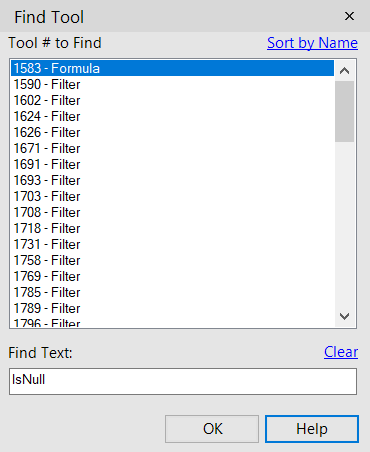
I wish we can find text and replace the formula like excel does.
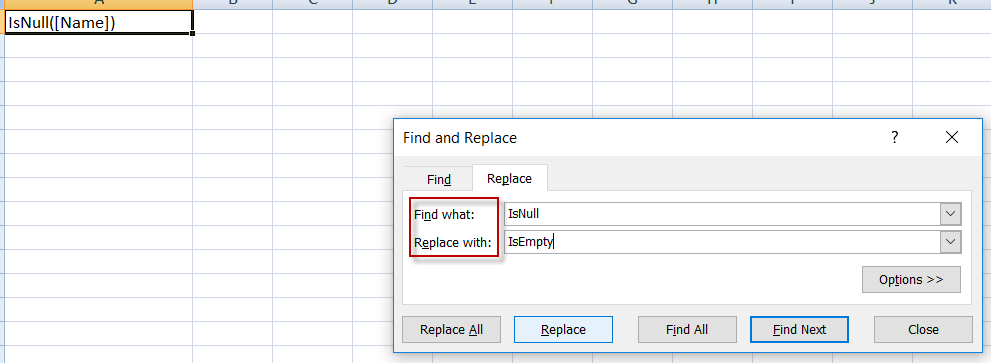
knozawa
When I save records out of a browser tool, an info window appears when the file is finished saving. Please add a hyperlink to that window that will open the newly saved file. This should work the same way as the hyperlink in the Output message window.
It would be a timesaver for workflow documentation if macro metadata could be passed through to the workflow where the macro is deployed. The image below suggests that the Description encased in the macro could be copied across to the corresponding Annotation panel. I would also suggest that the Meta Info panel have a checkbox to control this new funtionality.
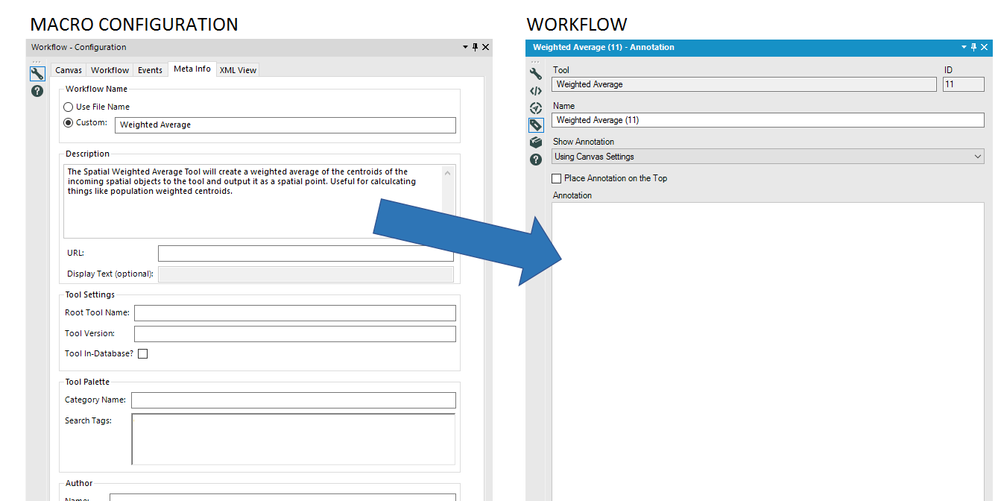
Similar concept to how when you right click on a folder, computer icon, or file in windows. When you right click on any of these things you are able to pull up a properties link/tab which gives you relevant information and path of the file location.
For this particular idea the properties tab will give information on the Alias, such as server type, connection type; ie microsoft provider or oracle provider, etc.
This would be helpful not only to go back and understand why you choose that connection type, but also when training others.
Thank you
- New Idea 395
- Accepting Votes 1,783
- Comments Requested 20
- Under Review 181
- Accepted 47
- Ongoing 7
- Coming Soon 13
- Implemented 550
- Not Planned 106
- Revisit 56
- Partner Dependent 3
- Inactive 674
-
Admin Settings
22 -
AMP Engine
27 -
API
11 -
API SDK
230 -
Bug
1 -
Category Address
13 -
Category Apps
114 -
Category Behavior Analysis
5 -
Category Calgary
21 -
Category Connectors
252 -
Category Data Investigation
79 -
Category Demographic Analysis
3 -
Category Developer
220 -
Category Documentation
82 -
Category In Database
215 -
Category Input Output
658 -
Category Interface
246 -
Category Join
109 -
Category Machine Learning
3 -
Category Macros
156 -
Category Parse
78 -
Category Predictive
79 -
Category Preparation
406 -
Category Prescriptive
2 -
Category Reporting
205 -
Category Spatial
83 -
Category Text Mining
23 -
Category Time Series
24 -
Category Transform
93 -
Configuration
1 -
Content
2 -
Data Connectors
985 -
Data Products
4 -
Desktop Experience
1,615 -
Documentation
64 -
Engine
136 -
Enhancement
421 -
Event
1 -
Feature Request
219 -
General
307 -
General Suggestion
8 -
Insights Dataset
2 -
Installation
26 -
Licenses and Activation
15 -
Licensing
15 -
Localization
8 -
Location Intelligence
82 -
Machine Learning
13 -
My Alteryx
1 -
New Request
229 -
New Tool
32 -
Permissions
1 -
Runtime
28 -
Scheduler
26 -
SDK
10 -
Setup & Configuration
58 -
Tool Improvement
210 -
User Experience Design
165 -
User Settings
87 -
UX
228 -
XML
7
- « Previous
- Next »
-
 Carolyn
on:
Blob output to be turned off with 'Disable all too...
Carolyn
on:
Blob output to be turned off with 'Disable all too...
- MJ on: Add Tool Name Column to Control Container metadata...
-
fmvizcaino
on:
Show dialogue when workflow validation fails
- ANNE_LEROY on: Create a SharePoint Render tool
- jrlindem on: Non-Equi Relationships in the Join Tool
- AncientPandaman on: Continue support for .xls files
- EKasminsky on: Auto Cache Input Data on Run
- jrlindem on: Global Field Rename: Automatically Update Column N...
- simonaubert_bd on: Workflow to SQL/Python code translator
- abacon on: DateTimeNow and Data Cleansing tools to be conside...
| User | Likes Count |
|---|---|
| 7 | |
| 3 | |
| 3 | |
| 3 | |
| 3 |


