Alteryx Designer Desktop Ideas
Share your Designer Desktop product ideas - we're listening!Submitting an Idea?
Be sure to review our Idea Submission Guidelines for more information!
Submission Guidelines- Community
- :
- Community
- :
- Participate
- :
- Ideas
- :
- Designer Desktop: New Ideas
Featured Ideas
Hello,
After used the new "Image Recognition Tool" a few days, I think you could improve it :
> by adding the dimensional constraints in front of each of the pre-trained models,
> by adding a true tool to divide the training data correctly (in order to have an equivalent number of images for each of the labels)
> at least, allow the tool to use black & white images (I wanted to test it on the MNIST, but the tool tells me that it necessarily needs RGB images) ?
Question : do you in the future allow the user to choose between CPU or GPU usage ?
In any case, thank you again for this new tool, it is certainly perfectible, but very simple to use, and I sincerely think that it will allow a greater number of people to understand the many use cases made possible thanks to image recognition.
Thank you again
Kévin VANCAPPEL (France ;-))
Thank you again.
Kévin VANCAPPEL
In Many of our tools,Before processing any file We create backup and move it to some backup with the datetime stamp.
Can we have such option like "CreateBackup" with timestamp in input and output tools?
Can we have string function that parse the string between 2 indices?
As FindString can find particular string occurrence,we can easily get required part of string easily from that index till required index.
or If we want entire remaining string we can have a function like:
Substring(String,StartIndex,EndIndex) Where endIndex can be : Length(String)-1
When working within the canvas/properties the mouse is the primary tool and allowing a middle click would be an easy way to initiate the workflow.
Currently, middle button can be used for moving in the canvas area (click and hold) and closing it (click on the tab).
I'm glad that there is a Date filter function but I was wondering whether it could be changed?
I like how the ordinary Filter function has a true and a false output and I was wondering whether the Date Filter could have the same?
Hi All,
I had posted in the Tool Master | Unique thread about how when I use this tool it does not preserve my sort.
This seems odd to me. I understand that it's "a blocking tool and that records are then sorted prior to executing the tool process" as @TaraM points out. However, in a program where data is explicitly manipulated to a condition, there is an expectation on my side (maybe mistakenly?) that if I sort something that it would not be changed unless stated or indicated in some fashion.
For my use case I was sorting to eliminate the duplicates, then joining that data to eliminate other duplicates and outputting the resultant to my users and future-state will be automatically fed into a system, for each stage it matters that the sort function is kept intact.
I know it's a simple complaint / fix, but its unexpected behavior on my end and could mean less confusion and less tools on the board. which is always a good thing in my book.
Wonder if it would be possible to have a set of SQL tools in Alteryx which to the user would look like you are dragging in a tool to manipulate the data (such as filtering data) but in the background it is updating the SQL (such as adding a WHERE clause) meaning the module runs faster. This would be easier than having to manually update the SQL code and would run quicker than bringing all data through and filtering afterwards.
I know there is currently the Visual Query Builder, but this is quite fiddly to use so would be good to have something more user-friendly.
Try to create an oracle 32 bit connection. Type in something wrong in the descriptor or user id or password. You get a silent failure with no underlying notice about where you went wrong.
You can get meaningful error messages from other database types, I got meaningful errors for ODBC connections to mysql and sql server while poking at this.
Granted, it's only useful for jerks like me who don't type things in correctly and still have 32 bit Oracle instances to get to but somewhere down the chain the Oracle client is telling you that the user id was bad or the tns name couldn't be found or whatever, but you never get that metadata pushed back up to the user.
A way to filter multiple fields by the same variable.
For Example. If I have multiple columns that have Names, email addresses, etc. I want to filter all fields so that each field Does Not Contain = "Test"
If this already exist, my apologies. Just point me in the right direction 😉
This is pretty straightforward:
The join tool right now does only inner joins, requiring the use of the union tool to emulate outer joins.
By itself it works fine, however when having workflows involving a large number of joins and unions with lots of data in it performance is severely impacted, leaving to situations where Alteryx Designer slows down massively even with extra CPU/RAM available.
Thank you and regards,
Marco Zara
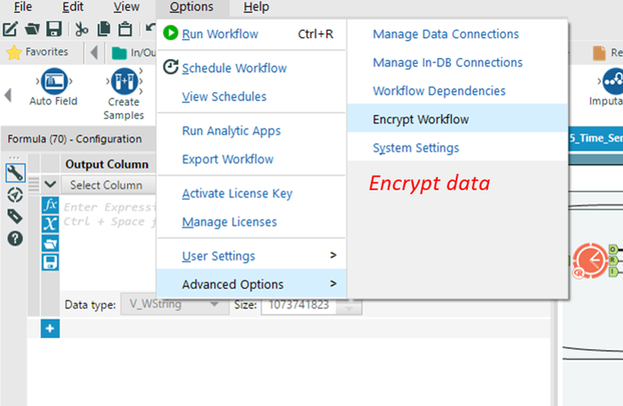
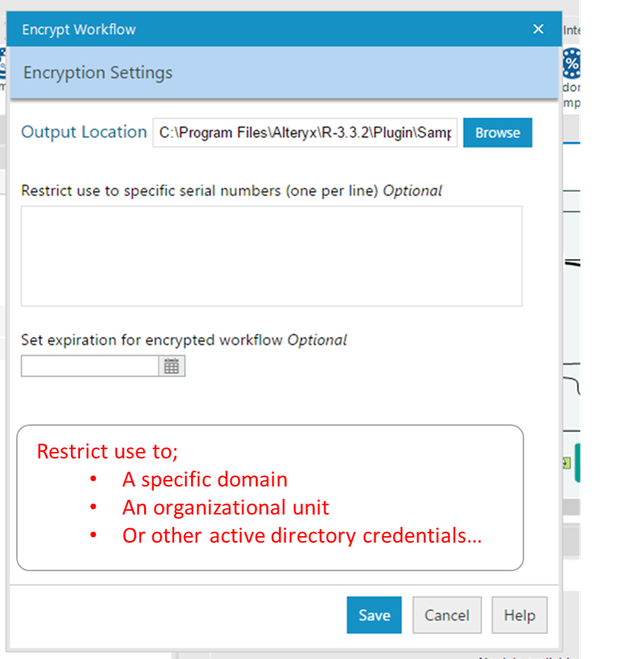
I came up with an idea while replying to @Deeksha. An interesting option to secure the data would be to encrypt the data sets and "license" it to
- specific users
- specific time spans or
- people with certain credentials
just like we do by encrypting the workflow...
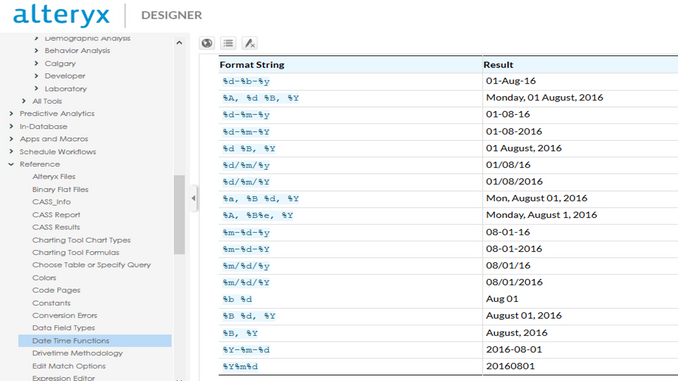
When enriching your date data, week information is pretty critical, I suggest adding %w to the format stings as well..
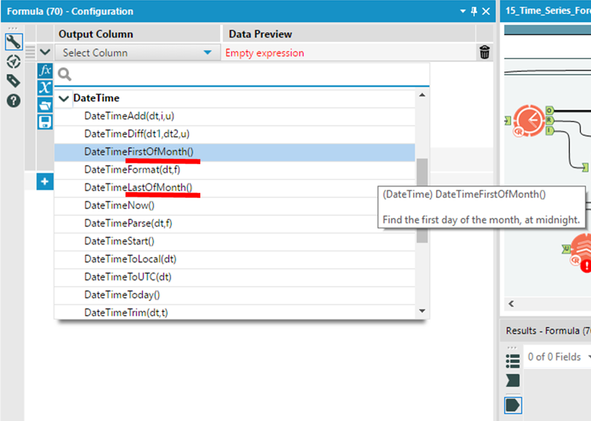
Several month based expressions can also be made weekly, data time first of week #31, last of week #45 etc....
Also came across a lot of questions at our community on how to turn week based data...
Writing the formula is obvious (Ceil(DateTimeDiff([Today],[Date],'days')/7))
but having a DateTimeDiff([Today],[Date],'weeks') is preferable don't you think?
Cheers
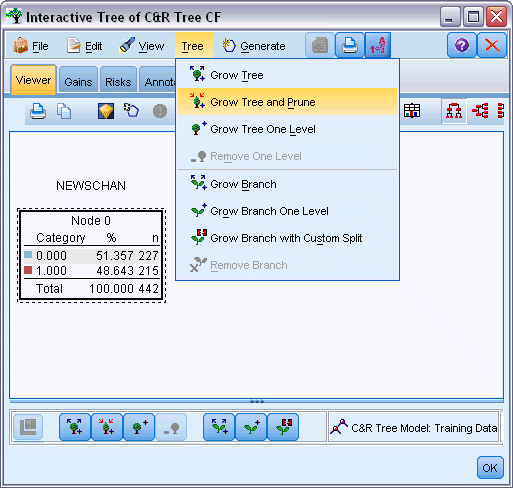
The existing decision tree node is automatic
but business users need to mingle with the decision tree, prune the tree and grow certain parts of the tree using their domain expertise...
SPSS has a nice facility as you can see below... Desperately looking forward for an Alteryx version...
There might be a data sensitivity concern due to a potential exposure to the admin groups if data is written into the Alteryx DB , especially if the database used to run Alteryx in your organization is maintained by a group of specialized DBAs in a different group.
To ensure data protection in a scenario like this - Can you include an option to check that a valid network path/ output system is provided for the output files?
This would ensure the data is exposed only to the business user groups that own the data.
We uncovered a possibility in which the user may potentially output a huge file into the Alteryx database without specifying an external system to house it - which could possibly take up a lot of space in the database we use for running Alteryx (store schedules, user and run data to name a few), this may even bring down the environment and sure doesn't seem like a good practice.
Can you please include a check to ensure that this can be disabled or capped ( specify a limit on the size) ?
Recently my trial license expired, and after receiving our activation licenses, I needed to upgrade from the 'User' version to the 'Admin' version.
When uninstalling the previous 'User' version, it appeared to complete successfully, and I then started installing the 'Admin' version from the installer.
After installation completed, I noticed that three versions of Alteryx appeared in my Windows 'Programs and Features' in Control Panel - Alteryx (Remove Only), Alteryx (Admin), and Alteryx (User).
When attempting to uninstall the 'User' version, it appeared to complete as expected, but did nothing when examining the application or root directory location, and I could still access and open and use the 'User' version of Alteryx.
To make a long story short, after going into regedit and removing all registry keys named 'Alteryx' including the SRC source key for Alteryx, I was able to manually remove all three of these versions and reinstall the 'Admin' application successfully.
Some kind of an uninstaller to wipe out all Alteryx directories, installations/versions, etc. to perform a clean uninstall/reinstall would be super valuable and probably save some folks a ton of time who are evaluating the product and moving from a Trial(User) version to an activated Admin license.
Apologies if this has been posted before, but couldn't find it.
In extended multi-workflow projects I output both yxdb files for later workflow use and xlsx files for human use to simplify support and allow non-Alteryx users to follow my workings.
Intuitively, I do this by copying and pasting the output file and then changing the type on the pasted output tool.
The behaviour on the copied output tool is not as expected if you change the file type without re-launching the File selector dialog.
I expected that changing the File Format should blank the file name browse, or change the file name to match the new FIle Format selection..
The number 1 issue I have with training Excel/SQL users on wonderful Alteryx is that "<>" isn't valid as an operator - I also struggled with this.
Why should users have to learn old ANSI SQL operators, <> seems unambiguous.
Apologies if this has been posted previously, but couldn't find it with the limited Search capability, but that's another post =)..
 Hollingsworth
on
07-28-2017
07:37 AM
Hollingsworth
on
07-28-2017
07:37 AM
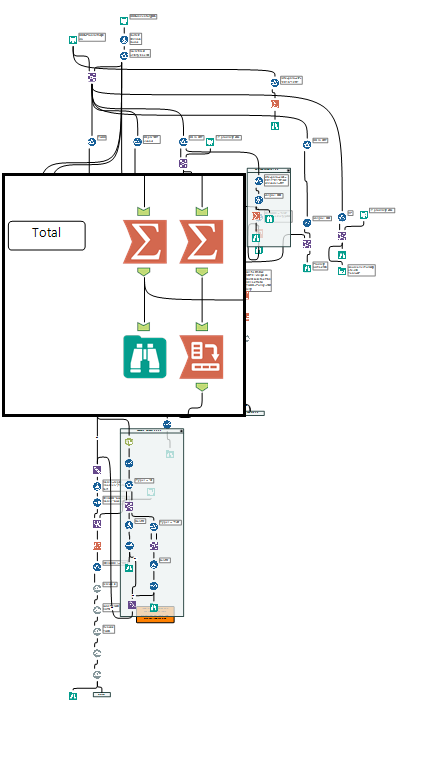
Idea: Create a UX feature to provide a cursor area magnification.
Problem: One of the challenges of working with Alteryx is quickly navigating around the canvas. Traditional software editors have bookmarks or anchors that let you quickly jump to predefined parts of the code.
Alteryx does not have these. Instead, the tools available are the Find tool, Zoom tools, and the Overview window. While capable, they still require a lot of typing and clicking, panning, zooming, etc.
Solution: Create a small magnification window that would follow the cursor around the canvas. This is commonly known as a Loupe feature in many image editing software such as Aperture.
Benefits: This would allow a user to have a full view of their entire workflow and yet be able to see and configure a specific tool with ease.
Activation: I think this feature could be activated in two ways.
1 - The user could toggle the feature by clicking a keyboard shortcut
2 - The feature would automatically enable once the zoom was out beyond a predetermined level.
Options: The user would be able to shrink or enlarge the size of the magnification window.
Example: I've mocked up an image of what this might look like below.
It would be nice to have the option to open a macro from the configuration window. I often use the find tool to locate macros and sometimes they are in collapsed tool containers or buried under other tools and it makes it difficult to right click on the tool itself. The find tool brings up the configuration window so if there was a button on that window it would make opening the macro more efficient.
May I suggest on input data of YXDB files the ability to turn off/on spatial objects within the configuration tool to speed up load times when working through or testing a large module.
Thank you
- New Idea 395
- Accepting Votes 1,783
- Comments Requested 20
- Under Review 181
- Accepted 47
- Ongoing 7
- Coming Soon 13
- Implemented 550
- Not Planned 106
- Revisit 56
- Partner Dependent 3
- Inactive 674
-
Admin Settings
22 -
AMP Engine
27 -
API
11 -
API SDK
230 -
Bug
1 -
Category Address
13 -
Category Apps
114 -
Category Behavior Analysis
5 -
Category Calgary
21 -
Category Connectors
252 -
Category Data Investigation
79 -
Category Demographic Analysis
3 -
Category Developer
220 -
Category Documentation
82 -
Category In Database
215 -
Category Input Output
658 -
Category Interface
246 -
Category Join
109 -
Category Machine Learning
3 -
Category Macros
156 -
Category Parse
78 -
Category Predictive
79 -
Category Preparation
406 -
Category Prescriptive
2 -
Category Reporting
205 -
Category Spatial
83 -
Category Text Mining
23 -
Category Time Series
24 -
Category Transform
93 -
Configuration
1 -
Content
2 -
Data Connectors
985 -
Data Products
4 -
Desktop Experience
1,615 -
Documentation
64 -
Engine
136 -
Enhancement
421 -
Event
1 -
Feature Request
219 -
General
307 -
General Suggestion
8 -
Insights Dataset
2 -
Installation
26 -
Licenses and Activation
15 -
Licensing
15 -
Localization
8 -
Location Intelligence
82 -
Machine Learning
13 -
My Alteryx
1 -
New Request
229 -
New Tool
32 -
Permissions
1 -
Runtime
28 -
Scheduler
26 -
SDK
10 -
Setup & Configuration
58 -
Tool Improvement
210 -
User Experience Design
165 -
User Settings
87 -
UX
228 -
XML
7
- « Previous
- Next »
-
Carolyn
on:
Blob output to be turned off with 'Disable all too...
- MJ on: Add Tool Name Column to Control Container metadata...
-
fmvizcaino
on:
Show dialogue when workflow validation fails
- ANNE_LEROY on: Create a SharePoint Render tool
- jrlindem on: Non-Equi Relationships in the Join Tool
- AncientPandaman on: Continue support for .xls files
- EKasminsky on: Auto Cache Input Data on Run
- jrlindem on: Global Field Rename: Automatically Update Column N...
- simonaubert_bd on: Workflow to SQL/Python code translator
- abacon on: DateTimeNow and Data Cleansing tools to be conside...
| User | Likes Count |
|---|---|
| 7 | |
| 3 | |
| 3 | |
| 3 | |
| 2 |


