The Alteryx Community is a finalist in three 2026 CMX Awards! Help us win Customer Support Community, Most Engaged Community, and User Group Program of the Year - vote now! (it only takes about 2 minutes) before January 9.
ACT NOW: The Alteryx team will be retiring support for Community account recovery and Community email-change requests Early 2026. Make sure to check your account preferences in my.alteryx.com to make sure you have filled out your security questions. Learn more here
Start Free Trial

Alteryx Designer Desktop Ideas

Share your Designer Desktop product ideas - we're listening!
Submitting an Idea?

Be sure to review our Idea Submission Guidelines for more information!

Submission Guidelines
Find Missing Macro

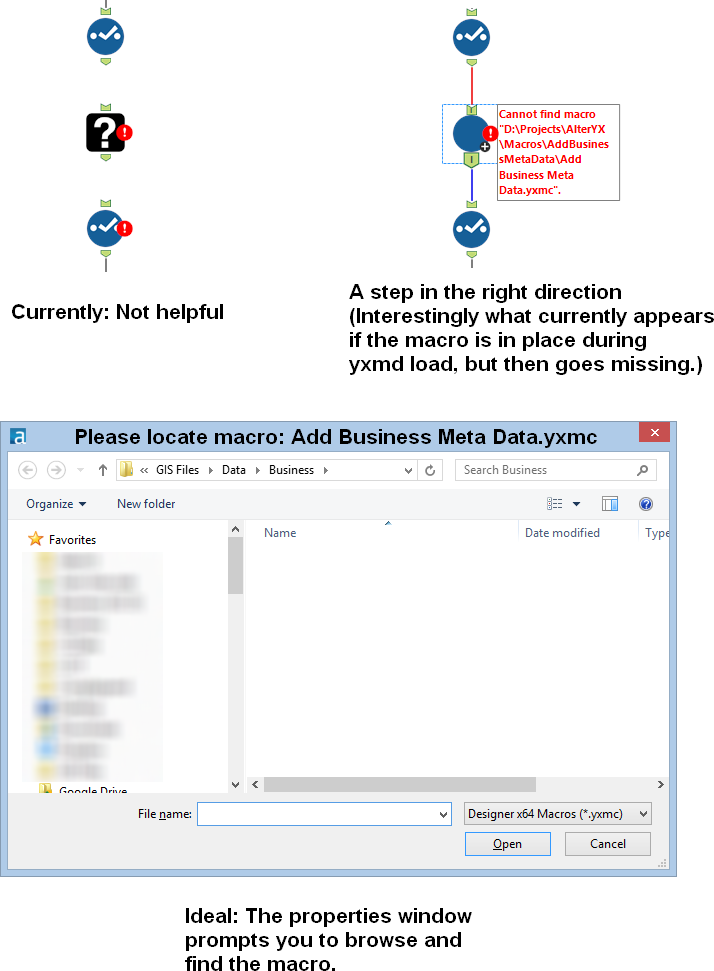
Idea: Prompt the user to find a missing macro instead of the current UX of a question mark icon.


Issue: When a macro referenced in a workflow is missing, then there is no way to a) know what the name of the macro was (assuming you were lazy like me and didn't document with a comment) and b) find the macro so you can get back to business.


When this happens to me know, I have to go to the XML view and search for macros and then cycle through them until I find the one that's missing. Then I have to either copy the macro back into that location or manually edit the workflow XML. Not cool man.


Solution: When a macro is missing, the image below at the right should be shown. In the properties window, a file browse tool should allow the user to find the macro.


FindMissingMacro.png


33 Comments
DanielG
12 - Quasar

Woohoo!!!  Good news to end the week.  Thanks @NicoleJ 

NicoleJ
Alteryx
Alteryx
Status changed to: Implemented

It brings me INCREDIBLE joy to announce the release of a new, MUCH improved experience for updating missing macros in your workflow, released with 23.2!! 

(Oh, black question mark icon... you shall not be missed.)


Check out this blog article with all the details, and let us know what you think!! 🎉


https://help.alteryx.com/current/en/release-notes/designer-release-notes/designer-2023-2-release-not... 

Hollingsworth
12 - Quasar
12 - Quasar

It brings me incredible joy to hear that this feature is now in the product! Thank you, Nicole, et.al.