 This article is part of the Tool Mastery Series, a compilation of Knowledge Base contributions to introduce diverse working examples for Designer Tools. Here we’ll delve into uses of the Append Cluster Tool on our way to mastering
the Alteryx Designer:
The K-Centroids Cluster Analysis Tool includes multiple algorithms that perform partitioning cluster analysis. The outputs of this tool are a Model Object and a Report. These outputs are very useful, but they do not include a data stream with the cluster labels attached to the original records. Nor does the K-Centroids Cluster Analysis Tool allow you to apply your generated clusters to an unseen data set. With the K-Centroids Cluster Analysis Tool alone, a record has no way to know which cluster it belongs to.

No need to fear, this is what the Append Cluster Tool is for! The Append Cluster Tool is effectively a Score Tool for the K-Centroids Cluster Analysis Tool. It takes the O anchor output (the model object) of the K-Centroids Cluster Analysis Tool, and a data stream (either the same data used to create the clusters, or a different data set with the same fields), and appends a cluster label to each incoming record.
The Configuration for this tool literally could not be easier. One input is the Model Object, the other is the data steam. It does not matter which you connect to which anchor. The field names of your data stream do need to match the field names referenced in your model object.
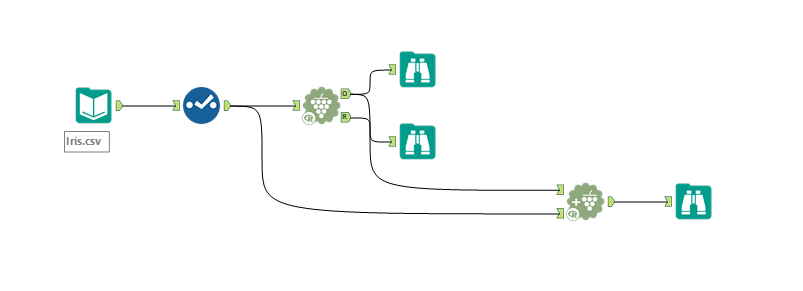
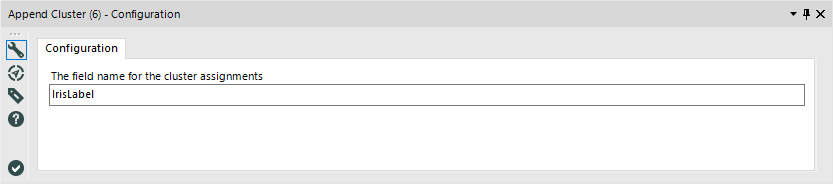
The only configuration option in the Tool's Configuration is a Text input; The field name for the cluster assignments. This setting determines the name of the cluster assignment field, with the default field name being "Cluster." This value must start with a letter and only include letters, numbers, and "_" or "." characters (These are standard R variable name rules).
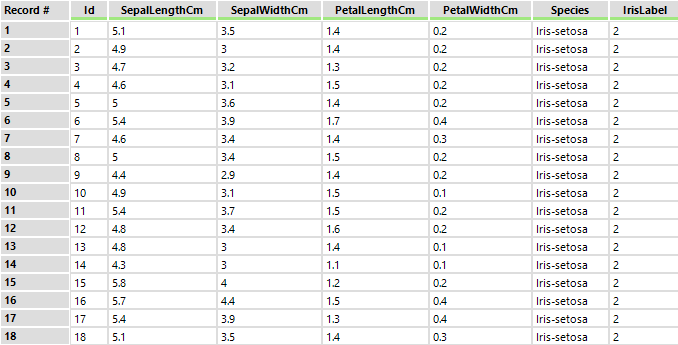
And that’s it for configuration. The Output of this Tool is your original data stream with a new field appended to the end. This field contains the cluster labels for each record.The cluster names are consecutive integers starting with one.
Because this tool applies a pre-built model to a data stream, the records being assigned clusters do not need to be fed in to the tool all at once. You can use this tool to apply a pre-made cluster model to a new data set each month, or to determine which cluster each of the records in your training data set ended up in.
Happy Clustering!
By now, you should have expert-level proficiency with the Append Cluster Tool! If you can think of a use case we left out, feel free to use the comments section below! Consider yourself a Tool Master already? Let us know atcommunity@alteryx.comif you’d like your creative tool uses to be featured in the Tool Mastery Series.
Stay tuned with our latest posts every#ToolTuesdayby following@alteryxon Twitter! If you want to master all the Designer tools, considersubscribingfor email notifications.


