In case you missed the announcement: The Alteryx One Fall Release is here! Learn more about the new features and capabilities here
ACT NOW: The Alteryx team will be retiring support for Community account recovery and Community email-change requests after December 31, 2025. Make sure to check your account preferences in my.alteryx.com to make sure you have filled out your security questions. Learn more here
Start Free Trial

Alteryx Designer Desktop Discussions

Find answers, ask questions, and share expertise about Alteryx Designer Desktop and Intelligence Suite.
SOLVED

Macro for Removing Sum_ In the Summarize Tool

BrandonS4
8 - Asteroid

I am wondering if there is a macro someone has created that will remove the "Sum_" when you sum a double using the Summarize tool?  I know you can manually change the name in the field within the tool and you can also put a select tool after and remove it as well as use the dynamic rename.  I was curious if there is a macro that I can add to my favorites and just insert it after the summarize to make building a workflow easier.


Thanks,

1 REPLY 1
ArtApa
Alteryx
Alteryx

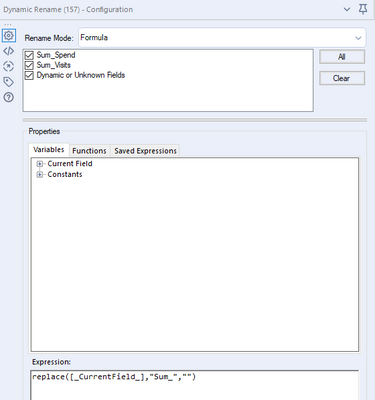
Hi @BrandonS4 - This will be a one tool macro, which does not make a lot of sense. Here how you can configure the Dynamic Rename tool:


ArtApa_0-1642723547973.png


Formula: replace([_CurrentField_],"Sum_","")


Labels
Top Solution Authors