Hi,
I would like to add a column with the file name from a particular input earlier in my workflow to this (see screenshot attached). Is this possible?
Thanks!
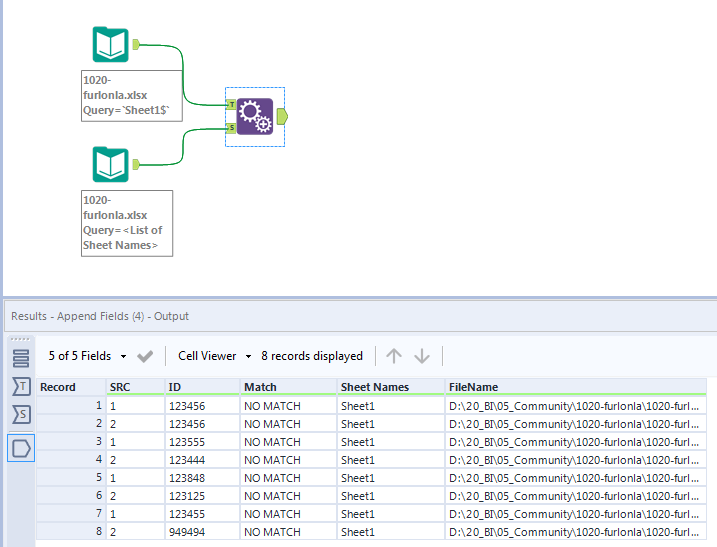
@furlonla Just to add to the solution to @Emil_Kos , after getting file information, an Append Field tool can joint the information together.
Hi @Qiu,
Good point.
I wonder @furlonla why you wanted to add this later in the workflow? It isn't acceptable for you to add it at the beginning?
EDIT: In this case, @Qiu appending solution should work for you @furlonla
Hey @Emil_Kos @Qiu
The append fields is creating duplicates, when I add it to the tool before the union tool. When I add it to the original input I'm receiving an error that there are more than 16, there are more than 16 records in the source.
Hi @furlonla,
If you will use summarize to have only file name(1 column and 1 row) you will be able to use append fields without creating duplicates.
Thanks a mill - that worked! I summarised by the file name then filtered out the null results and the used the append tool!
@furlonla Select Allow All Appends can resolve that issue of Append Tool.Appreciate you could mark it as acceped if it works for you.
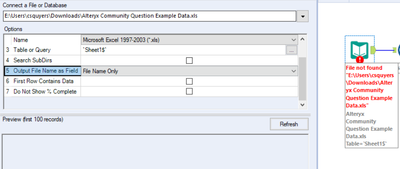
When using a data input tool you can choose the output file name as: File name.
Please see example attached.
Thanks, I have done that. However, as I use the union tool and then summarise data. I have been unable to bring this column in as it won't summairse the data how I want it. See screenshot of what I am currently getting. Column fund code is the file name that I want. Let me know if this isn't clear.