In case you missed the announcement: The Alteryx One Fall Release is here! Learn more about the new features and capabilities here
ACT NOW: The Alteryx team will be retiring support for Community account recovery and Community email-change requests after December 31, 2025. Set up your security questions now so you can recover your account anytime, just log out and back in to get started. Learn more here
Start Free Trial

Alteryx Designer Desktop Discussions

Find answers, ask questions, and share expertise about Alteryx Designer Desktop and Intelligence Suite.
SOLVED

Move field from one column to another

jhosmer002
7 - Meteor

Hi, I am trying to move the data from column AF to column AH, if it exists. If no data is found in AF, then leave AH as is. Here is the formula that I tried, as well as multiple other ways with no luck. 


Output Column: Market (AH)

Formula: IF [Ultimate Parent: Associated US Office: Market] THEN [Ultimate Parent: Associated US Office: Market] ELSE [Market] ENDIF
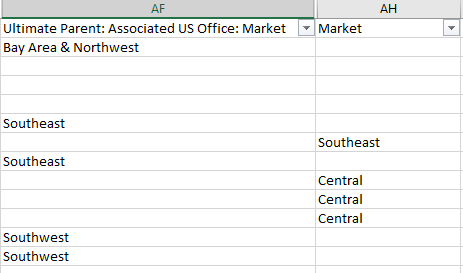
 

Capture.PNG

Do you have another solution to this? Thank you so much!! 

2 REPLIES 2
seven
12 - Quasar

Hi,


you were really close!


IF !IsEmpty([Ultimate Parent])
THEN [Ultimate Parent]
ELSE [Market]
ENDIF

seven_1-1596741130817.png


jhosmer002
7 - Meteor

Fantastic!! Thank you! 

Labels
Top Solution Authors