Help.
I have an iterative macro. I have 3 test Excel files. There are multiple sheets in each workbook, but he target sheet is the same in all 3 files. The macro's output mode is set to Auto Configure by Name. Each files runs through the macro successfully. But, the macro does not work when placed into a workflow and connected to a directory containing all 3 of the test files. I get the error:
Error: macro_test_prep (270): Iteration #1: Tool #6: The field "TOA" is not contained in the record.
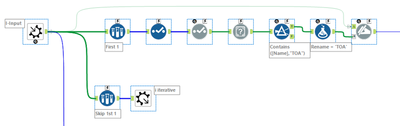
There is a field in each macro that is called Include In TOA. However, in one of the files it comes in as Includein TOA. To address this, I added a section at the start of my macro that finds the field name that contains TOA and renames it TOA.
Tool #6 is the Filter that looks for Contains TOA in the Name field after running through the Field Info tool.
While the error references Tool #6, I suspect it might be something before it.
What am I missing?
Thanks