In case you missed the announcement: The Alteryx One Fall Release is here! Learn more about the new features and capabilities here
ACT NOW: The Alteryx team will be retiring support for Community account recovery and Community email-change requests after December 31, 2025. Set up your security questions now so you can recover your account anytime, just log out and back in to get started. Learn more here
Start Free Trial

Alteryx Designer Desktop Discussions

Find answers, ask questions, and share expertise about Alteryx Designer Desktop and Intelligence Suite.
SOLVED

Flat File Question

alexlyle
8 - Asteroid

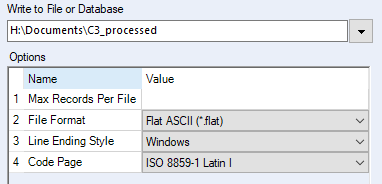
I need to save a file as a single, long, string. I assume this is what is meant by flatfile. when I try to save as:

alexlyle_0-1589392904021.png


I don't think it's working. Can someone tell me how to export it as a single long string instead of rows and columns? thank you.

1 REPLY 1
CharlieS
17 - Castor
17 - Castor

Hi @alexlyle 


Don't forget to add a file extension to your file path. The output path should look like this: "H:\Documents\C3_processed.flat"


Another common strategy some prefer for text is to use the .csv format with no separator. If you want the file to still have a .flat extension, that's fine too. Check out the attached workflow for an example of this.

Labels
Top Solution Authors