ACT NOW: The Alteryx team will be retiring support for Community account recovery and Community email-change requests Early 2026. Make sure to check your account preferences in my.alteryx.com to make sure you have filled out your security questions. Learn more here
Start Free Trial

Alteryx Server Discussions

Find answers, ask questions, and share expertise about Alteryx Server.
SOLVED

Transpose/Crosstabs Help

calmeria
5 - Atom

Hello!


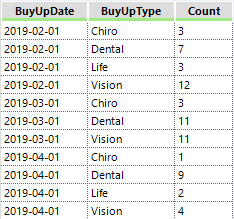
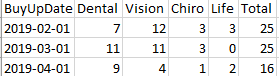
I'm still new to Alteryx and I'm attempting to change Figure 1 below to look like Figure 2. I've been trying to work with the Crosstabs or Transpose tools in order to create Figure 2 but I'm either using the tools incorrectly or using the wrong tools altogether. If anyone has some insight, I would appreciate it! Thanks!


Figure 1

2019-07-24 08_42_28-Alteryx Designer x64 - Ancillary Upsell Workflow.yxmd_.png


Figure 2

2019-07-24 08_46_12-Book1 - Excel.png


2 REPLIES 2
Thableaus
17 - Castor
17 - Castor

Hi @calmeria 


To pivot the Column names you can use the Cross-Tab Tool.

Group by BuyUpDate, use BuyUpType as Column Names and Count as Value.


You can also drag a Summarize tool and calculate the total separately, grouping by BuyUpDate (parallel yo your Cross-Tab tool, not after). 

Then, use the Join tool to append the Total column to your pivoted table, using BuyUpDate as the linking field.


Cheers,

calmeria
5 - Atom

@Thableaus 


It worked! Thank you!