Hello friends,
What is the best way to sum values from multiple columns, from an Excel file, into a new column? If it is an expression, could you please show an example?
Thank you!
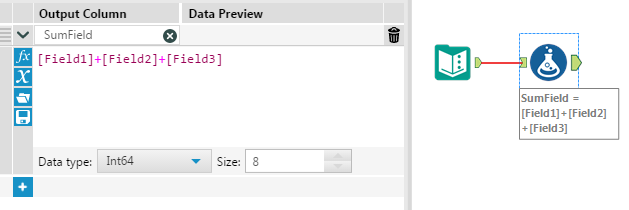
I would use the Formula tool. Place it after your Input Data tool, then from the drop-down in the Formula tool's configuration select "+ Add Column" and type the name for your new column. For the expression, use a formula to add them together:
Make sure to choose an appropriate Data type (i.e. Int16/32/64, Float, Double, etc) so you can use it later in your flow.
Hope this helps!
Dan
I also have a similar question...I currently have 10+ columns that I would like to sum up. Is there a way to do it without having to manually put in each field name into the formula tool?
Depending on your data structure, you could use a Transpose and then a Summarize. This would allow you to select the fields you want to keep and sum the rest together.
I have a similar requirement with more than 100 columns that i need to sum up. But i do not want to do a transpose & summarize. Is there any other way of doing it efficiently?
Hi @GaRaGe,
why you don't want to use transpose? I think you want to see your sumed field along with other 100 fields, for that you can use join tool and achieve the desire result. i am attaching the solved workflow. See if it helps.(As an example I am taking 20 fields, you can do this same on any number of fields)
Thanks,
Bharti
Thank you so much. I was struggling to solve this since yesterday.