In case you missed the announcement: The Alteryx One Fall Release is here! Learn more about the new features and capabilities here
ACT NOW: The Alteryx team will be retiring support for Community account recovery and Community email-change requests Early 2026. Make sure to check your account preferences in my.alteryx.com to make sure you have filled out your security questions. Learn more here
Start Free Trial

Alteryx Designer Desktop Discussions

Find answers, ask questions, and share expertise about Alteryx Designer Desktop and Intelligence Suite.

Cannot configure PowerBI output tool in Alteryx

Problem:

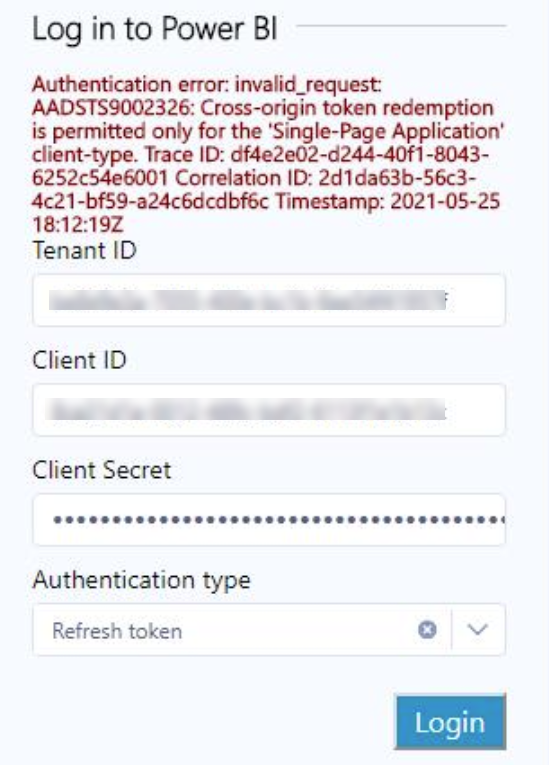
Alteryx designer is giving an error when trying to connect PowerBI output, via the Log In GUI.

I entered the Tenant ID, Client ID, Client Secret and chose refresh token. Takes me to login page and 2FA.

After credentials were entered and accepted, I receive the error “Authentication error: invalid_request: AADSTS9002326: Cross-origin token redemption is permitted only for the “Single-Page Application” client-type."

 
I've scoured the Community and other sources online and cannot find a working solution. There was a suggestion to remove the "Origin" header so it isn't in the API Call. However, I have no idea how to do that with the PowerBI Output tool.
1 REPLY 1
mnorberg
Alteryx Alumni (Retired)

Hi @Ibrokhim_Mirzakhonov,


Linking a similar post for you to check out! If the authentication error persists, I'd recommend submitting a case with our Support team by emailing support@alteryx.com.

Labels
Top Solution Authors