Weekly Challenges
Solve the challenge, share your solution and summit the ranks of our Community!Also available in | Français | Português | Español | 日本語
IDEAS WANTED
Want to get involved? We're always looking for ideas and content for Weekly Challenges.
SUBMIT YOUR IDEA- Community
- :
- Community
- :
- Learn
- :
- Academy
- :
- Challenges & Quests
- :
- Weekly Challenges
- :
- Re: Challenge #63: Data Preperation Using Pivot To...
Challenge #63: Data Preperation Using Pivot Tools
- Subscribe to RSS Feed
- Mark Topic as New
- Mark Topic as Read
- Float this Topic for Current User
- Bookmark
- Subscribe
- Mute
- Printer Friendly Page

- Mark as New
- Bookmark
- Subscribe
- Mute
- Subscribe to RSS Feed
- Permalink
- Notify Moderator

- Mark as New
- Bookmark
- Subscribe
- Mute
- Subscribe to RSS Feed
- Permalink
- Notify Moderator
Solution attached.
This one is beyond my knowledge way too much , it took me hours even after I looked into others solutions to create my own.
Things I learned from this challenge:
1. fill in data into empty field with expression
2. how to use pivot to stack data sets with multiple columns.

- Mark as New
- Bookmark
- Subscribe
- Mute
- Subscribe to RSS Feed
- Permalink
- Notify Moderator
Hi everyone,
below I send my solution to challenge # 63
In solving the problem I followed the following steps, according to the following rule:
IDENTIFY, BREAK DOWN, TRANSFORM AND REASSEMBLE.
Since in the use of the Transponse tool, the data is transformed into two columns, I asked myself how to create a third column to reorder the data through the Cross Tab tool. I thought of using the tool of the Mult-Row Formula, to create this field both to create a column of the DMA, both to create a column of the periods of "Weeks of" in the respective subset tables.
Below is the description of the steps that I weighed to follow:
- Phase (1) Create the sales value dataset for each field by adding a column of the respective DMA values. Attention delete the DMA code from the From the Values column
- Phase (2) Create the table of Value labels for each Field (The series of fields after the first F1 File, identifying respectively: Internal, External and Total of the Store)
- Phase (3) Create the "Sales Posting Week" date period table for each Field
- Phase (4) Add the relevant "Week of" periods, and field labels to the sales value dataset
Create a Pivot table to reorder the data, grouping by DMA and Week os sale
I tested by copying and pasting 3 new fields according to the recurring pattern, and the workflow should work.
I would be happy with your feedback
Thank you all
good job

- Mark as New
- Bookmark
- Subscribe
- Mute
- Subscribe to RSS Feed
- Permalink
- Notify Moderator
Hi everyone,
In solving the problem I followed the following steps, according to the following rule:
IDENTIFY, DISASSEMBLE, TRANSFORM AND REASSEMBLE.
Since in using the Transponse tool the data is transformed into two columns, I wondered how to create a third column to reorder the data using the Cross Tab tool. I thought about using the Multi-Line Formula toll, to create this field and to a column of the DMA, either to create a column of the periods of "Weeks of" in the respective subset tables.
Below is the description of the steps I weighed to follow:
- Phase (1) Create the sales value dataset for each field by adding a column of the respective DMA values. Attention delete [filter] the DMA code from the from the Values column
- Step (2) Create the table of Value labels for each Field (The series of fields after the first F1 File, identifying respectively: Internal, External and Total of Point)
- Step (3) Create the "Sales Posting Week" date period table for each Field
- Step (4) Add the relevant "Week of" periods, and field labels to the sales value dataset.
Create a Pivot table to reorder the data, grouping by DMA and Week of sale
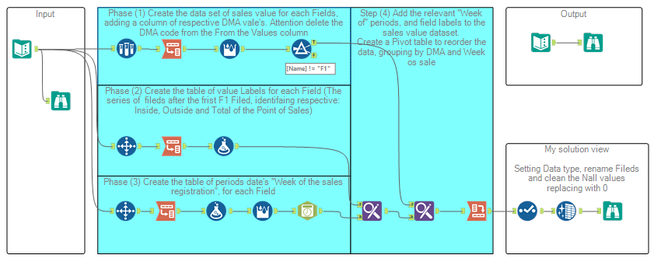
I tested by copying and pasting 3 new fields according to the recurring pattern, and the workflow should work.
I would be happy with your feedback
Thank you all
Good job

- Mark as New
- Bookmark
- Subscribe
- Mute
- Subscribe to RSS Feed
- Permalink
- Notify Moderator

- Mark as New
- Bookmark
- Subscribe
- Mute
- Subscribe to RSS Feed
- Permalink
- Notify Moderator
This one was challenging. I noticed that the solution had a lot more complex coding in some of the tools. Also, when I got to the end, my answers didn't match. Discovered it was because I took the extra step to calculate Total POS.


- Mark as New
- Bookmark
- Subscribe
- Mute
- Subscribe to RSS Feed
- Permalink
- Notify Moderator
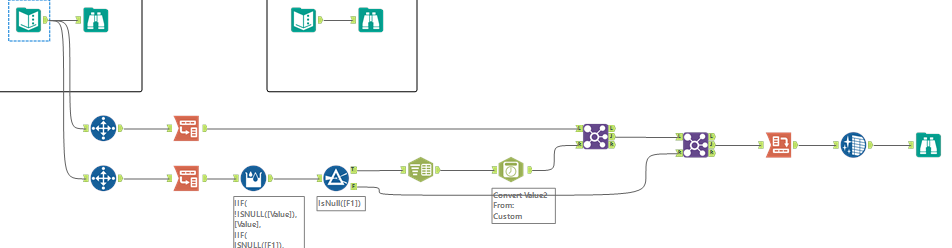
my solution 🙂

- Mark as New
- Bookmark
- Subscribe
- Mute
- Subscribe to RSS Feed
- Permalink
- Notify Moderator

- Mark as New
- Bookmark
- Subscribe
- Mute
- Subscribe to RSS Feed
- Permalink
- Notify Moderator

- Mark as New
- Bookmark
- Subscribe
- Mute
- Subscribe to RSS Feed
- Permalink
- Notify Moderator
This was a hard one. I went the macro route to process 3 rows at a time and union them. Seems like there has to be an easier way, but it got the job done ...
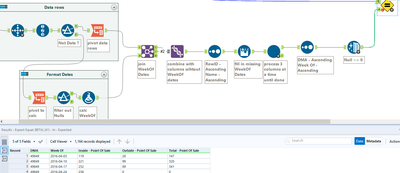
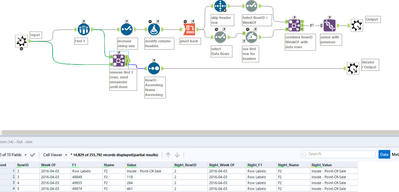
-
Advanced
301 -
Apps
26 -
Basic
158 -
Calgary
1 -
Core
157 -
Data Analysis
185 -
Data Cleansing
5 -
Data Investigation
7 -
Data Parsing
14 -
Data Preparation
238 -
Developer
36 -
Difficult
86 -
Expert
16 -
Foundation
13 -
Interface
39 -
Intermediate
268 -
Join
211 -
Macros
62 -
Parse
141 -
Predictive
20 -
Predictive Analysis
14 -
Preparation
272 -
Reporting
55 -
Reporting and Visualization
16 -
Spatial
60 -
Spatial Analysis
52 -
Time Series
1 -
Transform
227
- « Previous
- Next »
