Weekly Challenges
Solve the challenge, share your solution and summit the ranks of our Community!Also available in | Français | Português | Español | 日本語
IDEAS WANTED
Want to get involved? We're always looking for ideas and content for Weekly Challenges.
SUBMIT YOUR IDEA- Community
- :
- Community
- :
- Learn
- :
- Academy
- :
- Challenges & Quests
- :
- Weekly Challenges
- :
- Challenge #36: Data Cleansing Extract Authors
Challenge #36: Data Cleansing Extract Authors
- RSS フィードを購読する
- トピックを新着としてマーク
- トピックを既読としてマーク
- このトピックを現在のユーザーにフロートします
- ブックマーク
- 購読
- ミュート
- 印刷用ページ

- 新着としてマーク
- ブックマーク
- 購読
- ミュート
- RSS フィードを購読する
- ハイライト
- 印刷
- モデレーターに通知する
The link to the solution for last challenge #35 is HERE.
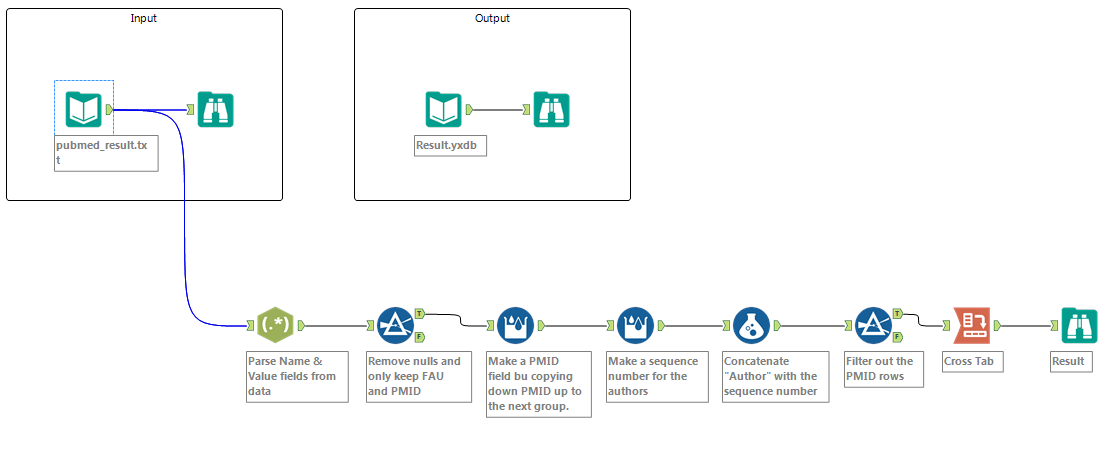
Use Case: An analytical consulting company downloads medical journal publication data from the web and would like to extract all of the authors for the listed entries.
The text input contains details about each article where FAU indicates the author name for the article – in most case there are multiple authors. The details of each article are contained in lines that begin with PMID and end with an empty line.
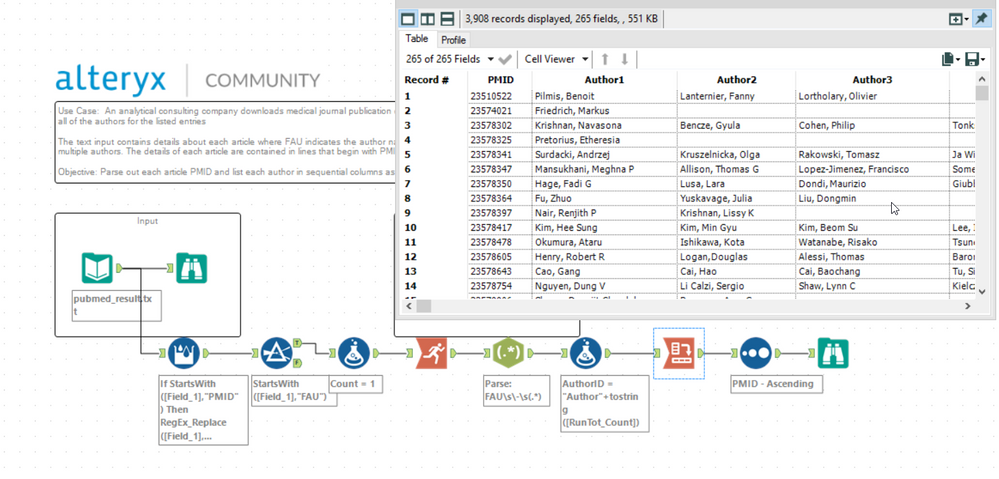
Objective: Parse out each article PMID and list each author in sequential columns as seen in the Results.yxmd file.

- 新着としてマーク
- ブックマーク
- 購読
- ミュート
- RSS フィードを購読する
- ハイライト
- 印刷
- モデレーターに通知する

- 新着としてマーク
- ブックマーク
- 購読
- ミュート
- RSS フィードを購読する
- ハイライト
- 印刷
- モデレーターに通知する
Very nice use of the 'select records' tool @Naledi

 MarqueeCrew
- 新着としてマーク
- ブックマーク
- 購読
- ミュート
- RSS フィードを購読する
- ハイライト
- 印刷
- モデレーターに通知する
 SeanAdams
- 新着としてマーク
- ブックマーク
- 購読
- ミュート
- RSS フィードを購読する
- ハイライト
- 印刷
- モデレーターに通知する
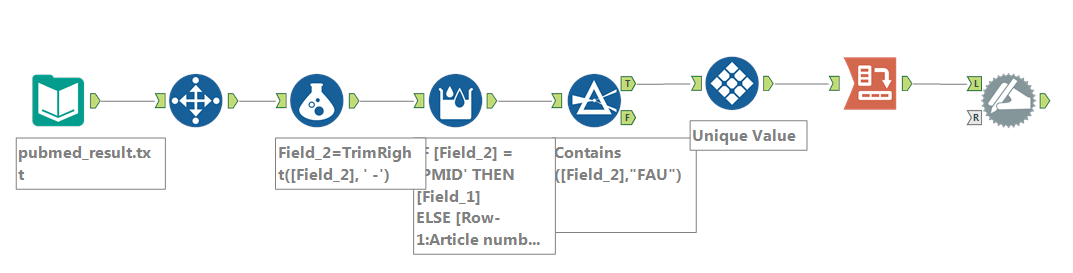
Slightly different approach
Then processed the authors into a cross-tab in 2 ways (for practice)
- first was a simple ArticleAuthorID (using a multi-row formula) and then crosstab
- Second was to use a summarize to concatenate into one delimited field, then use TextToColumns to do the same as a crosstab

 NicoleJohnson
- 新着としてマーク
- ブックマーク
- 購読
- ミュート
- RSS フィードを購読する
- ハイライト
- 印刷
- モデレーターに通知する

 estherb47
- 新着としてマーク
- ブックマーク
- 購読
- ミュート
- RSS フィードを購読する
- ハイライト
- 印刷
- モデレーターに通知する
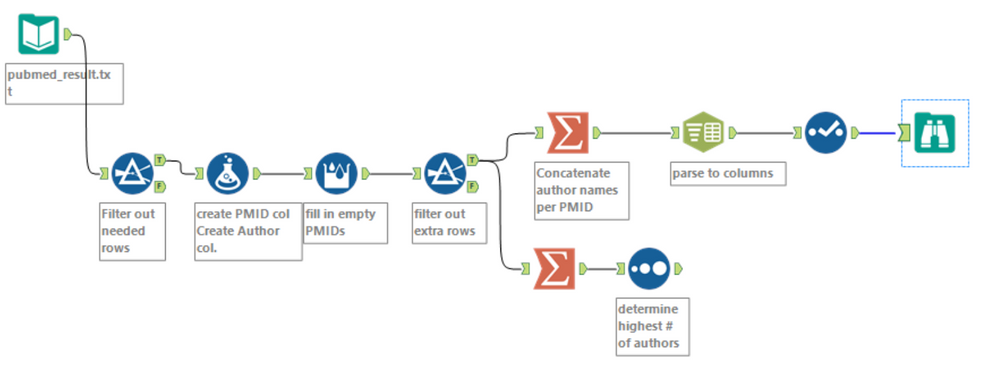
I used the Summarize tool to concatenate all of the names per PMID, and then parsed back into columns with Text to Cols

- 新着としてマーク
- ブックマーク
- 購読
- ミュート
- RSS フィードを購読する
- ハイライト
- 印刷
- モデレーターに通知する
This was fun, it would have been much easier if you could group when creating a RecordId.....

-
Advanced
299 -
Apps
26 -
Basic
158 -
Calgary
1 -
Core
157 -
Data Analysis
185 -
Data Cleansing
5 -
Data Investigation
7 -
Data Parsing
14 -
Data Preparation
237 -
Developer
35 -
Difficult
86 -
Expert
16 -
Foundation
13 -
Interface
39 -
Intermediate
266 -
Join
211 -
Macros
61 -
Parse
141 -
Predictive
20 -
Predictive Analysis
14 -
Preparation
272 -
Reporting
55 -
Reporting and Visualization
16 -
Spatial
60 -
Spatial Analysis
52 -
Time Series
1 -
Transform
226
- « 前へ
- 次へ »
