Tool Mastery
Explore a diverse compilation of articles that take an in-depth look at Designer tools.- Community
- :
- Community
- :
- Learn
- :
- Academy
- :
- Tool Mastery
- :
- Tool Mastery | Visual Layout
Tool Mastery | Visual Layout
- Subscribe to RSS Feed
- Mark as New
- Mark as Read
- Bookmark
- Subscribe
- Printer Friendly Page
- Notify Moderator

09-28-2017 05:22 PM - edited 07-23-2021 10:57 AM

This article is part of the Tool Mastery Series, a compilation of Knowledge Base contributions to introduce diverse working examples for Designer Tools. Here we’ll delve into uses of the Visual Layout Tool on our way to mastering the Alteryx Designer:
Note: This is a Laboratory tool and is not for production use. It may have documented known issues, may not be feature complete, may not be backwards compatible, and is subject to change. You can add your feedback about the Visual Layout Tool here.
A close relative of the Layout Tool, the Visual Layout Toolis the newest, and coolest, Reporting Tool on the block. Sporting all the badassery of the original Layout Tool in its ability to format and arrange reporting objects, the Visual Layout Tool differentiates in that it provides an intuitive, visual, interface that allows for easy drag-and-drop organization of multiple reporting object inputs. Basically, it’s the reporting tool equivalent of upgrading from Paint to Photoshop.

Remove the pain from working with reports – try Visual Layout!
Use the Visual Layout Tool with your reporting objects to…
- Skip the finer report object arrangement steps of the Layout Tool:
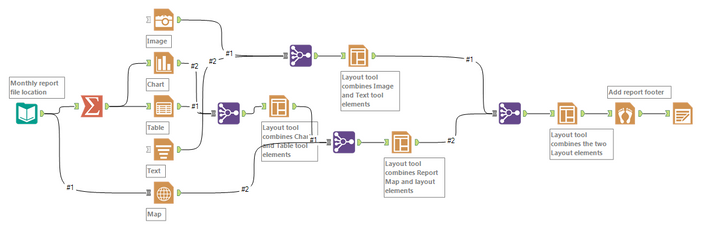
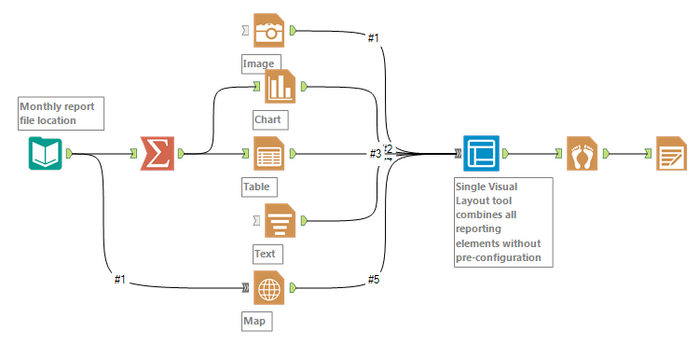
While building reports had never been easier, the original Layout Tool required some pre-configuration of reporting object streams – namely, having to combine them with a Union Tooland having to nest layouts to get finer template configuration. Kiss those steps goodbye!
Before:
After:
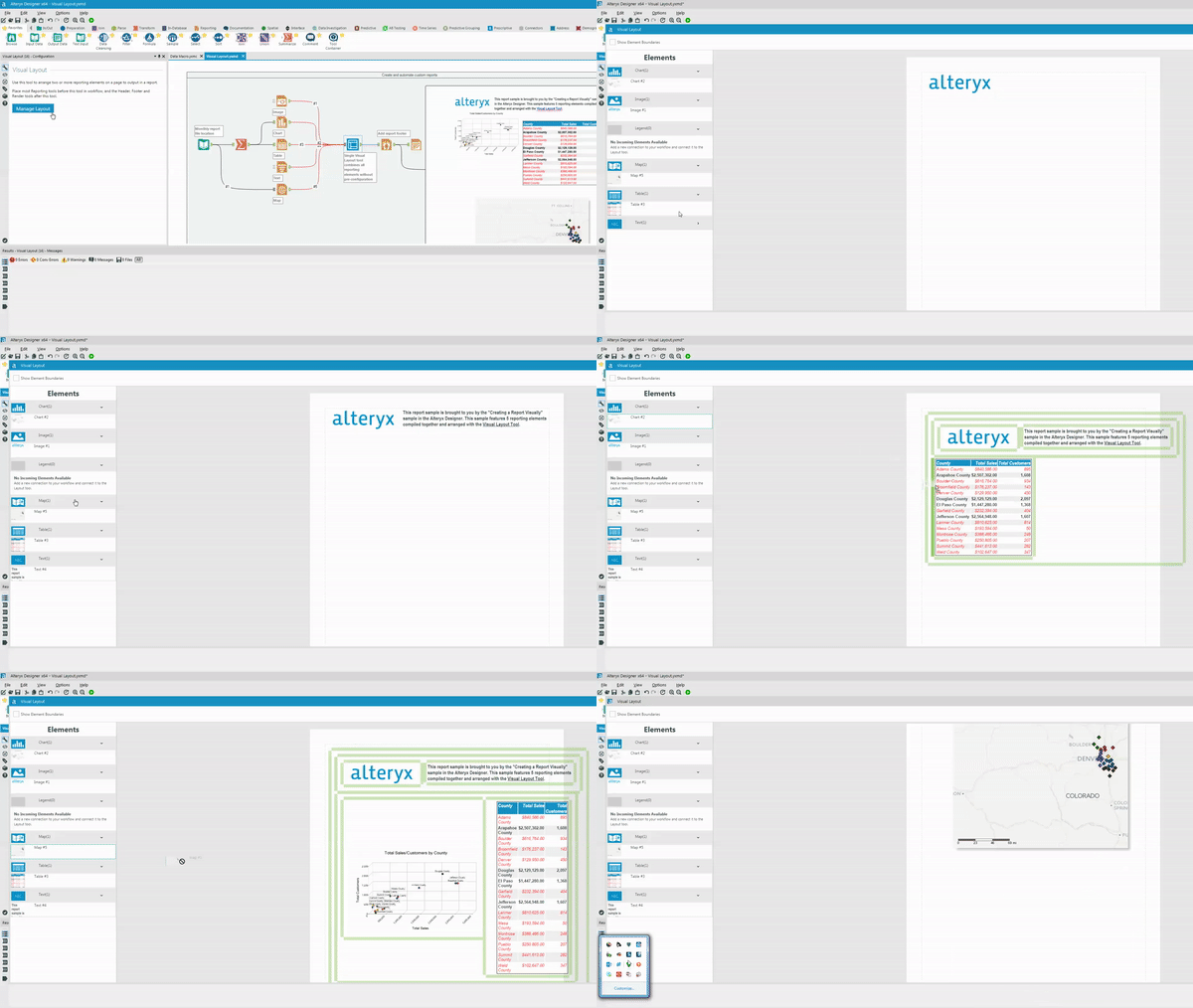
- Intuitively organize reporting elements:
If you’re new to the Visual Layout Tool’s interface you can check it out in all its glory here!The benefit of the improved interface is being able to quickly drag elements to their desired report location in the flick of a wrist. Observe!
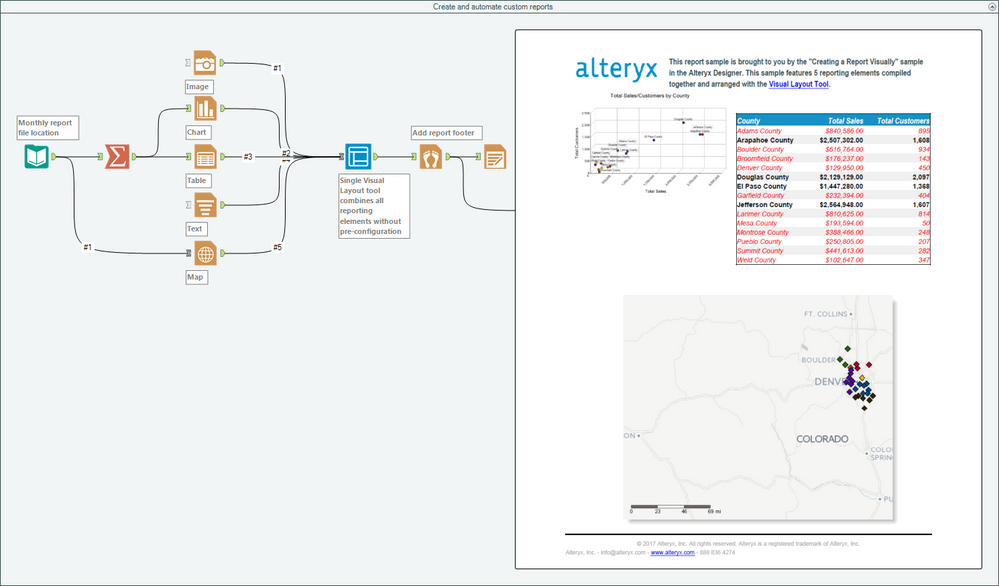
- Create and automate custom reports (and other documents) with graphics, maps, charts, tables, text, and more (attached in the v11.5 workflow Visual Layout.yxzp; can be found in your Designer Sample Workflows under Help >> Sample Workflows >> Describe what is happening >> Create a report layout):
If you’re having trouble getting your reports exactly to where you want them, be sure to check out our guide on how to arrange reporting objects! Looking to email your reports or presentations after creation? Masterthe Email Toolto automate the process or visit our resource on how to email different reports to different recipients!
By now, you should have expert-level proficiency with the Visual Layout Tool! If you can think of a use case we left out, feel free to use the comments section below! Consider yourself a Tool Master already? Let us know at community@alteryx.com if you’d like your creative tool uses to be featured in the Tool Mastery Series.
Stay tuned with our latest posts every#ToolTuesdayby following@alteryxon Twitter! If you want to master all the Designer tools, considersubscribingfor email notifications.

- Mark as Read
- Mark as New
- Bookmark
- Permalink
- Notify Moderator
Using the visual layout makes sense and I have been able to get my report to look the way I want and am able to do per 1 location. My question is, how can I roll this out on a larger scale and tell the workflow to produce a report per location that will eventually get emailed out to each location

- Mark as Read
- Mark as New
- Bookmark
- Permalink
- Notify Moderator
Hello,
I love this tool because it is so intuitive and powerful. However, I find that the formatting I establish in the tool, and see in the browse resulting tool, does not exactly flow through to the email tool output. Has anyone else experienced this issue?
Primarily it's with text I've brought in from the Report Text tool that I've centered in the output / extended the width to create headers for my tables. However, when they come through the email tool they revert to being a small width and left aligned.
Any advice? Is it because of a setting in the Visual Layout Tool's "Page Setup" section?
Thanks in advance!
-Chris

- Mark as Read
- Mark as New
- Bookmark
- Permalink
- Notify Moderator
How can I read the data from the table into the document with alteryx workflow so that the document shows all invoices belongs to one customer?
I tried to use Report Text tool but it created separate 6 difference documents instead of 4 documents.
Thanks a lot in advance!
-
2018.3
1 -
2023.1
1 -
API
2 -
Apps
7 -
AWS
1 -
Configuration
4 -
Connector
4 -
Container
1 -
Data Investigation
11 -
Database Connection
2 -
Date Time
4 -
Designer
2 -
Desktop Automation
1 -
Developer
8 -
Documentation
3 -
Dynamic Processing
10 -
Error
4 -
Expression
6 -
FTP
1 -
Fuzzy Match
1 -
In-DB
1 -
Input
6 -
Interface
7 -
Join
7 -
Licensing
2 -
Macros
7 -
Output
2 -
Parse
3 -
Predictive
16 -
Preparation
16 -
Prescriptive
1 -
Python
1 -
R
2 -
Regex
1 -
Reporting
12 -
Run Command
1 -
Spatial
6 -
Tips + Tricks
1 -
Tool Mastery
99 -
Transformation
6 -
Visualytics
1
- « Previous
- Next »
