ACT NOW: The Alteryx team will be retiring support for Community account recovery and Community email-change requests Early 2026. Make sure to check your account preferences in my.alteryx.com to make sure you have filled out your security questions. Learn more here
Start Free Trial

Alteryx Designer Desktop Discussions

Find answers, ask questions, and share expertise about Alteryx Designer Desktop and Intelligence Suite.
解決済み

Removing rows from Excel worksheet and adding them to a new worksheet

Travis_Ratliff
アステロイド

Hello All,


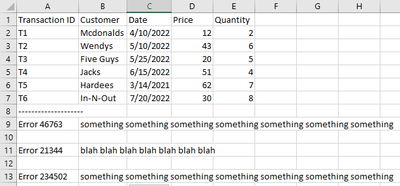
I have an excel worksheet that looks like this:
Travis_Ratliff_0-1666119017816.png


What I would like to do is take everything including that dashed line and put it on another worksheet in the same spreadsheet and label it "Tractions Error Log"


Any help would be appreciated on this


3件の返信3
acarter881
クエーサー

Hello @Travis_Ratliff.


This can be done as shown in the spoiler. I've attached the workflow. Please try it with your data and let me know if it works.

スポイラ
acarter881_0-1666121290913.png


Travis_Ratliff
アステロイド

@acarter881 This worked but I was wondering if you knew how I could do it and get rid of the headers up top on that page?

acarter881
クエーサー

@Travis_Ratliff Yes, that's a good point / question (see screenshot below).


acarter881_0-1666132780092.png


ラベル
トップのソリューション投稿者