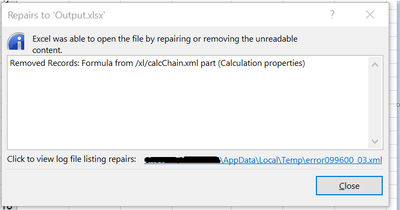
I have a Track Changes tab in my MS Excel file (Output.xlsx) which takes its inputs from another tab "Consolidation" in the same file. The latest update available in another Excel file (Input.xlsx) needs to be copied to the formula filled cells under the respective Quarters in the Track Changes tab. When the workflow tries to copy the data from the Input file to the formula filled cells in the Output file, I get the message prompts as shown below and the Output Excel file opens as a Repaired version.
I have attached the sample Input, Output and workflow for reference.
I am seeking help to ensure that the Output Excel file is intact and does not open as a Repaired version as the same needs to be used downstream for further operations.
P.S: I am using Alteryx Admin Designer Version:2020.2.3.27789, if that may be of any help.