Alteryx Designer Desktop Discussions
Find answers, ask questions, and share expertise about Alteryx Designer Desktop and Intelligence Suite.- Community
- :
- Community
- :
- Participate
- :
- Discussions
- :
- Designer Desktop
- :
- Re: Merging multiple files together with different...
Merging multiple files together with different number of columns.
- RSS-Feed abonnieren
- Thema als neu kennzeichnen
- Thema als gelesen kennzeichnen
- Diesen Thema für aktuellen Benutzer floaten
- Lesezeichen
- Abonnieren
- Stummschalten
- Drucker-Anzeigeseite

- Als neu kennzeichnen
- Lesezeichen
- Abonnieren
- Stummschalten
- RSS-Feed abonnieren
- Kennzeichnen
- Moderator informieren
Currently I am using a batch macro process to combine files on top of each other, however each file has a different amount of columns, and my batch process only looks at matching the same column in the same space each time. Files are continuously added to the folder every day, so the merged file is updated 2x a day through the gallery.
So when the batch process runs on my files, the macro doesn’t see the same column titles to stack on top of each other, so it ends up creating new columns.
I would like to stack the same columns on top of each other and be able to add any columns that are new in the merged file.
I have attached some sample data for clarity.
Gelöst! Gehe zu Lösung.
- Beschriftungen:
-
Batch Macro


 rkapoor
- Als neu kennzeichnen
- Lesezeichen
- Abonnieren
- Stummschalten
- RSS-Feed abonnieren
- Kennzeichnen
- Moderator informieren
@AshaCharis I was testing out a macro built by @apathetichell on your Excel sheets and I think it produces what you want as attached.

 atcodedog05
- Als neu kennzeichnen
- Lesezeichen
- Abonnieren
- Stummschalten
- RSS-Feed abonnieren
- Kennzeichnen
- Moderator informieren

- Als neu kennzeichnen
- Lesezeichen
- Abonnieren
- Stummschalten
- RSS-Feed abonnieren
- Kennzeichnen
- Moderator informieren
@atcodedog05 - Done ! - thanks for the support @rkapoor.
- Als neu kennzeichnen
- Lesezeichen
- Abonnieren
- Stummschalten
- RSS-Feed abonnieren
- Kennzeichnen
- Moderator informieren
Thank you so much for your help.
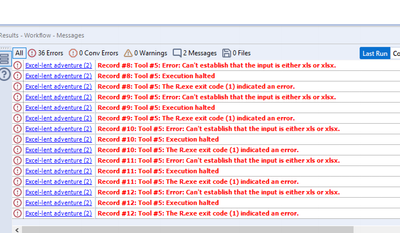
The files that are coming in are in .csv; do I just need to create another empty file sample the batch off of?
- Als neu kennzeichnen
- Lesezeichen
- Abonnieren
- Stummschalten
- RSS-Feed abonnieren
- Kennzeichnen
- Moderator informieren
- Als neu kennzeichnen
- Lesezeichen
- Abonnieren
- Stummschalten
- RSS-Feed abonnieren
- Kennzeichnen
- Moderator informieren
oh - did you want a combo macro which reads in any of .xlsx,.xls or .csv? It's possible but I haven't done it yet
- Als neu kennzeichnen
- Lesezeichen
- Abonnieren
- Stummschalten
- RSS-Feed abonnieren
- Kennzeichnen
- Moderator informieren
In the macro I wanted it to do is to stack the same columns on top of each other and be able to add any columns that are new in the merged file, but the macro that you first provided seems to not like the fact that I am stacking csvs.
- Als neu kennzeichnen
- Lesezeichen
- Abonnieren
- Stummschalten
- RSS-Feed abonnieren
- Kennzeichnen
- Moderator informieren
Try this one...
@rkapoor- updated version which spits out filename and allows for .csvs to be read in...
rkapoor
- Als neu kennzeichnen
- Lesezeichen
- Abonnieren
- Stummschalten
- RSS-Feed abonnieren
- Kennzeichnen
- Moderator informieren
Thanks for that @apathetichell

-
Academy
6 -
ADAPT
2 -
Adobe
204 -
Advent of Code
3 -
Alias Manager
78 -
Alteryx Copilot
27 -
Alteryx Designer
7 -
Alteryx Editions
96 -
Alteryx Practice
20 -
Amazon S3
149 -
AMP Engine
252 -
Announcement
1 -
API
1.210 -
App Builder
116 -
Apps
1.360 -
Assets | Wealth Management
1 -
Basic Creator
15 -
Batch Macro
1.559 -
Behavior Analysis
246 -
Best Practices
2.696 -
Bug
720 -
Bugs & Issues
1 -
Calgary
67 -
CASS
53 -
Chained App
268 -
Common Use Cases
3.825 -
Community
26 -
Computer Vision
86 -
Connectors
1.426 -
Conversation Starter
3 -
COVID-19
1 -
Custom Formula Function
1 -
Custom Tools
1.939 -
Data
1 -
Data Challenge
10 -
Data Investigation
3.489 -
Data Science
3 -
Database Connection
2.221 -
Datasets
5.223 -
Date Time
3.229 -
Demographic Analysis
186 -
Designer Cloud
743 -
Developer
4.376 -
Developer Tools
3.534 -
Documentation
528 -
Download
1.038 -
Dynamic Processing
2.941 -
Email
929 -
Engine
145 -
Enterprise (Edition)
1 -
Error Message
2.262 -
Events
198 -
Expression
1.868 -
Financial Services
1 -
Full Creator
2 -
Fun
2 -
Fuzzy Match
714 -
Gallery
666 -
GenAI Tools
3 -
General
2 -
Google Analytics
155 -
Help
4.711 -
In Database
966 -
Input
4.296 -
Installation
361 -
Interface Tools
1.902 -
Iterative Macro
1.095 -
Join
1.960 -
Licensing
252 -
Location Optimizer
60 -
Machine Learning
260 -
Macros
2.866 -
Marketo
12 -
Marketplace
23 -
MongoDB
82 -
Off-Topic
5 -
Optimization
751 -
Output
5.259 -
Parse
2.328 -
Power BI
228 -
Predictive Analysis
937 -
Preparation
5.171 -
Prescriptive Analytics
206 -
Professional (Edition)
4 -
Publish
257 -
Python
855 -
Qlik
39 -
Question
1 -
Questions
2 -
R Tool
476 -
Regex
2.339 -
Reporting
2.434 -
Resource
1 -
Run Command
576 -
Salesforce
277 -
Scheduler
411 -
Search Feedback
3 -
Server
631 -
Settings
936 -
Setup & Configuration
3 -
Sharepoint
628 -
Spatial Analysis
599 -
Starter (Edition)
1 -
Tableau
512 -
Tax & Audit
1 -
Text Mining
468 -
Thursday Thought
4 -
Time Series
432 -
Tips and Tricks
4.187 -
Topic of Interest
1.126 -
Transformation
3.732 -
Twitter
23 -
Udacity
84 -
Updates
1 -
Viewer
3 -
Workflow
9.983
- « Vorherige
- Nächste »


