In case you missed the announcement: The Alteryx One Fall Release is here! Learn more about the new features and capabilities here
ACT NOW: The Alteryx team will be retiring support for Community account recovery and Community email-change requests after December 31, 2025. Make sure to check your account preferences in my.alteryx.com to make sure you have filled out your security questions. Learn more here
Start Free Trial

Alteryx Designer Desktop Discussions

Find answers, ask questions, and share expertise about Alteryx Designer Desktop and Intelligence Suite.

How to quickly importing a big spreadsheets with password in Alteryx using R?

ilovepwc
5 - Atom

Hello experts,


The title might be a bit confusing. Basically I'm importing a password protected sheet using R in alteryx.

I used the imbedded R in Alteryx workflow, the R code is below:
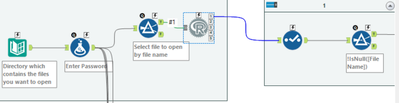
ilovepwc_0-1635936618117.png

if(!require(excel.link)){install.packages(c("excel.link"),repos='https://cran.revolutionanalytics.com/',dependencies = TRUE)}
library("excel.link")

df <- read.Alteryx("#1", mode="data.frame")
filename <- as.character(df[1,"FullPath"])
excel_pwd <- as.character(df[1,"excel_password"])

excel_data <- xl.read.file(filename, password = excel_pwd, write.res.password=excel_pwd)
excel_data <- as.data.frame(excel_data)
excel_data[] <- lapply(excel_data, as.character)

write.Alteryx(excel_data, 1)


The problem is the data is too huge (has 20k+ rows), so after 20min, there isn't any output.

Can anyone helps me out in this case? Any suggestion?


Thank you!
Yao

1 REPLY 1
apathetichell
20 - Arcturus

How long does this code take to run (sans Alteryx component) in R Studio?


This isn't erroring out? I usually see Alteryx fullpaths as "x:\...\...\" vs R wanting "x:/.../" etc...

Labels
Top Solution Authors