In case you missed the announcement: The Alteryx One Fall Release is here! Learn more about the new features and capabilities here
ACT NOW: The Alteryx team will be retiring support for Community account recovery and Community email-change requests Early 2026. Make sure to check your account preferences in my.alteryx.com to make sure you have filled out your security questions. Learn more here
Start Free Trial

Alteryx Designer Desktop Discussions

Find answers, ask questions, and share expertise about Alteryx Designer Desktop and Intelligence Suite.
SOLVED

How to Make an Application when then Input is a TXT File

MLRM
6 - Meteoroid

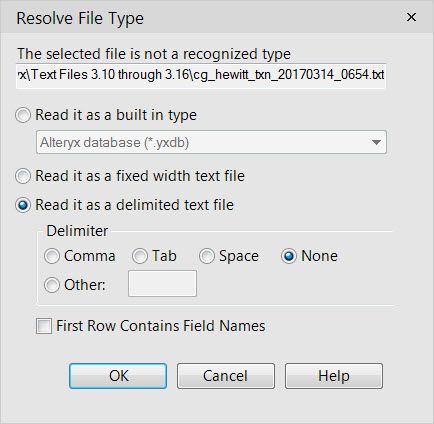
I am trying to make the Input file an Application / User input but in order to bring in the File it has to be read as a Delimited File with no Delimiters. Is there  a way to have this set up already done so the End User can just select the TEXT file and not have to manually open the Workflow and make these selections. Can I have the Input default to 
1. Read it as Delimited Text File

2. Select None as the Delimiter

3. Uncheck the First Row Contain Data Box 


2017-03-30_8-33-21.jpg

1 REPLY 1
mbarone
16 - Nebula
16 - Nebula

Sure.  Once you configure your input tool, just drag a file browse tool onto the canvas and connect it to your input tool.  An action tool will appear between the file browse tool and your input tool.  Configure the action tool with "Update Value", select the path of your original file, and check the "Replace a specific string" box at the bottom.


This will make your app ask the user to navigate to a file.  Once they do, it will use the specs you set up in your original input (i.e., it will only override the file path, not the specs).

Labels
Top Solution Authors