In case you missed the announcement: The Alteryx One Fall Release is here! Learn more about the new features and capabilities here
ACT NOW: The Alteryx team will be retiring support for Community account recovery and Community email-change requests after December 31, 2025. Set up your security questions now so you can recover your account anytime, just log out and back in to get started. Learn more here
Start Free Trial

Alteryx Designer Desktop Discussions

Find answers, ask questions, and share expertise about Alteryx Designer Desktop and Intelligence Suite.
SOLVED

Fixing Column width in Excel output

ericren
8 - Asteroid

When I use the render tool to output a table to excel sheet, the column width are always too small.


I am trying to output this as this but 


ACCOUNT NUMBER

ACCOUNT TITLE NAME

ACCOUNT TYPE CODE

ADP CURRENCY CODE

SECURITY TYPE

SECURITY SYMBOL

CUSIP NUMBER

QUANTITY


I get this instead.


ACC NUMACCOU TITLE NAMEACC TYP CODADP CURR CODESEC TYPSEC SYMCUSI NUMQUA
1 REPLY 1
ericren
8 - Asteroid

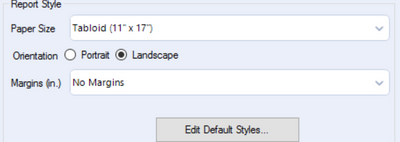
Solution: Change settings in render tool. Orientation to Landscape and paper size to larger option.


ericren_0-1671054050729.png


Labels
Top Solution Authors