ACT NOW: The Alteryx team will be retiring support for Community account recovery and Community email-change requests Early 2026. Make sure to check your account preferences in my.alteryx.com to make sure you have filled out your security questions. Learn more here
Start Free Trial

Alteryx Designer Desktop Discussions

Find answers, ask questions, and share expertise about Alteryx Designer Desktop and Intelligence Suite.
SOLVED

How to select columns dynamically using number of count

alt_tush
9 - Comet


Hello,


I have a below data set in excel. Data is import from line 1. So Alteryx created the default field Name like Field1,Field2,Field3 etc.


F1F2F3F4F5
ABCEFGPQRXYZMNO
ABCEFGPQRXYZMNO


My requirement is the selection of field in output file should be dynamic. If i passed the count 2 from text then it should select only first two columns i.e. F1 and F2 rest should be ignore. If i pass the count 4 then it should select first 4 columns i.e. F1,F2,F3 and F4 from above table.

Once the column selected, the number of columns i need to rename from F1,F2,F3 header with Column1, Column2, Column3 etc.


How can i achieve this? Could you please help!

Your help is really appreciated .

Thank you in advance.

4 REPLIES 4
Qiu
21 - Polaris
21 - Polaris

@alt_tush 
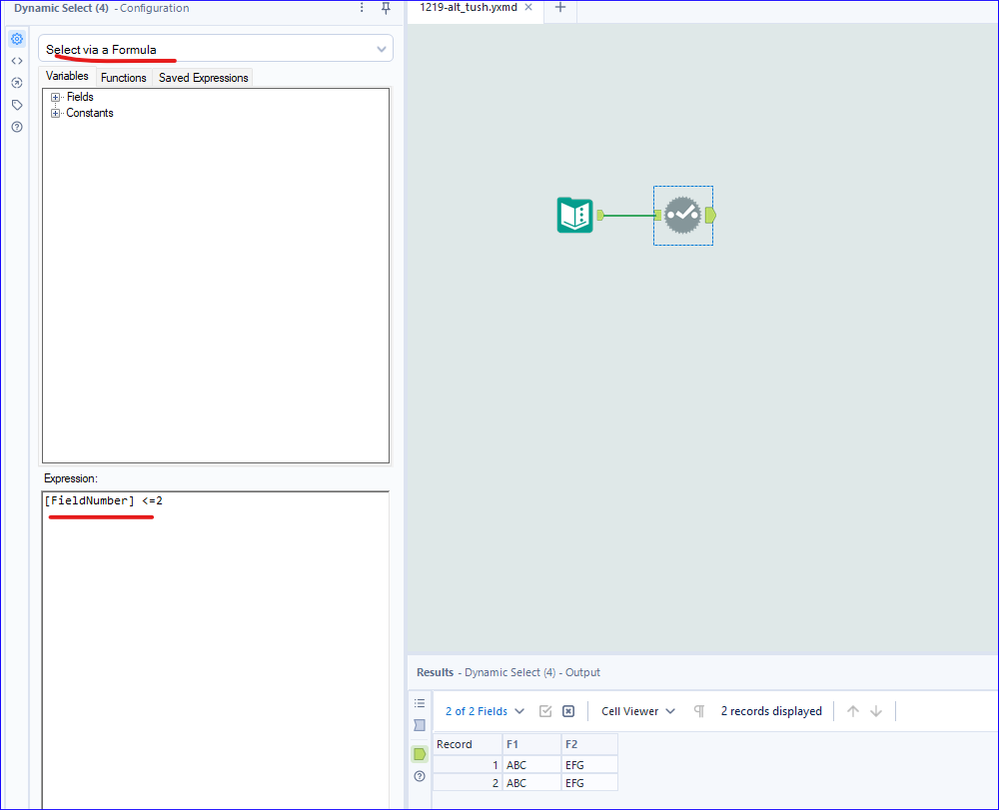
How about using a Dynamic Select tool as below.

1219-alt_tush.png

alt_tush
9 - Comet

Hello Qiu,
Thank you for prompt response. I point i missed to add. After selection of number of columns i need to rename the F1,F2,F3 header with Column1, Column2, Column3 etc.

alexnajm
19 - Altair
19 - Altair

Then use a Dynamic Rename - something like Replace([_CurrentField_], "F" ,"Column") should work

alt_tush
9 - Comet

Hello Alexnajm,

Thank you for your prompt respose. Yes it works.

Labels
Top Solution Authors