Alteryx Designer Desktop Discussions
Find answers, ask questions, and share expertise about Alteryx Designer Desktop and Intelligence Suite.- Community
- :
- Community
- :
- Participate
- :
- Discussions
- :
- Designer Desktop
- :
- Re: Dynamic Input Error
Dynamic Input Error
- Subscribe to RSS Feed
- Mark Topic as New
- Mark Topic as Read
- Float this Topic for Current User
- Bookmark
- Subscribe
- Mute
- Printer Friendly Page

- Mark as New
- Bookmark
- Subscribe
- Mute
- Subscribe to RSS Feed
- Permalink
- Notify Moderator
Hi,
I am using the Dynamic Input tool to read multiple CSV files into my workflow; however, there are some files that create an error due to "a field was missing a closing quote in record...". Once that error occurs, it stops reading any further CSV files.
I'm wondering, is it possible to change the settings so that it ignores that error and continues to read the remaining lines of the CSV file, along with any other CSV files that come after it?
Thanks in advance!!
Solved! Go to Solution.


 Thableaus
- Mark as New
- Bookmark
- Subscribe
- Mute
- Subscribe to RSS Feed
- Permalink
- Notify Moderator
Hi @lmosher
I think that would be the case you should use a Batch Macro to read these files.
In the Batch Macro you can actually give a special treatment to each of these cases of corrupted schema - you could even set something to skip these files.
There are some articles that explain this method
Cheers,
- Mark as New
- Bookmark
- Subscribe
- Mute
- Subscribe to RSS Feed
- Permalink
- Notify Moderator
Hi @Thableaus,
Thanks for your prompt response!
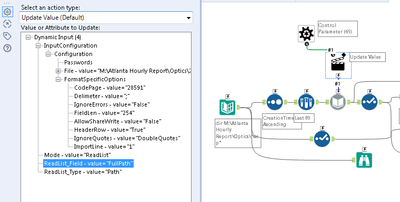
Here's what I've got so far per your suggestion. I've never used the Batch Macros before, so I'm not entirely sure how to progress from here.
One of the links you posted talked about changing the names of the input; my issue deals with a single line in the CSV file that doesn't have a closing quotation. How do you go about setting the macro to skip the lines in the file with the corrupted schema?
 Thableaus
- Mark as New
- Bookmark
- Subscribe
- Mute
- Subscribe to RSS Feed
- Permalink
- Notify Moderator
In this case you don't use the Dynamic Input.
The macro needs to be built separately from where you're going to insert the File Paths (from the Directory Tool).
I will get you an example later, but if you carefully read the articles I posted, you will figure this out.
Cheers,

- Mark as New
- Bookmark
- Subscribe
- Mute
- Subscribe to RSS Feed
- Permalink
- Notify Moderator
Using the "Text to Columns" tool is a lot more flexible than the "Input" tool, and then you can filter out the bad data and try to fix it.
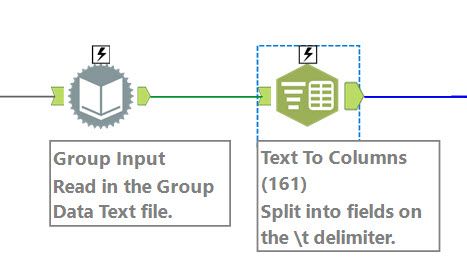
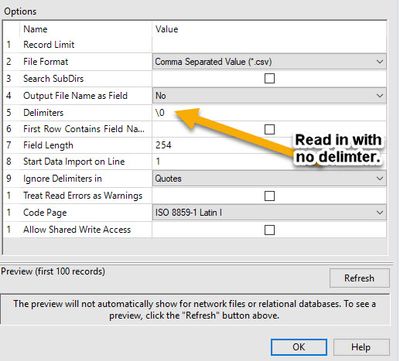
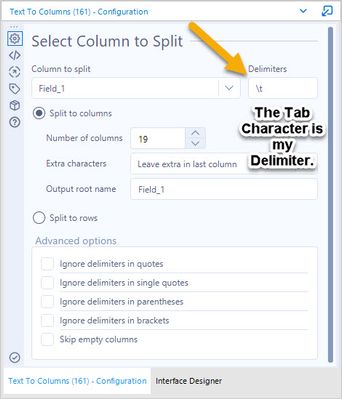
In the "Input" tool you set the delimiter to "\0" for no delimiter, and in the "Text to Columns" tool you put in your real delimiter.
The "Input" tools configuration window:
The "Text to Columns" tools configuration window:
- Mark as New
- Bookmark
- Subscribe
- Mute
- Subscribe to RSS Feed
- Permalink
- Notify Moderator
@darryl5280 this works perfectly! Thanks for the solution!!

- Mark as New
- Bookmark
- Subscribe
- Mute
- Subscribe to RSS Feed
- Permalink
- Notify Moderator
On the options where it says " Ignore delimiters in", I changed this from "Quotes" to "None", and that seemed to fix this error as well.

-
Academy
6 -
ADAPT
2 -
Adobe
204 -
Advent of Code
3 -
Alias Manager
78 -
Alteryx Copilot
25 -
Alteryx Designer
7 -
Alteryx Editions
94 -
Alteryx Practice
20 -
Amazon S3
149 -
AMP Engine
252 -
Announcement
1 -
API
1,208 -
App Builder
116 -
Apps
1,360 -
Assets | Wealth Management
1 -
Basic Creator
15 -
Batch Macro
1,559 -
Behavior Analysis
246 -
Best Practices
2,695 -
Bug
719 -
Bugs & Issues
1 -
Calgary
67 -
CASS
53 -
Chained App
268 -
Common Use Cases
3,825 -
Community
26 -
Computer Vision
86 -
Connectors
1,426 -
Conversation Starter
3 -
COVID-19
1 -
Custom Formula Function
1 -
Custom Tools
1,938 -
Data
1 -
Data Challenge
10 -
Data Investigation
3,487 -
Data Science
3 -
Database Connection
2,220 -
Datasets
5,222 -
Date Time
3,227 -
Demographic Analysis
186 -
Designer Cloud
741 -
Developer
4,372 -
Developer Tools
3,529 -
Documentation
527 -
Download
1,037 -
Dynamic Processing
2,939 -
Email
927 -
Engine
145 -
Enterprise (Edition)
1 -
Error Message
2,257 -
Events
198 -
Expression
1,868 -
Financial Services
1 -
Full Creator
2 -
Fun
2 -
Fuzzy Match
712 -
Gallery
666 -
GenAI Tools
3 -
General
2 -
Google Analytics
155 -
Help
4,707 -
In Database
966 -
Input
4,293 -
Installation
361 -
Interface Tools
1,901 -
Iterative Macro
1,094 -
Join
1,958 -
Licensing
252 -
Location Optimizer
60 -
Machine Learning
260 -
Macros
2,864 -
Marketo
12 -
Marketplace
23 -
MongoDB
82 -
Off-Topic
5 -
Optimization
751 -
Output
5,255 -
Parse
2,327 -
Power BI
228 -
Predictive Analysis
937 -
Preparation
5,169 -
Prescriptive Analytics
206 -
Professional (Edition)
4 -
Publish
257 -
Python
855 -
Qlik
39 -
Question
1 -
Questions
2 -
R Tool
476 -
Regex
2,339 -
Reporting
2,433 -
Resource
1 -
Run Command
575 -
Salesforce
277 -
Scheduler
411 -
Search Feedback
3 -
Server
630 -
Settings
934 -
Setup & Configuration
3 -
Sharepoint
627 -
Spatial Analysis
599 -
Starter (Edition)
1 -
Tableau
512 -
Tax & Audit
1 -
Text Mining
468 -
Thursday Thought
4 -
Time Series
431 -
Tips and Tricks
4,187 -
Topic of Interest
1,126 -
Transformation
3,728 -
Twitter
23 -
Udacity
84 -
Updates
1 -
Viewer
3 -
Workflow
9,980
- « Previous
- Next »


