In case you missed the announcement: The Alteryx One Fall Release is here! Learn more about the new features and capabilities here
ACT NOW: The Alteryx team will be retiring support for Community account recovery and Community email-change requests after December 31, 2025. Make sure to check your account preferences in my.alteryx.com to make sure you have filled out your security questions. Learn more here
Start Free Trial

Alteryx Designer Desktop Discussions

Find answers, ask questions, and share expertise about Alteryx Designer Desktop and Intelligence Suite.
SOLVED

Converting date fields with multiple date types

kwhitaker
6 - Meteoroid

I'm working with a date field which has dates in the following formats:

  • [Null]
  • 2019-10-12 00:00:00
  • 6/12/0:00
  • 10/10/2019 0:00
  • 8/6/2019 0:00

From a previous post, https://community.alteryx.com/t5/Alteryx-Designer-Discussions/Inconsistent-Date-format-string/td-p/2..., I pieced together this formula:

IF IsNull([BILL_DATE]) then [BILL_DATE]
elseif Contains([BILL_DATE], '-') Then [BILL_DATE]
else Replace(REGEX_Replace([BILL_DATE],"(\d{1,2})/(\d{1,2})/(\d{4})","$3-0$1-0$2"),"-00","-0")
endif


But I'm getting the following results:

  • [Null]
[Null]
  • 2019-10-12 00:00:00

2019-10-12

  • 6/12/2019 0:00

2019-06-01

  • 10/10/2019 0:00
[Null] because it's converting to  2019-010-010 0:00
  • 8/6/2019 0:00
2019-08-06


I'm fairly new to Alteryx.  Is this something that can be modified to work or do I need to take a completely different approach?

1 REPLY 1
JessieC
Alteryx
Alteryx

@kwhitaker ,


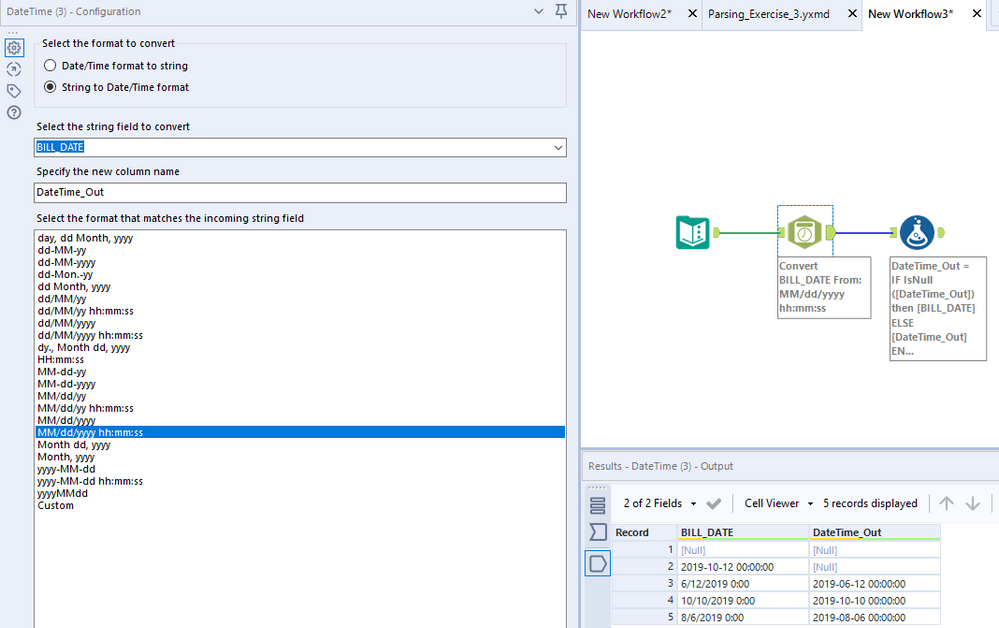
You can use the DateTime tool before a Formula - 

clipboard_image_0.png


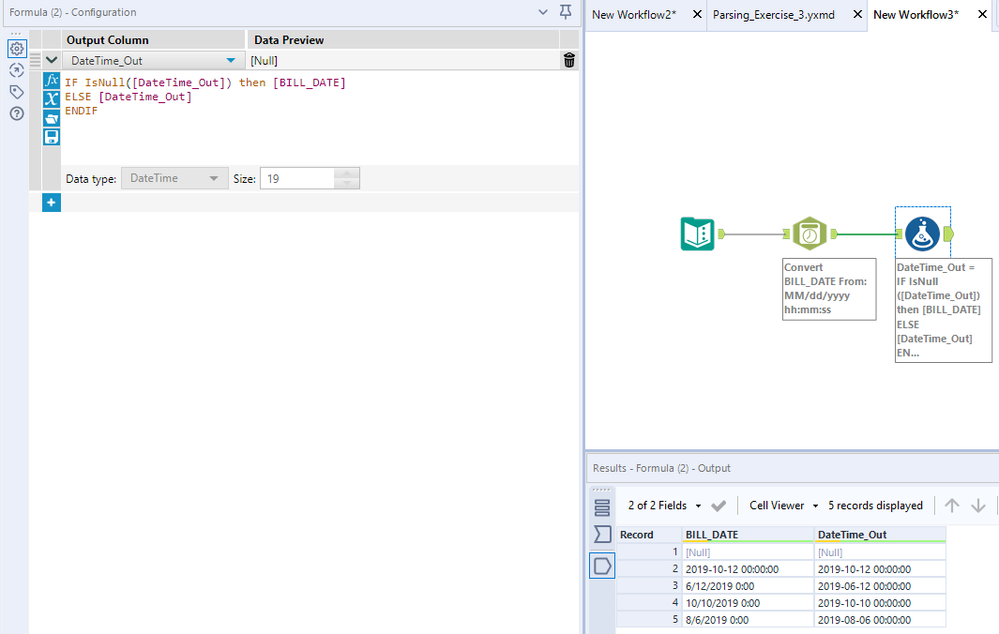
Formula - 

IF IsNull([DateTime_Out]) then [BILL_DATE]
ELSE [DateTime_Out]
ENDIF

clipboard_image_1.png

Labels
Top Solution Authors