ACT NOW: The Alteryx team will be retiring support for Community account recovery and Community email-change requests Early 2026. Make sure to check your account preferences in my.alteryx.com to make sure you have filled out your security questions. Learn more here
Start Free Trial

Alteryx Designer Desktop Discussions

Find answers, ask questions, and share expertise about Alteryx Designer Desktop and Intelligence Suite.
SOLVED

Convert date in format 31.01.2018

rjohnson123
7 - Meteor

My date is currently formatted like this: 31.01.2018.


I tried using the Custom format in DateTime Parse tool - using same format state above - but can't get the conversion to work correctly (i.e. from string to DateTime).


Any suggestions?

4 REPLIES 4
JosephSerpis
17 - Castor
17 - Castor

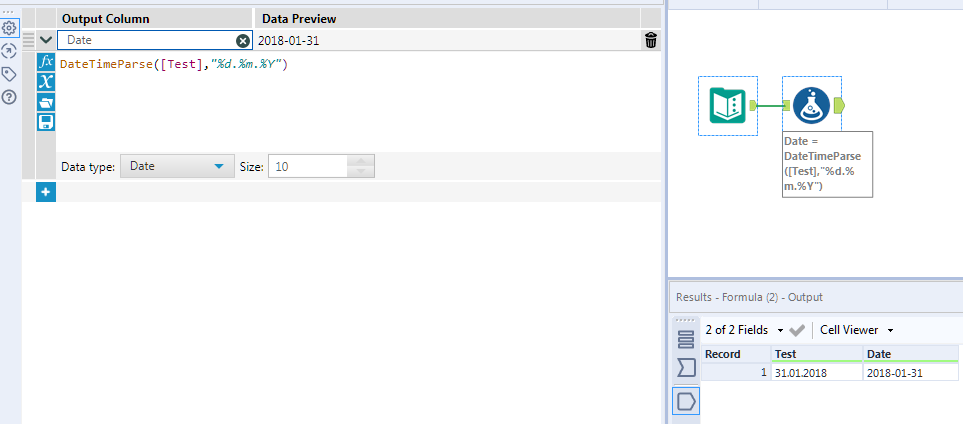
Hi @rjohnson123 if you use this syntax in a formula tool it will work. DateTimeParse([Test],"%d.%m.%Y")Date_290819.PNG

rjohnson123
7 - Meteor

Thanks for the guidance.


I'm still curious why I wasn't able to make it work using the Custom input that's built into the interface.

JosephSerpis
17 - Castor
17 - Castor

Hi @rjohnson123 that syntax would work in the datetime tool. I have this url saved on my favourites which I use whenever I do datetime functions https://help.alteryx.com/10.1/Reference/DateTimeFunctions.htm


Date_290819.PNG 

rjohnson123
7 - Meteor

That worked.  Thanks!

Labels
Top Solution Authors