In case you missed the announcement: The Alteryx One Fall Release is here! Learn more about the new features and capabilities here
ACT NOW: The Alteryx team will be retiring support for Community account recovery and Community email-change requests after December 31, 2025. Make sure to check your account preferences in my.alteryx.com to make sure you have filled out your security questions. Learn more here
Start Free Trial

Alteryx Designer Desktop Discussions

Find answers, ask questions, and share expertise about Alteryx Designer Desktop and Intelligence Suite.
SOLVED

Change rows to columns - concat the values form rows into a single new column

brendafos
10 - Fireball

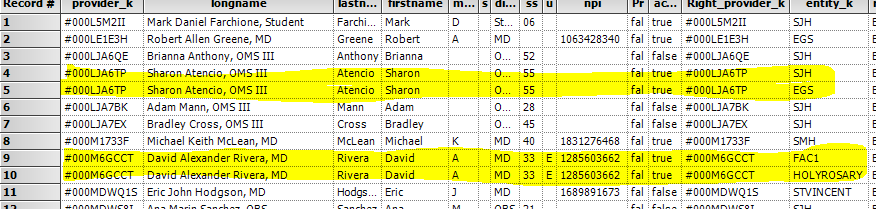
I have more than one row when one field has more than one value for the field.


cactusEntity.PNG


Two examples in yellow - each yellow area is a duplicate row ONLY because the last column has two vavlues. 

I would like a single row per name (second column), with the last column 'SJH' in  a row, then another row with 'EGS'  - I would like to be a single column/field with 'SJH, EGS' concat'd

There could be more than 2 but not more than 5 rows for any name. 


How best to do this?

I tried Cross Tab but I need a new feild to put the values in.


Please suggest how to do this.

Thanks.

2 REPLIES 2
JoeM
Alteryx Alumni (Retired)

@brendafos

All it takes is a summarize tool!

In the summarize tool, group by [longname], and concat [entity_k]. Example attached.

brendafos
10 - Fireball

Worked perfectly. 

The Summary tool continues to amaze me.  I need to learn more uses of it.


Thanks.


Labels
Top Solution Authors