Alteryx Community Resources
Get up-and-running on the Community and with Alteryx in record time.- Community
- :
- Community
- :
- Support
- :
- Community Resources
- :
- Designer Cheat Sheet
Designer Cheat Sheet
- RSS-Feed abonnieren
- Als neu kennzeichnen
- Als gelesen kennzeichnen
- Lesezeichen
- Abonnieren
- Drucker-Anzeigeseite
- Moderator informieren

am
02-14-2019
07:10 AM
- zuletzt bearbeitet am
12-14-2023
01:32 PM
von
 LeandraN
If you are reading this post, odds are that you recognize the value of Alteryx Designer, but you aren’t quite sure you have the knowledge to leverage it for your use. We know it can be challenging to find the right tool when you are just starting out, especially if you only have a 30-day trial. That is why we created this Designer Cheat Sheet to help you get to your data insights right away.
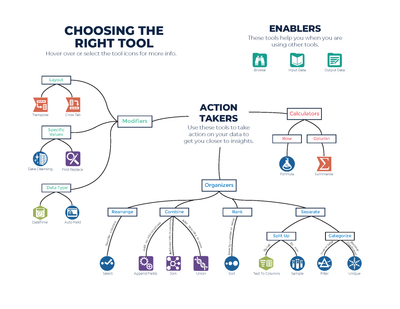
On the first page, you will find some of the most popular tools used to build Designer workflows. Hover over a tool icon to read a brief description of what it does and select the icon to visit the Help documentation page for that tool. Whether you want to organize your dataset, perform a calculation, or modify an aspect of your dataset, Designer has a tool for you.
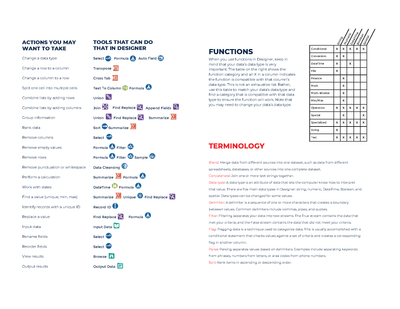
The second page lists some common actions you may want to perform and the tool(s) that can perform those actions. You will also find tips for using functions in Designer, including a nifty table that lists function categories and the datatypes those functions work with. Finally, you will find some useful terms and their definitions.
Whether you just downloaded the trial, or you are looking for an additional resource to refer to while learning how to use Designer, this cheat sheet can help you get familiar with the basics and on your way to data discoveries. Download a PDF of the cheat sheet below or bookmark this article. To learn more about Designer, check out our Interactive Lessons and the Tool Mastery Index.

- Als gelesen kennzeichnen
- Als neu kennzeichnen
- Lesezeichen
- Kennzeichnen
- Moderator informieren
Very Well Explained

- Als gelesen kennzeichnen
- Als neu kennzeichnen
- Lesezeichen
- Kennzeichnen
- Moderator informieren
AMAZAING, it's useful :p

- Als gelesen kennzeichnen
- Als neu kennzeichnen
- Lesezeichen
- Kennzeichnen
- Moderator informieren
knowlegable

- Als gelesen kennzeichnen
- Als neu kennzeichnen
- Lesezeichen
- Kennzeichnen
- Moderator informieren
Awesome

- Als gelesen kennzeichnen
- Als neu kennzeichnen
- Lesezeichen
- Kennzeichnen
- Moderator informieren
Great post super helpful for understanding.

- Als gelesen kennzeichnen
- Als neu kennzeichnen
- Lesezeichen
- Kennzeichnen
- Moderator informieren
nice lesson .

- Als gelesen kennzeichnen
- Als neu kennzeichnen
- Lesezeichen
- Kennzeichnen
- Moderator informieren
thanks for explaination

- Als gelesen kennzeichnen
- Als neu kennzeichnen
- Lesezeichen
- Kennzeichnen
- Moderator informieren
This is a good thing. This can be useful for many people.
- Als gelesen kennzeichnen
- Als neu kennzeichnen
- Lesezeichen
- Kennzeichnen
- Moderator informieren
Great post super helpful for understanding.thanks for explaination.

- Als gelesen kennzeichnen
- Als neu kennzeichnen
- Lesezeichen
- Kennzeichnen
- Moderator informieren
its helpful

- Als gelesen kennzeichnen
- Als neu kennzeichnen
- Lesezeichen
- Kennzeichnen
- Moderator informieren
Very good lesson and if is helpful to us

- Als gelesen kennzeichnen
- Als neu kennzeichnen
- Lesezeichen
- Kennzeichnen
- Moderator informieren
Great Information provided through this mind map.

- Als gelesen kennzeichnen
- Als neu kennzeichnen
- Lesezeichen
- Kennzeichnen
- Moderator informieren
Useful stuff to start.
Do we have verified source to download Alteryx application?

- Als gelesen kennzeichnen
- Als neu kennzeichnen
- Lesezeichen
- Kennzeichnen
- Moderator informieren
This cheatsheet is awesome! It's incredibly well-organized and makes everything so much easier to understand.

- Als gelesen kennzeichnen
- Als neu kennzeichnen
- Lesezeichen
- Kennzeichnen
- Moderator informieren
yes, it is a good information

- Als gelesen kennzeichnen
- Als neu kennzeichnen
- Lesezeichen
- Kennzeichnen
- Moderator informieren
This is great! Thank you!

- Als gelesen kennzeichnen
- Als neu kennzeichnen
- Lesezeichen
- Kennzeichnen
- Moderator informieren
It is quite helpful, thanks a lot😁

- Als gelesen kennzeichnen
- Als neu kennzeichnen
- Lesezeichen
- Kennzeichnen
- Moderator informieren
This is pretty good information. Thank you

- Als gelesen kennzeichnen
- Als neu kennzeichnen
- Lesezeichen
- Kennzeichnen
- Moderator informieren
Good lesson😊

- Als gelesen kennzeichnen
- Als neu kennzeichnen
- Lesezeichen
- Kennzeichnen
- Moderator informieren
good lession
- Als gelesen kennzeichnen
- Als neu kennzeichnen
- Lesezeichen
- Kennzeichnen
- Moderator informieren
good lesson

- Als gelesen kennzeichnen
- Als neu kennzeichnen
- Lesezeichen
- Kennzeichnen
- Moderator informieren
i learn great data entry skills

- Als gelesen kennzeichnen
- Als neu kennzeichnen
- Lesezeichen
- Kennzeichnen
- Moderator informieren
Great info. Thanks for covering all the frequently used tools and when to use which tool scenario's.

- Als gelesen kennzeichnen
- Als neu kennzeichnen
- Lesezeichen
- Kennzeichnen
- Moderator informieren
Very informative

- Als gelesen kennzeichnen
- Als neu kennzeichnen
- Lesezeichen
- Kennzeichnen
- Moderator informieren
Thanks for the capsule

- Als gelesen kennzeichnen
- Als neu kennzeichnen
- Lesezeichen
- Kennzeichnen
- Moderator informieren
Nice!!!
- Als gelesen kennzeichnen
- Als neu kennzeichnen
- Lesezeichen
- Kennzeichnen
- Moderator informieren
Great Lessons

- Als gelesen kennzeichnen
- Als neu kennzeichnen
- Lesezeichen
- Kennzeichnen
- Moderator informieren
NICE

- Als gelesen kennzeichnen
- Als neu kennzeichnen
- Lesezeichen
- Kennzeichnen
- Moderator informieren
it's very useful my intrenship course
- Als gelesen kennzeichnen
- Als neu kennzeichnen
- Lesezeichen
- Kennzeichnen
- Moderator informieren
Thank you for this! very useful
- Als gelesen kennzeichnen
- Als neu kennzeichnen
- Lesezeichen
- Kennzeichnen
- Moderator informieren
Excellent

- Als gelesen kennzeichnen
- Als neu kennzeichnen
- Lesezeichen
- Kennzeichnen
- Moderator informieren
good theme

- Als gelesen kennzeichnen
- Als neu kennzeichnen
- Lesezeichen
- Kennzeichnen
- Moderator informieren
Excellent classwork

- Als gelesen kennzeichnen
- Als neu kennzeichnen
- Lesezeichen
- Kennzeichnen
- Moderator informieren
Easy to understand

- Als gelesen kennzeichnen
- Als neu kennzeichnen
- Lesezeichen
- Kennzeichnen
- Moderator informieren
this is super helpful! Thanks for making this!

- Als gelesen kennzeichnen
- Als neu kennzeichnen
- Lesezeichen
- Kennzeichnen
- Moderator informieren
This is informative and improve skills .

- Als gelesen kennzeichnen
- Als neu kennzeichnen
- Lesezeichen
- Kennzeichnen
- Moderator informieren
This is good information, thanks.

- Als gelesen kennzeichnen
- Als neu kennzeichnen
- Lesezeichen
- Kennzeichnen
- Moderator informieren
5 - Atoms

- Als gelesen kennzeichnen
- Als neu kennzeichnen
- Lesezeichen
- Kennzeichnen
- Moderator informieren
Nice course

- Als gelesen kennzeichnen
- Als neu kennzeichnen
- Lesezeichen
- Kennzeichnen
- Moderator informieren
Good

- Als gelesen kennzeichnen
- Als neu kennzeichnen
- Lesezeichen
- Kennzeichnen
- Moderator informieren
wonderful

- Als gelesen kennzeichnen
- Als neu kennzeichnen
- Lesezeichen
- Kennzeichnen
- Moderator informieren
Good lesson

- Als gelesen kennzeichnen
- Als neu kennzeichnen
- Lesezeichen
- Kennzeichnen
- Moderator informieren
easy to learn
- Als gelesen kennzeichnen
- Als neu kennzeichnen
- Lesezeichen
- Kennzeichnen
- Moderator informieren
good lesson
- Als gelesen kennzeichnen
- Als neu kennzeichnen
- Lesezeichen
- Kennzeichnen
- Moderator informieren
Good

- Als gelesen kennzeichnen
- Als neu kennzeichnen
- Lesezeichen
- Kennzeichnen
- Moderator informieren
Great lesson!

- Als gelesen kennzeichnen
- Als neu kennzeichnen
- Lesezeichen
- Kennzeichnen
- Moderator informieren
easy to understand
- Als gelesen kennzeichnen
- Als neu kennzeichnen
- Lesezeichen
- Kennzeichnen
- Moderator informieren
it was very informative

- Als gelesen kennzeichnen
- Als neu kennzeichnen
- Lesezeichen
- Kennzeichnen
- Moderator informieren
good lesson

- Als gelesen kennzeichnen
- Als neu kennzeichnen
- Lesezeichen
- Kennzeichnen
- Moderator informieren
5 - ATOM


-
Account
5 -
Alteryx Trial
2 -
Community
36 -
Connect
1 -
Customer Support
2 -
Designer
13 -
Guidelines
6 -
Onboarding
9 -
Personal Information
3 -
Policies
2 -
Privacy
2 -
Server
3
