Pardon our dust - Alteryx Academy is under construction. Lessons and courses completed on Community from now until January 20th will not be recorded.
Search
Close
Start Free Trial
Activar sugerencias
La sugerencia automática le ayuda a obtener, de forma rápida, resultados precisos de su búsqueda al sugerirle posibles coincidencias mientras escribe.
Mostrando los resultados de
Weekly Challenges
Solve the challenge, share your solution and summit the ranks of our Community!Also available in | Français | Português | Español | 日本語
IDEAS WANTED
Want to get involved? We're always looking for ideas and content for Weekly Challenges.
SUBMIT YOUR IDEA- Community
- :
- Community
- :
- Learn
- :
- Academy
- :
- Challenges & Quests
- :
- Weekly Challenges
- :
- Re: Challenge #440: Unmask the Saboteur
Challenge #440: Unmask the Saboteur
Opciones
- Suscribirse a un feed RSS
- Marcar tema como nuevo
- Marcar tema como leído
- Flotar este Tema para el usuario actual
- Favorito
- Suscribir
- Silenciar
- Página de impresión sencilla

cdwaraga
Meteoro
09-10-2024
04:46 PM
- Marcar como nuevo
- Favorito
- Suscribir
- Silenciar
- Suscribirse a un feed RSS
- Resaltar
- Imprimir
- Notificar al moderador


krishnakumare
Asteroide
09-11-2024
03:29 AM
- Marcar como nuevo
- Favorito
- Suscribir
- Silenciar
- Suscribirse a un feed RSS
- Resaltar
- Imprimir
- Notificar al moderador

nSpire
Bola de fuego
09-11-2024
08:00 AM
- Marcar como nuevo
- Favorito
- Suscribir
- Silenciar
- Suscribirse a un feed RSS
- Resaltar
- Imprimir
- Notificar al moderador


tammybrown_tds
Cometa
09-11-2024
11:57 AM
- Marcar como nuevo
- Favorito
- Suscribir
- Silenciar
- Suscribirse a un feed RSS
- Resaltar
- Imprimir
- Notificar al moderador


a640687
Asteroide
09-12-2024
01:37 PM
- Marcar como nuevo
- Favorito
- Suscribir
- Silenciar
- Suscribirse a un feed RSS
- Resaltar
- Imprimir
- Notificar al moderador


Gem
Cometa
09-12-2024
01:40 PM
- Marcar como nuevo
- Favorito
- Suscribir
- Silenciar
- Suscribirse a un feed RSS
- Resaltar
- Imprimir
- Notificar al moderador

alisonpitt
Bólido
09-12-2024
02:05 PM
- Marcar como nuevo
- Favorito
- Suscribir
- Silenciar
- Suscribirse a un feed RSS
- Resaltar
- Imprimir
- Notificar al moderador
Fun challenge! More murder mysteries, please!


arizzio
Asteroide
09-12-2024
03:02 PM
- Marcar como nuevo
- Favorito
- Suscribir
- Silenciar
- Suscribirse a un feed RSS
- Resaltar
- Imprimir
- Notificar al moderador


Yogesh1795
Asteroide
09-13-2024
01:46 AM
- Marcar como nuevo
- Favorito
- Suscribir
- Silenciar
- Suscribirse a un feed RSS
- Resaltar
- Imprimir
- Notificar al moderador
AlexvanOs
Asteroide
09-13-2024
07:29 AM
- Marcar como nuevo
- Favorito
- Suscribir
- Silenciar
- Suscribirse a un feed RSS
- Resaltar
- Imprimir
- Notificar al moderador
Fun challenge, but there's an error in the macro and some unneccesary hints.
Spoiler
I had 12 suspects, but the macro also provides the correct answer with <12 suspects. There is no way the "Do you have enough suspects? We are expecting twelve" line will be the result because of the <= part in the bold part of the formula tool (8) of the macro below.
IF [Count] > 12
THEN "Too many suspects!!!"
ELSEIF [Count] <= 12
THEN "Elle Banna shakes and screams in pain!"
ElSE "Do you have enough suspects? We are expecting twelve"
ENDIF
Also, no need to parse the time when all incidents happen at night. Just filter the incidents beforehand and the only times that will pop up are night times. So I ignored that hint.
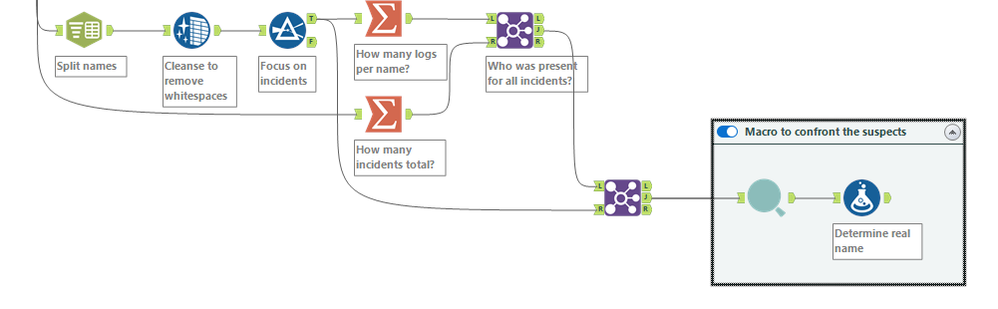
Since I don't like to limit my flows to only work with the current data, I decided not to filter on incident count = 7, but instead I counted the total amount of incidents and the amount of incidents per employee and matched who was present for all incidents that way.
IF [Count] > 12
THEN "Too many suspects!!!"
ELSEIF [Count] <= 12
THEN "Elle Banna shakes and screams in pain!"
ElSE "Do you have enough suspects? We are expecting twelve"
ENDIF
Also, no need to parse the time when all incidents happen at night. Just filter the incidents beforehand and the only times that will pop up are night times. So I ignored that hint.
Since I don't like to limit my flows to only work with the current data, I decided not to filter on incident count = 7, but instead I counted the total amount of incidents and the amount of incidents per employee and matched who was present for all incidents that way.
Etiquetas
-
Advanced
302 -
Apps
27 -
Basic
158 -
Calgary
1 -
Core
157 -
Data Analysis
185 -
Data Cleansing
5 -
Data Investigation
7 -
Data Parsing
14 -
Data Preparation
238 -
Developer
36 -
Difficult
87 -
Expert
16 -
Foundation
13 -
Interface
39 -
Intermediate
268 -
Join
211 -
Macros
62 -
Parse
141 -
Predictive
20 -
Predictive Analysis
14 -
Preparation
272 -
Reporting
55 -
Reporting and Visualization
16 -
Spatial
60 -
Spatial Analysis
52 -
Time Series
1 -
Transform
227
- « Anterior
- Siguiente »
