ACT NOW: The Alteryx team will be retiring support for Community account recovery and Community email-change requests Early 2026. Make sure to check your account preferences in my.alteryx.com to make sure you have filled out your security questions.
Learn more here
Search
Close
Start Free Trial
Vorschläge aktivieren
Mit der automatischen Vorschlagsfunktion können Sie Ihre Suchergebnisse eingrenzen, da während der Eingabe mögliche Treffer angezeigt werden.
Suchergebnisse werden angezeigt für
Weekly Challenges
Solve the challenge, share your solution and summit the ranks of our Community!Also available in | Français | Português | Español | 日本語
IDEAS WANTED
Want to get involved? We're always looking for ideas and content for Weekly Challenges.
SUBMIT YOUR IDEA- Community
- :
- Community
- :
- Learn
- :
- Academy
- :
- Challenges & Quests
- :
- Weekly Challenges
- :
- Challenge #337: Create a New List from an Existing...
Challenge #337: Create a New List from an Existing List
Optionen
- RSS-Feed abonnieren
- Thema als neu kennzeichnen
- Thema als gelesen kennzeichnen
- Diesen Thema für aktuellen Benutzer floaten
- Lesezeichen
- Abonnieren
- Stummschalten
- Drucker-Anzeigeseite

Tofel
Comet
10-14-2022
03:43 AM
- Als neu kennzeichnen
- Lesezeichen
- Abonnieren
- Stummschalten
- RSS-Feed abonnieren
- Kennzeichnen
- Moderator informieren
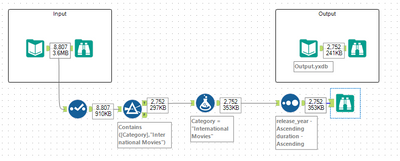

 jpowellsd
Alteryx
10-16-2022
09:47 PM
- Als neu kennzeichnen
- Lesezeichen
- Abonnieren
- Stummschalten
- RSS-Feed abonnieren
- Kennzeichnen
- Moderator informieren
I had to sort the answers to get them to match
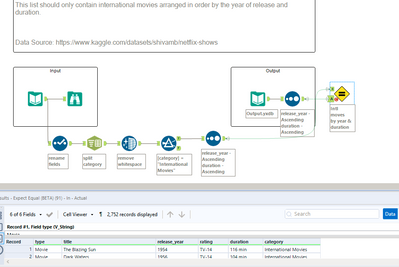

daiphuongngo
Comet
10-18-2022
05:32 PM
- Als neu kennzeichnen
- Lesezeichen
- Abonnieren
- Stummschalten
- RSS-Feed abonnieren
- Kennzeichnen
- Moderator informieren

keynguyen
Asteroid
10-18-2022
11:34 PM
- Als neu kennzeichnen
- Lesezeichen
- Abonnieren
- Stummschalten
- RSS-Feed abonnieren
- Kennzeichnen
- Moderator informieren

bkurt
Asteroid
10-19-2022
01:36 PM
- Als neu kennzeichnen
- Lesezeichen
- Abonnieren
- Stummschalten
- RSS-Feed abonnieren
- Kennzeichnen
- Moderator informieren
daiphuongngo
Comet
10-19-2022
05:07 PM
- Als neu kennzeichnen
- Lesezeichen
- Abonnieren
- Stummschalten
- RSS-Feed abonnieren
- Kennzeichnen
- Moderator informieren
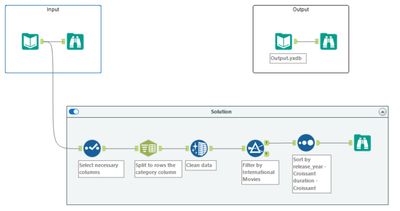

JokeFun
Asteroid
10-19-2022
08:08 PM
- Als neu kennzeichnen
- Lesezeichen
- Abonnieren
- Stummschalten
- RSS-Feed abonnieren
- Kennzeichnen
- Moderator informieren
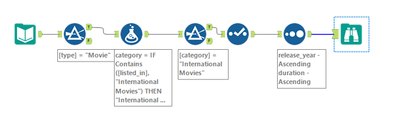
The requirement says "contain international movies", but not ONLY international movies. And also the Categories field says (Action and Adventure, Documentaries, etc.), based on which I think we need to keep the full information. So my understanding is there's no need to split the Categories column.

abner-sa
Asteroid
10-20-2022
08:12 AM
- Als neu kennzeichnen
- Lesezeichen
- Abonnieren
- Stummschalten
- RSS-Feed abonnieren
- Kennzeichnen
- Moderator informieren
My solution.
Spoiler
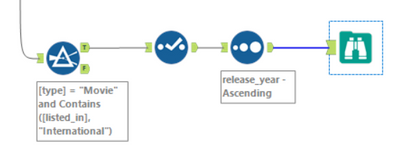
Just filter the list with:
[type] = "Movie" AND
REGEX_Match([listed_in],'.*International Movies.*')
[type] = "Movie" AND
REGEX_Match([listed_in],'.*International Movies.*')

DataKilroy
Asteroid
10-21-2022
08:50 AM
- Als neu kennzeichnen
- Lesezeichen
- Abonnieren
- Stummschalten
- RSS-Feed abonnieren
- Kennzeichnen
- Moderator informieren

SandeepBabuS
Asteroid
10-23-2022
10:01 PM
- Als neu kennzeichnen
- Lesezeichen
- Abonnieren
- Stummschalten
- RSS-Feed abonnieren
- Kennzeichnen
- Moderator informieren
Beschriftungen
-
Advanced
302 -
Apps
27 -
Basic
158 -
Calgary
1 -
Core
157 -
Data Analysis
185 -
Data Cleansing
5 -
Data Investigation
7 -
Data Parsing
14 -
Data Preparation
238 -
Developer
36 -
Difficult
87 -
Expert
16 -
Foundation
13 -
Interface
39 -
Intermediate
268 -
Join
211 -
Macros
62 -
Parse
141 -
Predictive
20 -
Predictive Analysis
14 -
Preparation
272 -
Reporting
55 -
Reporting and Visualization
16 -
Spatial
60 -
Spatial Analysis
52 -
Time Series
1 -
Transform
227
- « Vorherige
- Nächste »
