Weekly Challenges
Solve the challenge, share your solution and summit the ranks of our Community!Also available in | Français | Português | Español | 日本語
IDEAS WANTED
Want to get involved? We're always looking for ideas and content for Weekly Challenges.
SUBMIT YOUR IDEA- Community
- :
- Community
- :
- Learn
- :
- Academy
- :
- Challenges & Quests
- :
- Weekly Challenges
- :
- Challenge #3: Running Averages
Challenge #3: Running Averages
- RSS フィードを購読する
- トピックを新着としてマーク
- トピックを既読としてマーク
- このトピックを現在のユーザーにフロートします
- ブックマーク
- 購読
- ミュート
- 印刷用ページ

- 新着としてマーク
- ブックマーク
- 購読
- ミュート
- RSS フィードを購読する
- ハイライト
- 印刷
- モデレーターに通知する
Sean,
I'm not a statistician, but I don't think calculating a moving average with too few data points is correct either. The "closest value" approach and your approach could both yield significantly skewed results. Using a stock chart as a familiar use case, the 50-day and 200-day moving average charts do not begin until there are a sufficient number of data points to calculate the average. With your solution, in Month 2 the 3-month and 6-month averages are the same calculation because only two data points are available. This does not seem right. Within Alteryx, I think the correct approach is to select 'NULL' for the 'Values for Rows that don't Exist' setting. This matches the behavior seen in the stock chart example.
Ken

- 新着としてマーク
- ブックマーク
- 購読
- ミュート
- RSS フィードを購読する
- ハイライト
- 印刷
- モデレーターに通知する
This was a real stretch for me - I did finally get to an answer. However, as others have noted, there seems to be an issue with the provided solution's method for calculating the rolling 6-month avg
This post has been edited by Community Moderation to redact sensitive attachments. The original attachment has been replaced by post_placeholder.txt.


- 新着としてマーク
- ブックマーク
- 購読
- ミュート
- RSS フィードを購読する
- ハイライト
- 印刷
- モデレーターに通知する
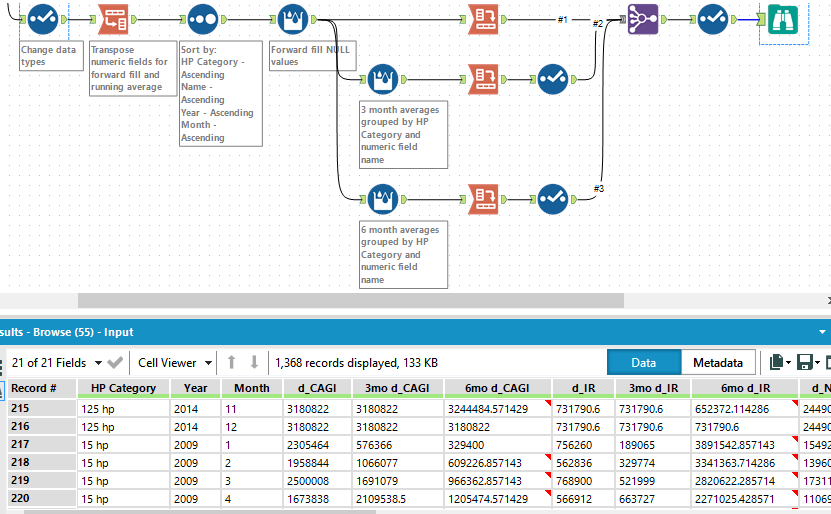
My solution for Challenge 3.

- 新着としてマーク
- ブックマーク
- 購読
- ミュート
- RSS フィードを購読する
- ハイライト
- 印刷
- モデレーターに通知する
This is a good challenge. I learnt a new tool and I got to use Transpose and Cross Tab, as I mess up with those 2 tools more than others. I took a bit of help but was able to complete the solution.
This post has been edited by Community Moderation to redact sensitive attachments. The original attachment has been replaced by post_placeholder.txt.

- 新着としてマーク
- ブックマーク
- 購読
- ミュート
- RSS フィードを購読する
- ハイライト
- 印刷
- モデレーターに通知する
As some of you already pointed out, the result set does not necessarily match those on the problem. The root cause seems to be that the result set seems to have been compiled without grouping the HP Category on the 6 month multi-row function.
Thus, I had difficulty matching the results.
This post has been edited by Community Moderation to redact sensitive attachments. The original attachment has been replaced by post_placeholder.txt.

- 新着としてマーク
- ブックマーク
- 購読
- ミュート
- RSS フィードを購読する
- ハイライト
- 印刷
- モデレーターに通知する
I went through multiple iterations of Multi-Row Tools using IfElse statements with modifying each field for 3mo or 6mo. While this was the right idea, it was lengthy and inefficient. I took a look at what others were doing, and, unfortunately, got so stuck that I referenced the solution file. I have modified for a more efficient process and more like the solution.
See attached.
This post has been edited by Community Moderation to redact sensitive attachments. The original attachment has been replaced by post_placeholder.txt.


-
Advanced
299 -
Apps
26 -
Basic
158 -
Calgary
1 -
Core
157 -
Data Analysis
185 -
Data Cleansing
5 -
Data Investigation
7 -
Data Parsing
14 -
Data Preparation
237 -
Developer
35 -
Difficult
86 -
Expert
16 -
Foundation
13 -
Interface
39 -
Intermediate
266 -
Join
211 -
Macros
61 -
Parse
141 -
Predictive
20 -
Predictive Analysis
14 -
Preparation
272 -
Reporting
55 -
Reporting and Visualization
16 -
Spatial
60 -
Spatial Analysis
52 -
Time Series
1 -
Transform
226
- « 前へ
- 次へ »
