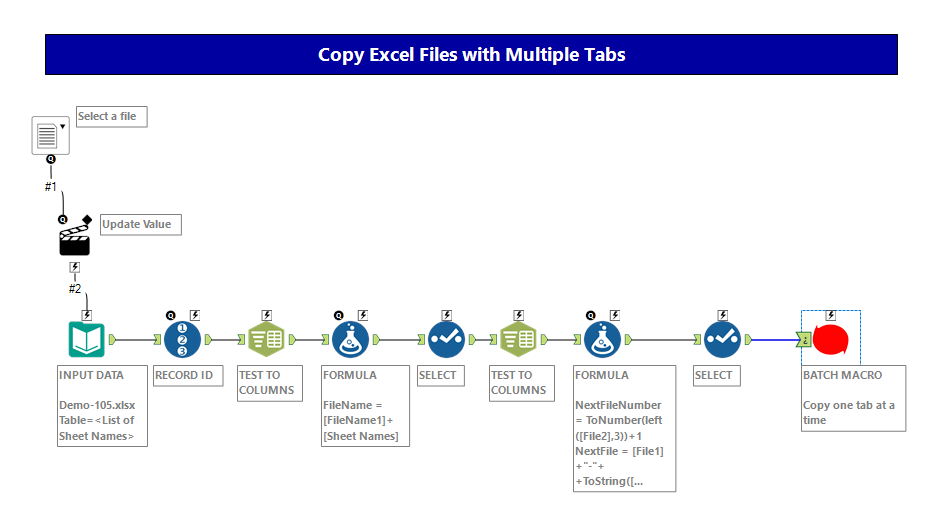
My workflow outputs to a hidden sheet in an Excel file - each time I run the module, the data in my hidden sheet gets refreshed and the Excel sheet updates its graphs and tables using the hidden tab.
The process runs once a week, picking up scheduled text file outputs from our BI scheduling environment. So far so good. I'm struggling with automating the following steps and need some help please:
I need a way to automate the creation of the new weekly Excel file. Here are the steps:
1. Use Directory tool and sort descending on creation date to find the most recent report - let's call it Week1.xlsx
2. Copy Week1.xslx (which contains multiple tabs) and export it as Week2.xlsx
3. Run module and output data to hidden sheet in Week2.xlsx
I have figured out steps 1 and 2 already. Step 2 was quite hard, but I use the "Take File Name from Field" output option, so I can create the new file name in a formula tool.
However I'm struggling with step 2 - although I can input and then output an Excel file, I can't handle the dozens of sheets. Is there a way to get alteryx to read in all Excel Sheets, change the filename, and then output all sheets?
Or, do I need some kind of batch file to duplicate week1.xlsx and turn it into week2.xlsx before the module runs? I'm struggling to figure out the most logical way to do this. Thanks