In case you missed the announcement: The Alteryx One Fall Release is here! Learn more about the new features and capabilities here
ACT NOW: The Alteryx team will be retiring support for Community account recovery and Community email-change requests after December 31, 2025. Make sure to check your account preferences in my.alteryx.com to make sure you have filled out your security questions. Learn more here
Start Free Trial

Alteryx Designer Desktop Discussions

Find answers, ask questions, and share expertise about Alteryx Designer Desktop and Intelligence Suite.
SOLVED

Using multi row formula

Ronal_bal
8 - Asteroid

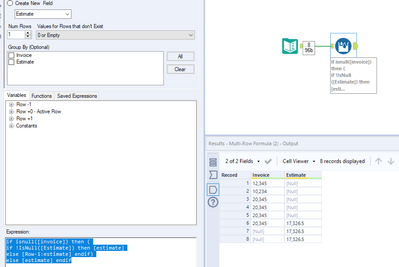
Hi, I need to use the same 6-month average calculated estimate to the consecutive months until I receive a new invoice number for that month. Ultimate goal is to have estimate for every month even though we don't have invoice for the previous month.

I have already implemented multi-row formula to calculate 6-month average which calculates estimates. but I need to use the same same estimates for coming months until i receive a new invoice.

I've used this formula, but nothing pops on the estimate field.

if isnull([invoice]) then (
if [estimate] !IsNull then [estimate]
else [Row-1:estimate] endif)
else [estimate] endif


Attached screenshot:

Screenshot 2022-07-20 081159.png

1 REPLY 1
OllieClarke
16 - Nebula
16 - Nebula

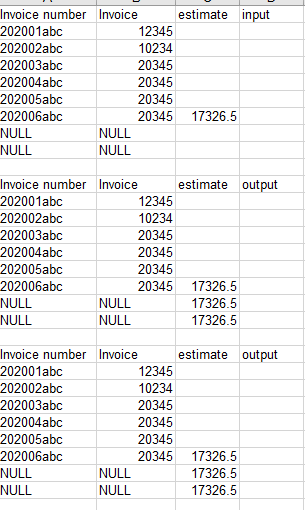
Hey @Ronal_bal you've just slightly mistyped your formula

if isnull([invoice]) then (
if !IsNull([Estimate]) then [estimate]
else [Row-1:estimate] endif)
else [estimate] endif

Your !IsNull() needs to wrap around estimate, then it works :)

OllieClarke_0-1658320264559.png


Labels
Top Solution Authors