Hi Team,
Hope you are well.
I need help. I have to separate the Active hosts and scan assets from the below the column into a new column.
Please let me know how to go about it,
Thanks,
Hello,
the Text to Column tool is perfect for this. Here my Solution:
This is the endresult:
Example is attached. Hope this helps!
Greetings Alex
Hi @sriniprad08,
this is a more complicated matter then. For this we have to use regular expressions. I'm not very familiar with them, but I think I cooked something up that works. Here is the flow:
Here the result:
I added row 3 to show you, that the last one is always taken (doesn't matter how many delimeters there are). I attached the Workflow as well.
Hi @AlexEntz ,
Perfect. Thank you very much.
Cheers
Sri
Thank you for helping out. I found that there are couple of texts which has "-" in the begining . Is it possible to remove only the last one?
get Lk sdf-Ksdfffffsfs-Mais EXT - Netblocks Assignedget Lk sdf-Ksdfffffsfs-Vordef EXT - Netblocks Assigned
Thanks
Perfect. Thank you so much. Really appreciate your time 🙂
Cheers,
Thanks for the help. Is it possible to retain only the parts before - Network Assigned. Actually i need to remove the "-Network Assigned".
For eg. As per below in the separate column.
get Lk sdf-Ksdfffffsfs-Mais EXT get Lk sdf-Ksdfffffsfs-Vordef EXT
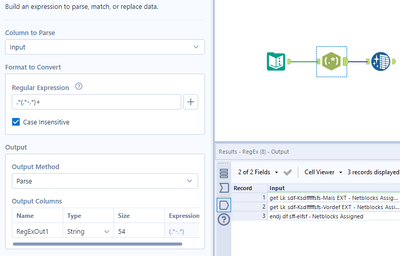
for that, you will have to change the regular expression to this: (.*-)+
This is the result:
If you the want to remove the last "-" use a formula tool with this expression: TrimRight([RegExOut1],"-")
I hope this answers your question !