ACT NOW: The Alteryx team will be retiring support for Community account recovery and Community email-change requests Early 2026. Make sure to check your account preferences in my.alteryx.com to make sure you have filled out your security questions. Learn more here
Start Free Trial

Alteryx Designer Desktop Discussions

Find answers, ask questions, and share expertise about Alteryx Designer Desktop and Intelligence Suite.
RÉSOLU

Remove null values after comma in a string and retain only non null values

mercurial_maverick
Astéroïde

Attached file shows a column output which has values concatenated and separated by comma. I want to retain only non-null values. For example the below values needs to be cleaned up to give Sales Foor, Tenant Space


,,,Sales Floor,,Tenant Space,,,


similarly there are rows that have commas only. which means null values are concatenated and separated by comma. These need to be cleaned up and replaced with blanks

8 RÉPONSES 8
Garrett
Bolide

Parse values to rows, clean values, concatenate values back together into single row.


Balloons your data a bit, but no need for tricky String functions or RegEx.


Meet the need?

Hi @mercurial_maverick,


You can just use a simple formula tool with the expression given below:


trim(REGEX_Replace([Area Served],",", " "))

regex.png


I hope this solves your problem

Sapna Gupta
mercurial_maverick
Astéroïde

HEllo @grazitti_sapna,


Thank you for your response. This did resolve most of the issue. However is there a way to omit only the unwanted commas and retain the ones between non null values. for example, "Sales Floor, Tenant Space".


Regards,


Ram

Hi @mercurial_maverick,


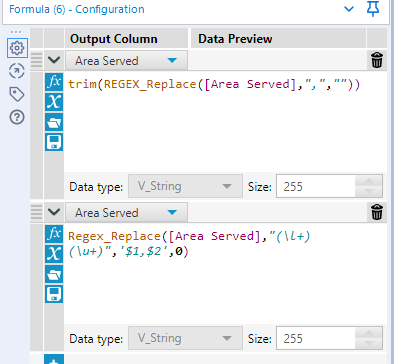
Try the Formulas as given in the screenshot below and check if it works for you.


regex_final.png


result_final.png


I hope I have been able to resolve the issue that you were facing.


Sapna Gupta
mercurial_maverick
Astéroïde

Could you please paste the formulas here as a text? I'm unable to figure out the text in the first bracket () after area served in the second formula. @grazitti_sapna 

Hi @mercurial_maverick,


Here you go:


trim(Regex_replace([Area Served,",",""))


Regex_replace([Area Served], "(\l+)(\u+)",'$1,$2',0)

Sapna Gupta
mercurial_maverick
Astéroïde

Perfect! That worked. Thank you much! @grazitti_sapna 

tuhinarai
Atome

Hey,

I am facing a similar issue, although the commas don't appear on the CSV file but rather when I open the output csv file in notepad. And I need the output in columns itself and not merge in rows. Is there a way to fix this?


Thanks

Étiquettes
Auteurs des meilleures solutions