In case you missed the announcement: The Alteryx One Fall Release is here! Learn more about the new features and capabilities here
ACT NOW: The Alteryx team will be retiring support for Community account recovery and Community email-change requests Early 2026. Make sure to check your account preferences in my.alteryx.com to make sure you have filled out your security questions. Learn more here
Start Free Trial

Alteryx Designer Desktop Discussions

Find answers, ask questions, and share expertise about Alteryx Designer Desktop and Intelligence Suite.

SOLVED

Multi row Formula issue

Joker_Hazard
11 - Bolide

Hello guys

Anyone know how to fix this?

Joker_Hazard_0-1630094047166.png


I know that there is no row afterwards to validate this formula, but I would like Alteryx to understand that if there is no subsequential row, then make "OK" instead of "Erro" at the last row.

Any ideas?

2 REPLIES 2
jrgo
14 - Magnetar

Hi @Joker_Hazard 


Try this. Doesn't matter which field the first condition uses, but suggest using STRING field and that the field always has a value.

IF ISEMPTY([Row+1:DESCRICAO_HISTORICO])
THEN 'OK'
ELSEIF [Sum_VALOR] = [Row+1:Sum_VALOR]
THEN 'OK'
ELSE 'Erro'
ENDIF


shreyanshrathod
11 - Bolide

Hi @Joker_Hazard ,


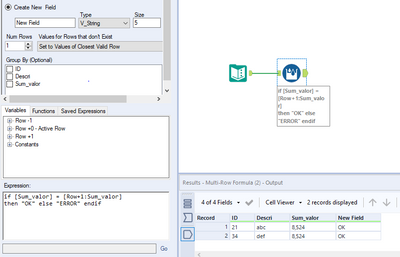
please play around with "Values for rows that don't exist" in the MULTI-ROW formula Configuration window.

I have kept it as "Set to values of closest valid row" meaning your IF condition will always return TRUE for last record and hence "OK" will be output.


shreyanshrathod_0-1630236960717.png


Hope this solves it.


Regards,

Shreyansh

Labels
Top Solution Authors