In case you missed the announcement: The Alteryx One Fall Release is here! Learn more about the new features and capabilities here
ACT NOW: The Alteryx team will be retiring support for Community account recovery and Community email-change requests after December 31, 2025. Set up your security questions now so you can recover your account anytime, just log out and back in to get started. Learn more here
Start Free Trial

Alteryx Designer Desktop Discussions

Find answers, ask questions, and share expertise about Alteryx Designer Desktop and Intelligence Suite.
SOLVED

Modifying GeoIdentifiers

Jcdaniels
6 - Meteoroid

I'm looking at this link:


https://help.alteryx.com/9.5/index.htm#Geographic_Identifiers.htm


I want to be able to modify these GeoIdentifiers such as "assign threshold" and "multiple designator". Where in Alteryx Designer can I actually change these variable/parameters/thresholds?


Thanks,

Josiah

2 REPLIES 2
EricM
Alteryx
Alteryx

Hi Josiah,


To make changes to the GeoIdentifiers you'll need to navigate to your Alteryx data install directory and modify the appropriate GeoIdentifier file using a text editor such as Notepad++.


The GeoIdentifier files typically live here - C:\Program Files (x86)\Alteryx\DataProducts\Portfolio\ALTERYX_US_Experian_16B_16B\Data, but may be in a different location depending on your machine/install configurations.


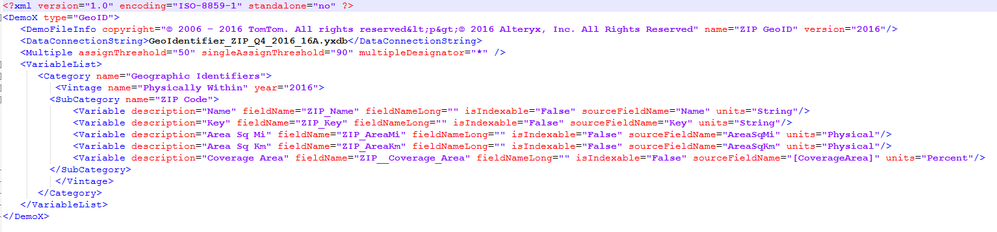
The file extension for GeoIdentifiers is .demox.  When you open a .demox file in a text editor you should see something similar to the screenshot below.  Here, you can make adjustments to the thresholds, etc. You should make a backup copy of the original file, and be aware that if you install a data update you will need to copy over any custom settings to the new .demox file.


image.png

Jcdaniels
6 - Meteoroid

Thank you Eric. Super Helpful!

Labels
Top Solution Authors