In case you missed the announcement: The Alteryx One Fall Release is here! Learn more about the new features and capabilities
here
ACT NOW: The Alteryx team will be retiring support for Community account recovery and Community email-change requests after December 31, 2025. Set up your security questions now so you can recover your account anytime, just log out and back in to get started.
Learn more here
Search
Close
Start Free Trial
Turn on suggestions
Auto-suggest helps you quickly narrow down your search results by suggesting possible matches as you type.
Showing results for
Alteryx Designer Desktop Discussions
Find answers, ask questions, and share expertise about Alteryx Designer Desktop and Intelligence Suite.- Community
- :
- Community
- :
- Participate
- :
- Discussions
- :
- Designer Desktop
- :
- Re: Journal Entry - Moving Numbers between Debit a...
SOLVED
Journal Entry - Moving Numbers between Debit and Credit
Options
- Subscribe to RSS Feed
- Mark Topic as New
- Mark Topic as Read
- Float this Topic for Current User
- Bookmark
- Subscribe
- Mute
- Printer Friendly Page

jalizmaldonado
8 - Asteroid
02-19-2021
07:11 AM
- Mark as New
- Bookmark
- Subscribe
- Mute
- Subscribe to RSS Feed
- Permalink
- Notify Moderator
Hi, I hope all is well.
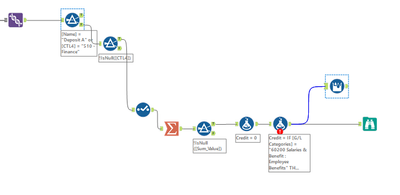
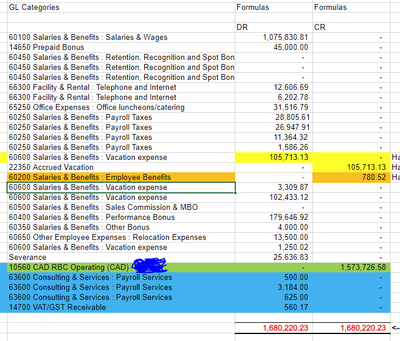
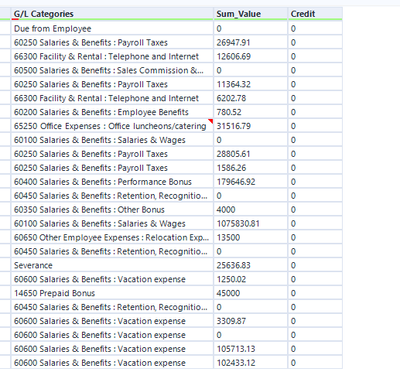
I'm currently in the process of moving a number that is in the debit column to the credit column so that I can then add the correct totals for debit and credit.
To move the debit to credit, I created the following formula which didn't work. Not sure what I did incorrectly.
IF [G/L Categories] = "60200 Salaries & Benefit : Employee Benefits" THEN [Sum_Value] = [Credit] ELSE "" ENDIF
Then I tried to add the debit/credit column by using the Multi-Row Formula tool but I couldn't figure out how to add the entire column and provide me with a total amount on the bottom of the column.
Please help. Also, if there are any formula how-to videos, please share.
Solved! Go to Solution.
Labels:
- Labels:
-
Workflow

12 REPLIES 12

 messi007
15 - Aurora
02-19-2021
11:27 AM
- Mark as New
- Bookmark
- Subscribe
- Mute
- Subscribe to RSS Feed
- Permalink
- Notify Moderator
02-21-2021
03:43 PM
- Mark as New
- Bookmark
- Subscribe
- Mute
- Subscribe to RSS Feed
- Permalink
- Notify Moderator
02-22-2021
06:06 AM
- Mark as New
- Bookmark
- Subscribe
- Mute
- Subscribe to RSS Feed
- Permalink
- Notify Moderator

- « Previous
-
- 1
- 2
- Next »


Labels
-
Academy
6 -
ADAPT
2 -
Adobe
203 -
Advent of Code
3 -
Alias Manager
77 -
Alteryx Copilot
24 -
Alteryx Designer
7 -
Alteryx Editions
91 -
Alteryx Practice
20 -
Amazon S3
149 -
AMP Engine
250 -
Announcement
1 -
API
1,206 -
App Builder
116 -
Apps
1,359 -
Assets | Wealth Management
1 -
Basic Creator
14 -
Batch Macro
1,553 -
Behavior Analysis
245 -
Best Practices
2,690 -
Bug
719 -
Bugs & Issues
1 -
Calgary
67 -
CASS
53 -
Chained App
267 -
Common Use Cases
3,820 -
Community
26 -
Computer Vision
85 -
Connectors
1,424 -
Conversation Starter
3 -
COVID-19
1 -
Custom Formula Function
1 -
Custom Tools
1,935 -
Data
1 -
Data Challenge
10 -
Data Investigation
3,485 -
Data Science
3 -
Database Connection
2,215 -
Datasets
5,216 -
Date Time
3,226 -
Demographic Analysis
186 -
Designer Cloud
738 -
Developer
4,362 -
Developer Tools
3,525 -
Documentation
526 -
Download
1,036 -
Dynamic Processing
2,934 -
Email
927 -
Engine
145 -
Enterprise (Edition)
1 -
Error Message
2,253 -
Events
196 -
Expression
1,867 -
Financial Services
1 -
Full Creator
2 -
Fun
2 -
Fuzzy Match
711 -
Gallery
666 -
GenAI Tools
3 -
General
2 -
Google Analytics
155 -
Help
4,704 -
In Database
965 -
Input
4,289 -
Installation
360 -
Interface Tools
1,899 -
Iterative Macro
1,091 -
Join
1,956 -
Licensing
252 -
Location Optimizer
60 -
Machine Learning
259 -
Macros
2,858 -
Marketo
12 -
Marketplace
23 -
MongoDB
82 -
Off-Topic
5 -
Optimization
750 -
Output
5,245 -
Parse
2,325 -
Power BI
227 -
Predictive Analysis
936 -
Preparation
5,160 -
Prescriptive Analytics
205 -
Professional (Edition)
4 -
Publish
257 -
Python
852 -
Qlik
39 -
Question
1 -
Questions
2 -
R Tool
476 -
Regex
2,339 -
Reporting
2,428 -
Resource
1 -
Run Command
573 -
Salesforce
276 -
Scheduler
410 -
Search Feedback
3 -
Server
628 -
Settings
932 -
Setup & Configuration
3 -
Sharepoint
624 -
Spatial Analysis
599 -
Starter (Edition)
1 -
Tableau
512 -
Tax & Audit
1 -
Text Mining
468 -
Thursday Thought
4 -
Time Series
430 -
Tips and Tricks
4,183 -
Topic of Interest
1,126 -
Transformation
3,721 -
Twitter
23 -
Udacity
84 -
Updates
1 -
Viewer
3 -
Workflow
9,963
- « Previous
- Next »


